
Here’s the thing about running OpenClaw on your laptop is not the right home for it. Trust me, I tried. For about three weeks, I had OpenClaw humming along on my MacBook, and every time I closed the lid to walk to a coffee shop, the agent went dark. Missed Telegram messages. Half-finished morning briefings. Cron jobs that never fired because I was on a flight.
If you want OpenClaw to actually behave like a 24/7 personal assistant — the kind that wakes up at 6 a.m., scans your inbox, summarizes overnight Slack chatter, and texts you before you even open your eyes, you need it on a VPS. A small, always-on Linux box in a data center somewhere, doing its thing while you sleep.
The catch? Not every VPS is a good fit. OpenClaw has some specific quirks. It’s a Node.js process, it loves RAM more than CPU, it benefits enormously from Docker for sandboxing, and it absolutely hates being exposed to the public internet. So picking the right host matters more than people realize.
I’ve tested, deployed on, and bled credits across most of the major options out there. Here’s an honest, ranked list of the 10 best OpenClaw VPS providers in 2026, what they cost, what they’re good at, where they fall short, and which one I’d actually pick if I were starting fresh today.
Let’s get into it….
What OpenClaw Actually Needs From a VPS
Before we dive into the rankings, a quick reality check on specs. I’ve seen way too many people grab a $2/month plan, install OpenClaw, and then complain that it’s slow.
Here’s what the official OpenClaw docs and real-world deployments suggest as the practical minimum:
| Resource | Bare minimum | Comfortable | What it’s used for |
|---|---|---|---|
| RAM | 2 GB | 4–8 GB | Node.js Gateway + Chromium for browser tools |
| vCPUs | 1 | 2 | Concurrent skill execution |
| Storage | 20 GB SSD | 40–80 GB NVMe | Markdown workspace, Docker images, snapshots |
| Bandwidth | 1 TB/mo | Unmetered | LLM API traffic + browser fetches |
| OS | Ubuntu 22.04+ / Debian 12 | Same | Best community support |
If you’re running OpenClaw with the browser tool, Chromium alone can chew through 1.5 GB of RAM. Add the Gateway, your skills, Docker overhead, and any background services — and 2 GB starts to feel cramped real fast. Aim for 4 GB if you can swing it. Your future self will thank you.
Okay. On to the list.
1. DigitalOcean — Best Overall for OpenClaw (And It’s Not Even Close)
If I had to pick one cloud hosting provider for AI agents for someone setting up OpenClaw for the first time, it’d be DigitalOcean. Full stop.
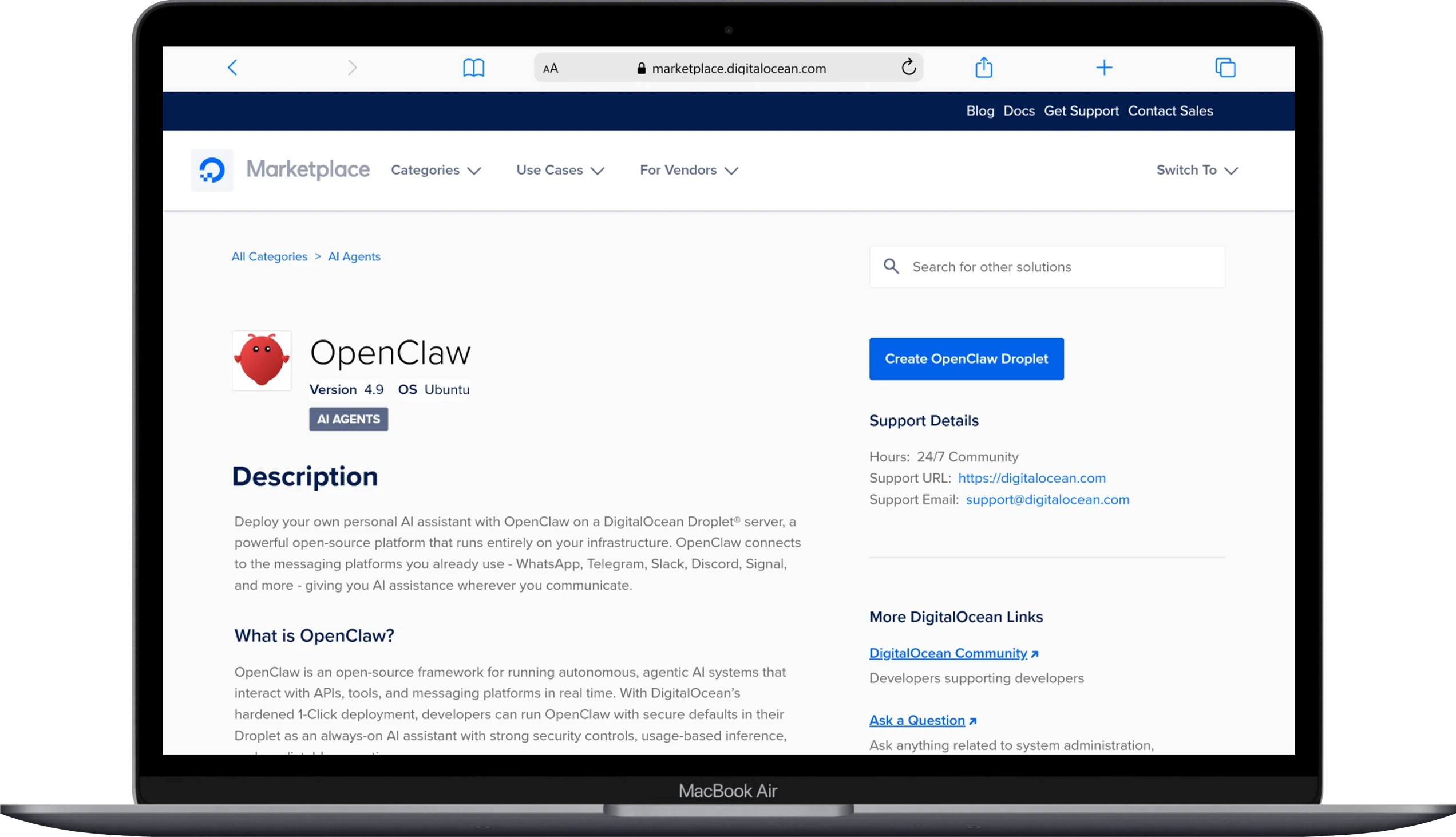
The reason is simple: they’re the only major cloud provider that built a security-hardened, 1-Click OpenClaw Deploy image specifically for the project. Click a button, pick your droplet size, and you get a pre-configured instance with sane defaults — fail2ban running, firewall rules in place, Docker pre-installed, and OpenClaw ready to onboard in minutes.
Pricing: Starts at $12/month for the OpenClaw 1-Click Marketplace image. The recommended multi-channel configuration (the one most people actually want) is $24/month. Per-second billing if you’re just testing.
Specs at $12/mo: 2 GB RAM, 1 vCPU, 50 GB SSD, 2 TB transfer.
Pros:
- Genuinely the smoothest first-time install experience anywhere
- Strong default security hardening (fail2ban, firewalls, Docker isolation)
- Excellent REST API and developer tooling for automation
- Snapshots, backups, and rebuilds are dead simple
- Great community tutorials specifically for OpenClaw
Cons:
- More expensive per GB of RAM than European providers like Hetzner or Contabo
- The $12/mo entry point is a bit lean if you’re running multiple skills
My take: If you want the closest thing to “it just works” for OpenClaw, this is it. The hardened 1-Click image saves you hours of setup, and the documentation is phenomenal. Yes, you’ll pay a small premium — but if your time is worth more than five bucks an hour, it pays for itself the first day.
2. Hetzner — Best Performance-to-Price Ratio (Community Favorite)
Hetzner is the answer Reddit gives when someone asks “where should I host OpenClaw?” and honestly, the community isn’t wrong.
This German provider has been quietly running circles around the bigger names on raw value for years. The CX22 plan starts at around $4.09/month and gives you 2 vCPUs and 4 GB of RAM — which is roughly what DigitalOcean charges three times as much for. The official OpenClaw docs even include a dedicated Hetzner deployment guide.
Pricing:
- CX22: $4.09/mo (2 vCPU, 4 GB RAM, 40 GB SSD) — sweet spot for OpenClaw
- CX33: $6.59/mo (2 vCPU, 8 GB RAM, 80 GB SSD)
- CPX21: $7.59/mo (3 dedicated vCPUs, 4 GB RAM)
- CCX13: $14.09/mo (dedicated AMD EPYC, production-grade)
Pros:
- Unbeatable price-to-performance, especially on the CX line
- Officially supported with documented OpenClaw deployment guide
- Hourly billing with monthly price caps
- Dedicated CPU upgrade paths (CCX series) when you outgrow shared cores
- GDPR-compliant (matters if you’re processing EU data)
Cons:
- No 1-click OpenClaw image — you’ll be running the install script yourself
- Data centers primarily in Germany, Finland, and a few US locations (Ashburn, Hillsboro)
- Support is solid but slower than premium hosts
My take: This is what I run my personal OpenClaw on. The CX33 at $6.59/month with 8 GB RAM is, in my opinion, the absolute best deal in self-hosted AI agents right now. If you’re comfortable on the command line, it’s a no-brainer.
3. Hostinger — Best 1-Click Deploy for Beginners

Hostinger pivoted hard into the AI agent hosting space in 2026, and they did something clever: they built a pre-configured VPS Docker Manager template specifically for OpenClaw. You don’t even need to know what a Docker container is — just click “deploy” and walk away.
They also bundled an in-house AI assistant called Kodee that helps you troubleshoot setup issues in plain English, plus a Nexos AI integration so you can technically run OpenClaw without bringing your own OpenAI or Anthropic API key. That last bit is genuinely useful for casual users who don’t want to set up billing accounts with three different AI companies.
Pricing: Starts at $6.99/month for the OpenClaw-ready VPS (2 vCPU cores, 8 GB RAM, 100 GB NVMe).
Pros:
- Cleanest beginner experience besides DigitalOcean
- 1-click OpenClaw template through their Docker Manager
- Generous specs at the entry tier (8 GB RAM!)
- Built-in AI troubleshooting via Kodee
- Frequent promotional pricing
Cons:
- The headline price requires longer-term commitments (renewal prices are higher)
- Mixed performance reviews compared to DigitalOcean and Hetzner
- Fewer datacenter regions than enterprise providers
My take: If you’ve never SSH’d into a server in your life, start here. The setup hand-holding is the best in the business, and 8 GB of RAM at this price point is genuinely impressive. Just budget for the renewal price hike when your initial term ends.
4. Contabo — Best Value If You Need a Lot of RAM

Contabo is the “wait, that can’t be right” provider. Their Cloud VPS 10 plan is $3.96/month and gives you 4 vCPU cores, 8 GB of RAM, and 50 GB of NVMe SSD. That’s not a typo. That’s just how Contabo prices things.
For OpenClaw specifically — where RAM is the biggest bottleneck because of the Node.js process plus headless Chromium — this is borderline absurd value.
Pricing:
- Cloud VPS 10: $3.96/mo (4 vCPU, 8 GB RAM, 50 GB NVMe)
- Cloud VPS 20: $6.36/mo (6 vCPU, 16 GB RAM, 100 GB NVMe)
Pros:
- Best raw RAM-to-dollar ratio of anyone on this list
- 16 GB plans for under $7/month — genuinely wild
- Strong network performance for the price
- Available in multiple global regions (US, Europe, Asia, Australia)
Cons:
- No 1-click OpenClaw deployment
- Provisioning can take a few minutes longer than competitors
- Customer support is functional but bare-bones
- The network can occasionally be choppy during peak hours
My take: If you’re planning to run multiple OpenClaw agents, multiple skills, or have heavy browser-automation workloads, Contabo’s 16 GB plan is hard to beat at any price. Just don’t expect hand-holding. This is a “you know what you’re doing” host.
5. Oracle Cloud — Best Free Tier (Forever Free, Actually Free)

Here’s the underdog pick that drives everyone on Reddit crazy. Oracle Cloud’s Always Free tier includes an Ampere A1 ARM instance with up to 4 vCPUs and 24 GB of RAM — and you can run it indefinitely without paying a dollar.
That’s not a free trial. It’s a permanent free tier that Oracle introduced to compete with AWS and never quite walked back.
Pricing: $0/month, forever, on the Always Free tier.
Specs (free tier): 4 ARM vCPUs (split however you want), 24 GB RAM total, 200 GB block storage.
Pros:
- It’s free. Did I mention free?
- 24 GB of RAM is overkill in the best way for OpenClaw
- Surprisingly good performance from the Ampere ARM cores
- Multiple global regions
Cons:
- Notoriously hard to actually get the free instance — they’re capacity-constrained, and you’ll often see “out of capacity” errors
- ARM architecture means some skills/Docker images need ARM-compatible builds
- Oracle’s UI is genuinely the worst on this list (it’s like fighting through a 2009 enterprise portal)
- Free accounts can be reclaimed if Oracle decides you’re “abusing” the tier
- Setup is noticeably more painful than every other option
My take: If you’re patient, technical, and want zero monthly cost, Oracle Cloud is hard to argue with. Just don’t expect a smooth experience. I’ve spent more time fighting Oracle’s console than configuring OpenClaw itself. But once it’s running? Free 24 GB RAM AI agent. Hard to complain.
6. Vultr — Best for Global Latency and Edge Deployments
Vultr quietly ships some of the best networking in the budget VPS space. They have 32+ data center locations worldwide — meaning if you’re in Tokyo, Sydney, São Paulo, or Mumbai, you can deploy OpenClaw on a server that’s geographically close to you, cutting latency dramatically.
That matters more than you’d think for OpenClaw, especially when the agent is fetching webpages, hitting LLM APIs, and bouncing data back and forth on every interaction.
Pricing:
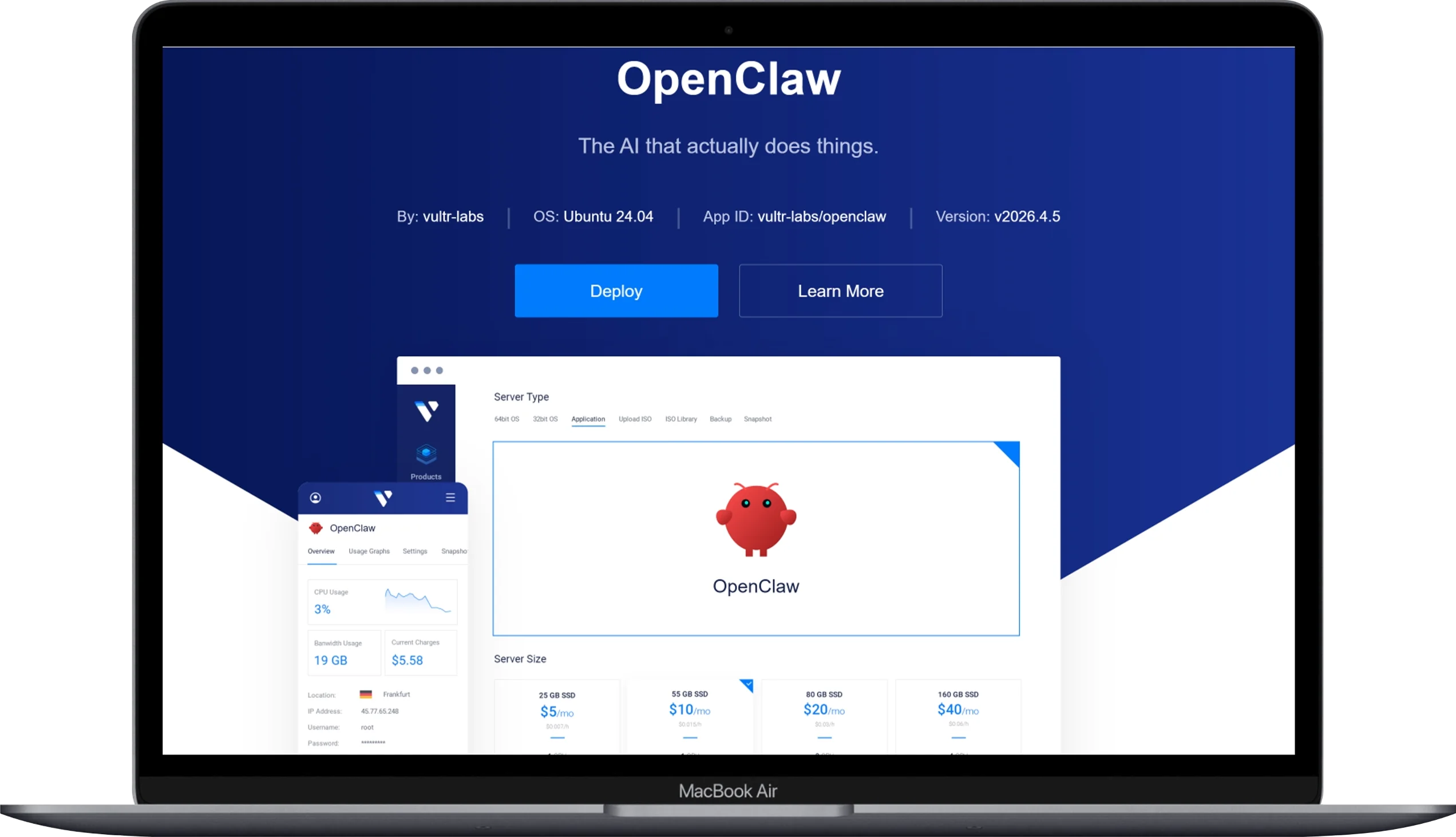
- Regular Cloud Compute: $6/mo (1 vCPU, 1 GB RAM, 25 GB SSD)
- High Frequency: $12/mo (1 vCPU, 2 GB RAM, 64 GB NVMe)
- High Performance: $18/mo (1 vCPU, 2 GB RAM, 60 GB NVMe — fastest CPU)
Pros:
- Massive global footprint (Tokyo, Singapore, Sydney, São Paulo, Johannesburg…)
- High Frequency plans use 3+ GHz CPUs — fast for Node.js workloads
- Hourly billing, spin up/destroy instantly
- Solid one-click apps marketplace (no native OpenClaw image yet, but Docker is one click)
Cons:
- Entry plans cap at 1 GB RAM — too small for OpenClaw
- You need at least the $12/mo High Frequency tier for serious use
- No native OpenClaw 1-click deployment
My take: If you live outside North America or Europe and care about response speed, Vultr’s regional coverage genuinely changes the game. The $12/mo High Frequency plan with 2 GB RAM is the realistic OpenClaw entry point here.
7. Linode (Akamai) — Best for Reliability and Old-School Stability
If you’re looking for the best VPS for AI Agents, Linode is the best one. Linode (now technically Akamai Cloud) has been around forever, and that shows in the platform’s polish. Their support is among the best in the budget VPS world, their dashboard is clean, and their network has the kind of boring reliability you only appreciate when something breaks at 3 a.m.
Pricing:
- Nanode: $5/mo (1 vCPU, 1 GB RAM, 25 GB SSD) — too small for OpenClaw
- Linode 4 GB: $24/mo (2 vCPU, 4 GB RAM, 80 GB SSD) — sweet spot
Pros:
- Rock-solid uptime track record
- Genuinely helpful 24/7 phone and ticket support
- Excellent documentation and community library
- Now backed by Akamai’s enterprise-grade global network
Cons:
- More expensive than Hetzner or Contabo for similar specs
- No native 1-click OpenClaw deployment (Docker app gets you close)
- Pricing didn’t get the same love as their network upgrades
My take: If you’ve been burned by flaky budget hosts before and you’d happily pay a little more for “this just works, every time,” Linode is your pick. It’s the host equivalent of a Toyota Camry — not flashy, but it’ll outlive you.
8. Kamatera — Best for Custom Configurations and Enterprise-Grade Setups

Kamatera doesn’t sell pre-baked plans. You configure your VPS like you’re building a PC: pick your CPU count, your RAM, your SSD, your bandwidth, your data center (they have 20+ globally). It’s overwhelming for beginners and amazing once you know what you want.
Pricing: Starts around $6/month for a basic setup. Production-grade configurations (4+ vCPUs, 8+ GB RAM) typically run $30–$50/month. Hourly billing.
Pros:
- Over 1,000 possible configurations
- 20+ global data centers (more than DigitalOcean)
- Hourly billing with no contracts
- Full root access, raw VPS — no funny business
- 30-day free trial (no credit card gymnastics)
Cons:
- No 1-click OpenClaw image
- The pricing calculator is genuinely confusing on first visit
- You’re 100% on your own for setup
- Not the cheapest at any specific config
My take: If you’re running multiple services on one VPS, or you have a specific weird requirement (like “I need 12 GB RAM but only 1 vCPU”), Kamatera lets you build exactly what you need. For most people, it’s overkill.
9. IONOS — Best Cheap Option With 24/7 Phone Support
IONOS is one of those legacy European hosts that quietly built a really competitive VPS lineup over the past few years. Their starter plan is $3/month and includes unlimited traffic up to 1 Gbit/s — which is rare at this price point — plus DDoS protection and 24/7 phone support.
Pricing:
- VPS S: $3/mo (1 vCPU, 1 GB RAM, 10 GB SSD) — too tight for OpenClaw
- VPS M: $5/mo (2 vCPU, 2 GB RAM, 80 GB SSD) — minimum viable
- VPS L: $9/mo (4 vCPU, 8 GB RAM, 160 GB SSD) — recommended
Pros:
- Genuine 24/7 phone support (rare at this price)
- Unlimited traffic at 1 Gbit/s
- Built-in DDoS protection and customizable firewall
- Strong European data center network
- Very transparent pricing — no contract gymnastics
Cons:
- The dashboard feels dated
- No 1-click OpenClaw deployment
- The $3/mo plan doesn’t have enough RAM for OpenClaw
- Outside of Europe, latency can be uneven
My take: Underrated. If you want phone support (some people genuinely need this), the $9/mo VPS L plan is solid. Older folks I’ve helped set up self-hosted AI agents have universally preferred IONOS because they can call a human. That alone is worth something.
10. Fly.io — Best for Developer-First Deployments and Edge Compute
Fly.io is the wildcard pick. It’s not a traditional VPS — it’s a global app platform that runs your workload as a Firecracker microVM, deployable to 35+ regions around the world with a single command. The OpenClaw docs include an official Fly.io install guide, which is a strong signal.
Pricing: Pay-as-you-go. A typical OpenClaw setup (shared-CPU, 2 GB RAM) runs around $8–$12/month. They also offer $5/month in free credit to start.
Pros:
- Insanely fast deployment (
flyctl deployand you’re live) - Edge-style global deployment
- Native Docker workflow (matches OpenClaw’s containerized approach)
- Excellent developer ergonomics, modern CLI
- Great for adding redundancy or multi-region setups
Cons:
- Pricing model is harder to predict than fixed-price VPS
- Persistent storage requires Fly Volumes (extra config)
- Probably not what you want if you’ve never used Docker
- Smaller community than DigitalOcean or Linode
My take: If you’re a developer who already lives in Docker land and want OpenClaw deployed in 30 seconds with a single CLI command, Fly.io is genuinely magical. For non-developers? Skip it — you’ll fight the abstractions.
Quick Comparison Table
For the skimmers (I see you), here’s the full lineup at a glance:
| Rank | Provider | Best For | Starting Price | RAM at Entry | 1-Click OpenClaw? |
|---|---|---|---|---|---|
| 1 | DigitalOcean | Overall best, beginners | $12/mo | 2 GB | ✅ Yes |
| 2 | Hetzner | Price-to-performance | $4.09/mo | 4 GB | ❌ No (official guide) |
| 3 | Hostinger | Easiest beginner setup | $6.99/mo | 8 GB | ✅ Yes |
| 4 | Contabo | Most RAM per dollar | $3.96/mo | 8 GB | ❌ No |
| 5 | Oracle Cloud | Free forever | $0 | 24 GB (ARM) | ❌ No |
| 6 | Vultr | Global low-latency | $12/mo (HF) | 2 GB | ❌ No |
| 7 | Linode/Akamai | Rock-solid reliability | $24/mo | 4 GB | ❌ No |
| 8 | Kamatera | Full customization | ~$6/mo | Custom | ❌ No |
| 9 | IONOS | Cheap + phone support | $5/mo | 2 GB | ❌ No |
| 10 | Fly.io | Developer ergonomics | ~$8/mo | 2 GB | ❌ No (official guide) |
How to Actually Pick One (My Honest Recommendation)
If you’ve made it this far, you probably want a clear answer instead of “well, it depends.” Here’s how I’d frame it:
Are you brand new to VPS hosting? → DigitalOcean. Pay the small premium for the 1-click hardened image. You’ll save hours of setup pain.
You’re technical and want the best deal? → Hetzner CX33 at $6.59/month. 8 GB of RAM, dedicated EU bandwidth, official OpenClaw docs. Hard to beat.
Are you building a side hustle on a budget? → Contabo Cloud VPS 10. $3.96/month for 8 GB RAM is absurd; just be ready to set things up yourself.
You don’t want to pay a dime? → Oracle Cloud Always Free, if you can endure the setup. 24 GB of RAM for $0 is real, but the journey is rough.
You want phone support and zero AWS-style pricing surprises? → IONOS VPS L at $9/month.
You’re a developer who lives in Docker? → Fly.io. You’ll know if this is you.
A Few Things Nobody Tells You About OpenClaw VPS Hosting
Before you click “deploy” on anything, three quick warnings from someone who’s made these mistakes already:
Don’t expose the OpenClaw Gateway to the public internet. I’ve said this in previous articles and I’ll keep saying it — the Gateway should bind to localhost. Use Tailscale or an SSH tunnel to access it remotely. The official OpenClaw docs have a great Tailscale guide. Don’t skip this. There are 42,000+ exposed instances on the public internet right now and you don’t want to be one of them.
Budget for LLM API costs separately. The VPS bill is the small one. Your real spend is on Claude, GPT-5, or DeepSeek API calls. A moderately active OpenClaw setup easily burns through $20–$80/month in LLM tokens. Plan accordingly.
Pick a provider that supports snapshots. OpenClaw stores its memory as plain Markdown in ~/.openclaw/workspace/. Snapshot that directory weekly. If something goes wrong (a malicious skill, a corrupted state, a bad config), you’ll restore in two minutes instead of two hours. Every provider on this list supports snapshots — actually use them.
Final Thoughts
Let’s be honest — there’s no single “perfect” OpenClaw host. The right answer genuinely depends on whether you value time, money, performance, simplicity, or geography most.
For 80% of people reading this, DigitalOcean’s 1-Click image is the smart pick. It’s not the cheapest, but it’s the smoothest, and the security defaults already save you from half the mistakes new self-hosters make. You’ll be up and running in 20 minutes instead of three hours.
For technical users who want maximum bang-for-buck, Hetzner CX33 is unbeatable. I personally run my OpenClaw on Hetzner and have zero regrets.
For broke-but-determined hackers, Oracle Cloud’s Always Free tier with 24 GB of RAM is a genuine miracle if you can survive the setup process.
Whichever you pick, do yourself three favors: enable Docker sandboxing, lock the Gateway to localhost, and set up snapshot backups before you load any sensitive data into the workspace. The infrastructure is the easy part — running it safely is what separates a useful AI agent from a security incident waiting to happen.
Now go pick a host. Your future 24/7 AI assistant is waiting.
You May Also Like
 AI Agents
Is OpenClaw Safe to Run on Your Local Machine? An Honest Look at the Risks
 AI Agents
What Is OpenClaw? The Open-Source AI Agent Quietly Replacing Your Productivity Stack
 AI Agents
Kimi K2.6 Agent Review: Is This Open-Source Beast Actually Worth the Hype?
 Grok AI
How to Use Grok AI: A Practical Guide for Real People Who Actually Want to Get Things Done
 AI Tool Reviews
How to Use ChatGPT for Beginners: The Complete Step-by-Step Guide (2026)
 ChatGPT