

If you’ve heard about ChatGPT but have no idea where to start, you’re in the right place. I remember the first time I opened ChatGPT — I stared at the blank text box and had no clue what to type. It felt overwhelming. But here’s the truth: ChatGPT is one of the simplest AI tools you’ll ever use, and you can get real value from it within your first five minutes. For anyone who wants to build on that first spark of curiosity, Coursiv offers structured, gamified AI lessons that take you from that blank text box to real, job-ready confidence — with over 1.57 million learners already making the leap.
ChatGPT is an AI-powered chatbot built by OpenAI. It can write emails, answer questions, summarize documents, write code, and help you brainstorm ideas. As of early 2026, ChatGPT has surpassed 700 million weekly active users, making it the most widely used AI assistant on the planet. That number alone tells you something powerful is happening here.
This guide is written specifically for you — the beginner who wants clear, simple instructions without the tech jargon. By the end, you’ll know exactly how to set up your account, write effective prompts, understand the latest models, and use ChatGPT to solve real problems in your daily life.
What Is ChatGPT and Why Should You Use It?
ChatGPT is an AI chatbot that understands and generates human-like text responses. It was created by OpenAI and first launched in November 2022. The tool uses a large language model (LLM) called GPT (Generative Pre-trained Transformer) to process your questions and return helpful, accurate answers instantly.
Here’s why millions of people use it every single day:
- It saves you serious time. Tasks that normally take you 30 minutes — like drafting a professional email or summarizing a long report — can be done in under 60 seconds. You get the same quality work done, only much faster.
- It’s available around the clock. Unlike a human assistant, ChatGPT never sleeps, never takes a break, and never has a bad day. You can ask it questions at 2 AM on a Sunday and still get a smart, instant answer.
- It’s free to start using today. The basic version of ChatGPT costs absolutely nothing. You don’t need a credit card or subscription to begin getting real value from it right now.
- It adjusts to your specific needs. Whether you’re a high school student, a small business owner, or a freelance writer, ChatGPT adapts its tone, style, and format based on exactly what you ask for.
- It improves your productivity immediately. Research shows that knowledge workers who use AI tools like ChatGPT complete tasks 37% faster on average compared to those who rely solely on traditional methods.
How Do You Create a ChatGPT Account as a Beginner?
Creating a ChatGPT account takes under three minutes and only requires an email address or a Google account. If you smartphone user, you can download the ChatGPT app on Apple’s App Store or on the Google Play Store. Here’s exactly how to do it, broken down step by step so nothing gets missed.

What Steps Do You Follow to Sign Up for ChatGPT?
- Go to the official website. Open your browser and visit chatgpt.com or you can download the app via Apple’s App Store or on the Google Play Store.
- Click the “Sign Up” button. You’ll find this button (sign up for free) in the top right corner of the homepage. Clicking it immediately starts the registration process with no waiting required.
- Choose your preferred sign-up method. You can register using your email address, your Google account, your phone number, or your Apple account. Most beginners choose Google sign-in because it’s the fastest and removes extra verification steps entirely.
- Verify your email address. If you sign up with an email address instead of Google, OpenAI will send a verification link to your inbox. Check your spam folder if it doesn’t appear within two minutes.
- Enter your name and date of birth. This confirms your identity. You must be at least 13 years old to create an account. Users under 18 may need parental consent in some regions.
- You’re in — start chatting immediately. Once your account is active, you’ll land directly on the main chat screen. You’ll see a text box at the bottom of the page. That’s where your first conversation with ChatGPT begins right now.
✅ Pro Tip: Sign up using your Google account. It’s the fastest method, skips email verification, and lets you log in with one click every time after that.
What Does the ChatGPT Interface Look Like?
The ChatGPT interface is intentionally clean and minimal — it features a chat window, a message input box, a sidebar for conversation history, and a model selector at the top. You don’t need any technical background to navigate it comfortably.
Here’s a quick breakdown of every element you’ll see on screen:
| Interface Element | What It Does |
|---|---|
| Chat Window | Displays your full conversation with ChatGPT in real time as you type |
| Message Input Box | Where you type your message, question, prompt, or uploaded file |
| New Chat Button | Clears the current conversation and starts a completely fresh one |
| Conversation History (Sidebar) | Lists all your past chats so you can revisit them anytime |
| Model Selector (Paid Plans) | Lets you manually switch between Instant, Thinking, and Pro modes |
| Auto Mode | Automatically selects the best model based on the complexity of your question |
| Microphone Icon | Activates voice mode so you can speak your prompt instead of typing |
| Attachment Icon | Allows you to upload images, documents, and files for ChatGPT to analyze |
The interface is designed so that a first-time user understands it within seconds of landing on the page. There are no complicated menus, no hidden settings, and no technical configurations required before your first conversation.
How Do You Write a Good ChatGPT Prompt as a Beginner?
A prompt is the message or question you type into ChatGPT, and the quality of that prompt directly determines the quality of the answer you receive. This is the single most important skill you’ll develop as a ChatGPT user.
What Makes a ChatGPT Prompt Actually Work?
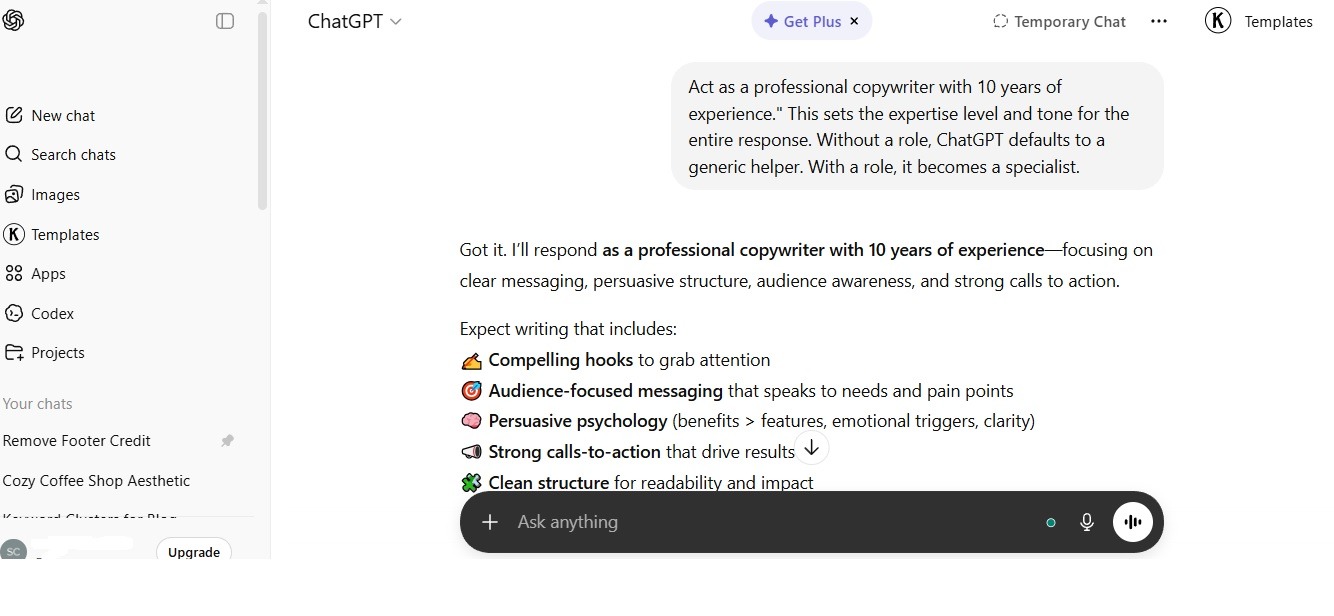
Think of writing a prompt like giving someone directions to a destination. The more specific and clear your directions, the more accurately they arrive exactly where you want them. Vague prompts produce generic, useless results. Specific prompts produce precise, actionable results every single time.
Here are the four core elements that make any ChatGPT prompt powerful:
- Role: Tell ChatGPT who to act as. Example: “Act as a professional copywriter with 10 years of experience.” This sets the expertise level and tone for the entire response. Without a role, ChatGPT defaults to a generic helper. With a role, it becomes a specialist.
- Task: State clearly and directly what you want done. Example: “Write a 200-word product description.” Avoid open-ended requests. The more precise your task, the more useful the output becomes immediately.
- Context: Provide background information that helps ChatGPT understand your unique situation. Example: “The product is a reusable insulated water bottle designed for long-distance trail hikers.” Context removes all guesswork and produces results tailored specifically to your needs.
- Format: Specify exactly how you want the response structured. Example: “Use three bullet points,” “Write in a single paragraph,” or “Format this as a table with two columns.” Format instructions shape the final output so it’s immediately usable without extra editing on your part.
What Are Some Ready-to-Use ChatGPT Prompts for Beginners?

Here are seven real, copy-paste-ready prompts you can use right now:
- For Writing a Professional Email: “Act as a professional assistant. Write a polite email asking my manager for next Friday off. Keep it under 100 words and use a respectful tone.”
- For Understanding a Complex Topic: “Explain how inflation affects everyday grocery prices. Use simple language a 12-year-old could understand and give two real-life examples.”
- For Brainstorming Creative Ideas: “Give me 10 unique side business ideas for someone who works a 9-to-5 job and has weekends free. Focus on low startup cost options.”
- For Summarizing Long Content: “Summarize the following article in exactly 5 bullet points. Focus only on the most important facts: [paste your article text here]”
- For Improving Your Writing: “Review the following paragraph and improve its clarity, grammar, and flow. Keep the same meaning but make it more professional: [paste your text here]”
- For Learning a New Skill: “Create a 7-day beginner learning plan for someone who wants to learn basic Python programming. Include one goal per day and a free resource for each.”
- For Preparing for a Job Interview: “Act as an interviewer for a marketing coordinator role at a tech startup. Ask me 5 common interview questions one at a time and give me feedback after each answer.”
What Can ChatGPT Actually Help You Do Every Day?
ChatGPT can assist you with writing, research, learning, coding, planning, translation, math, and creative projects — all through simple conversation. It replaces multiple apps and tools with a single, always-available assistant.
How Can You Use ChatGPT for Work and Professional Tasks?
- Draft professional emails and business messages in seconds. Describe the situation, the recipient, and the tone you want. ChatGPT delivers a polished draft instantly, saving you the mental effort of starting from scratch every time.
- Create content outlines and first drafts for blog posts, reports, and presentations. You provide the topic and key points. ChatGPT structures your content into a clear, logical framework that you can refine and publish.
- Generate social media captions and ad copy for any platform. Tell ChatGPT your brand voice, the product, and the target audience. It writes platform-optimized captions for Instagram, LinkedIn, X (Twitter), and Facebook.
- Build Excel and Google Sheets formulas without needing to know spreadsheet syntax. Describe what you need in plain English — for example, “Calculate the percentage change between column A and column B” — and ChatGPT writes the exact formula for you.
- Prepare for job interviews by asking ChatGPT to simulate the entire interview. Paste the job description and ask it to act as the interviewer. Practice your answers and get specific, actionable feedback in real time.
How Can Students Use ChatGPT to Learn Faster?
- Break down difficult concepts instantly. Stuck on a topic in chemistry, economics, or history? Ask ChatGPT to explain it in simpler terms or use a real-world analogy. It adjusts the explanation based on your grade level when you tell it your age or background.
- Get instant feedback on your writing. Paste your essay or report into ChatGPT and ask for grammar corrections, better vocabulary suggestions, and structural improvements. It acts like a personal editor available 24 hours a day.
- Create personalized study guides. Paste your class notes and ask ChatGPT to turn them into a structured summary, a list of key terms, or a set of practice quiz questions. This transforms passive notes into active learning tools.
- Practice a foreign language conversationally. Ask ChatGPT to hold a conversation with you in Spanish, French, Japanese, Mandarin, or any language you’re learning. It corrects your mistakes gently and explains the grammar rules behind each correction.
- Solve math problems step by step. Don’t just get the final answer. Ask ChatGPT to walk you through the entire solution process so you understand the method and can replicate it independently on your next exam.
What Is the Difference Between ChatGPT Free, Go, Plus, and Pro in 2026?
As of March 2026, ChatGPT offers four main plans — Free, Go, Plus, and Pro — each powered by the latest GPT-5.3 and GPT-5.4 model family, with different message limits and feature access at each tier.
Here is the complete, up-to-date comparison:
| Feature | Free ($0) | Go ($8/mo) | Plus ($20/mo) | Pro ($200/mo) |
|---|---|---|---|---|
| Default AI Model | GPT-5.3 Instant | GPT-5.3 Instant | GPT-5.3 Instant | GPT-5.3 Instant |
| GPT-5.3 Instant Messages | 10 per 5 hours | 160 per 3 hours | 160 per 3 hours | Unlimited |
| Fallback After Limit | GPT-5.3 Mini | GPT-5.3 Mini | GPT-5.3 Mini | No fallback needed |
| GPT-5.4 Thinking Access | ❌ Not available | 10 messages/5 hrs | 3,000 messages/week | Unlimited |
| GPT-5.4 Pro Access | ❌ Not available | ❌ Not available | ❌ Not available | ✅ Full access |
| Context Window (Instant) | 16K tokens | 32K tokens | 32K tokens | 128K tokens |
| Context Window (Thinking) | — | 256K tokens | 256K tokens | 400K tokens |
| Image Generation (DALL·E) | Limited | Standard | Expanded & faster | Full unlimited |
| File & Document Upload | Limited | Standard | Expanded | Maximum |
| Web Browsing | ✅ Available | ✅ Available | ✅ Available | ✅ Available |
| Deep Research Mode | Limited | Standard | Expanded | Full access |
| Memory & Custom Instructions | Basic | Standard | Expanded | Maximum |
| Voice Mode | Basic | Standard | Full | Full + Advanced |
| Model Picker (Manual Select) | ❌ | ✅ | ✅ | ✅ |
| Priority Access During Peak | ❌ | ✅ | ✅ | ✅ Always first |
Important Update (March 2026): As of February 13, 2026, OpenAI officially retired GPT-4o, GPT-4.1, GPT-4.1 mini, o4-mini, and GPT-5 (Instant and Thinking). All ChatGPT users are now on the GPT-5.3 and GPT-5.4 model family. Source
Free vs. Plus — Which One Should You Choose as a Beginner?
For most beginners, the Free plan is a genuinely great starting point. You get access to GPT-5.3 Instant — one of the most advanced AI models ever released — at absolutely no cost. Ten messages every five hours is more than enough for casual daily use.
Upgrade to Plus ($20/month) when you start needing ChatGPT for professional tasks, heavy writing projects, or daily productivity workflows. The jump from 10 messages per 5 hours to 160 messages per 3 hours is significant, and the access to GPT-5.4 Thinking for complex reasoning tasks is a real game-changer.
Go ($8/month) is a smart middle-ground option if you use ChatGPT regularly but don’t need the full Plus feature set. It offers the same message volume as Plus for Instant mode at less than half the price.
Pro ($200/month) is designed for researchers, developers, data analysts, and power users who need unlimited, unrestricted access to the most capable AI models available anywhere.
What Are the Most Common Mistakes Beginners Make With ChatGPT?
The single most common mistake beginners make is writing prompts that are too vague. A vague prompt produces a generic answer. A specific prompt produces a precise, usable answer. The difference is always in the details you provide.
Here are the top five mistakes to avoid — and the exact fix for each one:
- Being too vague with your request. Typing “write something about dogs” gives you a paragraph nobody asked for. Instead, type: “Write a 200-word fun facts article about Golden Retrievers for a children’s educational website. Use simple words and two short paragraphs.” That specificity completely transforms the quality of the output.
- Not giving ChatGPT enough context about your situation. ChatGPT knows nothing about your life, your job, or your goals unless you tell it. If you want help writing an apology email, tell ChatGPT what happened, who you’re writing to, what the relationship is, and what tone you want. More context always equals a better result.
- Accepting the very first response without refining it. ChatGPT is a conversation tool, not a vending machine. If the first answer isn’t exactly right, simply say “Make it shorter,” “Use a more casual tone,” or “Add two more examples.” Each follow-up instruction makes the response better. Most people stop at the first answer and miss 80% of the value.
- Trusting ChatGPT as the sole source for critical facts. ChatGPT can occasionally produce incorrect information, especially on recent events, specific statistics, or niche technical topics. Always verify important facts through trusted, authoritative sources like government websites, academic databases, or established news organizations before acting on them.
- Forgetting to specify the format you need. If you want a numbered list, say “give me a numbered list.” If you want a table, say “format this as a table.” If you want a single paragraph, say “write this in one paragraph.” ChatGPT follows formatting instructions precisely — but only when you actually give them.
How Do You Get Consistently Better Results From ChatGPT Over Time?
You get better results from ChatGPT by mastering follow-up prompts, using conversation memory effectively, and treating every chat like an ongoing collaboration rather than a one-off request. The more you interact, the better it gets at understanding your needs.
Here are proven strategies that improve your results starting today:
- Use the “refine” technique. After receiving an answer, always follow up with “make this more concise,” “add a real-world example,” or “rewrite this in a more professional tone.” Iterating on responses produces dramatically better results than simply accepting the first draft.
- Use Memory to your advantage (Plus and above). ChatGPT can remember key facts about you — your job title, preferred writing style, industry, and goals — across different conversations. Tell ChatGPT once: “I am a marketing manager at a B2B software company. Always write in a professional but approachable tone.” It applies that context automatically going forward.
- Break large tasks into smaller steps. Instead of asking ChatGPT to “write a complete business plan,” ask it to first generate an outline, then expand each section one at a time. Step-by-step generation consistently produces higher quality results than trying to get everything in one single prompt.
- Use the Auto model selector for everyday tasks. When you’re unsure which model to use, leave it on Auto. ChatGPT’s Auto mode automatically decides whether your question needs GPT-5.3 Instant (fast, everyday tasks) or GPT-5.4 Thinking (complex reasoning), making the right choice faster than you could manually.
- Save your best prompts for reuse. When you find a prompt that consistently gives you great results, keep it in a notes app or document. Over time, you’ll build a personal library of high-performing prompts that saves you hours every single week.
What Are the Best Everyday Use Cases for ChatGPT Beginners?
The best everyday use cases for ChatGPT beginners include writing assistance, information lookup, language learning, creative brainstorming, and task planning. These are the areas where ChatGPT delivers the fastest, most noticeable impact for new users.
| Use Case | What to Ask ChatGPT | Time Saved |
|---|---|---|
| Email Writing | “Write a follow-up email after a job interview” | 15–25 minutes |
| Research Summary | “Summarize this article in 5 key points” | 20–40 minutes |
| Travel Planning | “Create a 5-day itinerary for Rome on a $1,500 budget” | 2–3 hours |
| Recipe Ideas | “Give me a healthy dinner recipe using chicken, spinach, and garlic” | 10–15 minutes |
| Language Translation | “Translate this paragraph into Spanish and explain the key grammar rules” | 20–30 minutes |
| Cover Letter Writing | “Write a cover letter for a junior graphic designer role at an agency” | 30–45 minutes |
| Budget Planning | “Create a simple monthly budget template for a single person earning $3,500/month” | 1–2 hours |
| Learning New Concepts | “Explain machine learning in simple terms with an everyday analogy” | Instant clarity |
Conclusion
ChatGPT is no longer just a novelty — it’s a practical, everyday tool that millions of people around the world use to work smarter, learn faster, and accomplish more in less time. As a beginner, your biggest advantage right now is that you’re getting started at a moment when the technology has never been more powerful or more accessible.
Here’s a quick summary of everything you’ve learned in this guide:
- You can create a free account at chat.openai.com in under three minutes.
- The current default model is GPT-5.3 Instant — one of the most advanced AI models ever built — and it’s free to use today.
- Better prompts always produce better results. Use the Role + Task + Context + Format framework every single time.
- The Free plan is perfect for beginners, with Go ($8/month) and Plus ($20/month) being smart upgrades for regular users.
- Always verify important facts from ChatGPT through authoritative sources before acting on them.
- Treat every conversation as a collaboration. Refine, iterate, and follow up to unlock ChatGPT’s full potential.
Your next step: Open chat.openai.com, create your free account, and type your very first prompt using the Role + Task + Context + Format structure you learned today. The fastest way to get better at using ChatGPT is simply to start using it — right now.
Frequently Asked Questions
Is ChatGPT free to use for beginners?
Yes, ChatGPT is completely free to use on the Free plan. You get access to GPT-5.3 Instant — OpenAI’s current standard model — at no cost, with up to 10 messages every 5 hours. After hitting that limit, ChatGPT automatically switches to the mini version until your limit resets. No credit card is required to get started.
Is ChatGPT safe for beginners to use?
Yes, ChatGPT is safe to use for general tasks. However, avoid sharing sensitive personal information such as passwords, social security numbers, bank details, or private medical data in your conversations. On the Free and Plus plans, your chats may be used to improve OpenAI’s models unless you manually opt out in the privacy settings.
Is ChatGPT better than doing a Google search?
No, ChatGPT is not a direct replacement for Google Search — they serve different purposes. Google is best for finding current news, specific websites, and real-time information. ChatGPT is better for generating written content, explaining concepts, summarizing information, and completing tasks. The two tools work best when used together.
Is GPT-5.3 available on the free plan in 2026?
Yes, GPT-5.3 Instant is available on the Free plan as of March 2026. This is a significant upgrade from earlier years. Free users get 10 messages every 5 hours with GPT-5.3 Instant before falling back to the mini version. Paid plans like Plus and Pro unlock higher message limits and access to GPT-5.4 Thinking and Pro modes.
Is it possible to use ChatGPT without creating an account?
Yes, you can access a limited version of ChatGPT without logging in by visiting chat.openai.com. However, creating a free account unlocks conversation history, memory features, file uploads, and higher usage limits. The account setup takes less than three minutes and requires only an email address or Google account.
Is ChatGPT accurate enough to trust for research and homework?
No, you should not rely solely on ChatGPT for academic research or critical fact-checking without independent verification. While ChatGPT is highly capable, it can occasionally produce confident-sounding incorrect information — a phenomenon called “hallucination.” Always cross-reference important claims with authoritative sources such as academic journals, official government websites, or established news publications before using them in formal work.
Is there a mobile app for ChatGPT beginners?
Yes, ChatGPT has official free apps for both iOS (iPhone/iPad) and Android smartphones. The mobile apps include voice mode, image upload, and all the same features as the web version. Download only from the official App Store or Google Play Store and make sure the developer is listed as OpenAI to avoid fake apps.
You May Also Like
 ChatGPT
How to Use ChatGPT at Work: Productivity Tips That Actually Save You Hours
 ChatGPT
How to Use ChatGPT Best Prompts
 AI Tool Reviews
GPTZero vs ZeroGPT: Which AI Detector Actually Holds Up in the Real World?
 AI Models
GPT-5.5 vs Claude Opus 4.7 vs Gemini 3.1 Pro: Real Benchmark Results Compared
 ChatGPT
ChatGPT 5.5 Is Here: Benchmarks, What’s New, What’s Different, and Is It Actually Worth the Hype?
 ChatGPT