
Let me be honest with you. When I first started using ChatGPT as a student, I didn’t fully understand what I was doing with it. I typed random questions, got random answers, and thought “this is just a fancy search engine.” I almost gave up on it after the first week.
Then everything changed when I learned how to actually use it properly. Since then, ChatGPT has become the single most useful tool in my entire study routine. I use it every single day — for writing essays, understanding difficult topics, preparing for exams, and organizing my assignments. And the results have been genuinely transformative.
Here’s the thing: you don’t need to be a tech expert to get real value from ChatGPT as a student. You just need a clear, step-by-step guide that shows you exactly what to do and what to avoid. That’s precisely what this tutorial is. According to a recent survey, 26% of students aged 13–17 already use ChatGPT for schoolwork — and that number is growing fast every month. This guide will make sure you’re using it smarter than everyone else.
Before diving in, if you’re completely new to ChatGPT, I highly recommend reading this complete beginner’s guide to ChatGPT first. It covers everything from account setup to your very first prompt, and it pairs perfectly with this student-focused tutorial.
What Is ChatGPT and Why Does It Matter for Students?
ChatGPT is an AI-powered assistant that can explain concepts, write drafts, create study guides, and tutor you on virtually any subject — completely available 24 hours a day, 7 days a week. Built by OpenAI, it understands natural language, meaning you talk to it exactly like you’d talk to a knowledgeable friend or tutor.
For students specifically, this is a huge deal. Think about it — you no longer have to wait until tomorrow’s class to get a concept explained. You don’t have to sit stuck on one paragraph for 45 minutes. You don’t have to pay $80/hour for a private tutor. ChatGPT handles all of that, instantly, for free.
Research published in academic journals confirms what I’ve personally experienced: ChatGPT improves academic performance, reduces cognitive overload, and enhances higher-order thinking skills when used correctly as a learning tool. The keyword there is “correctly.” That’s exactly what this entire tutorial is built around.
How Do You Set Up ChatGPT as a Student in 2026?
Setting up ChatGPT as a student takes under three minutes and costs absolutely nothing on the Free plan. Here’s the exact process I followed on my first day:
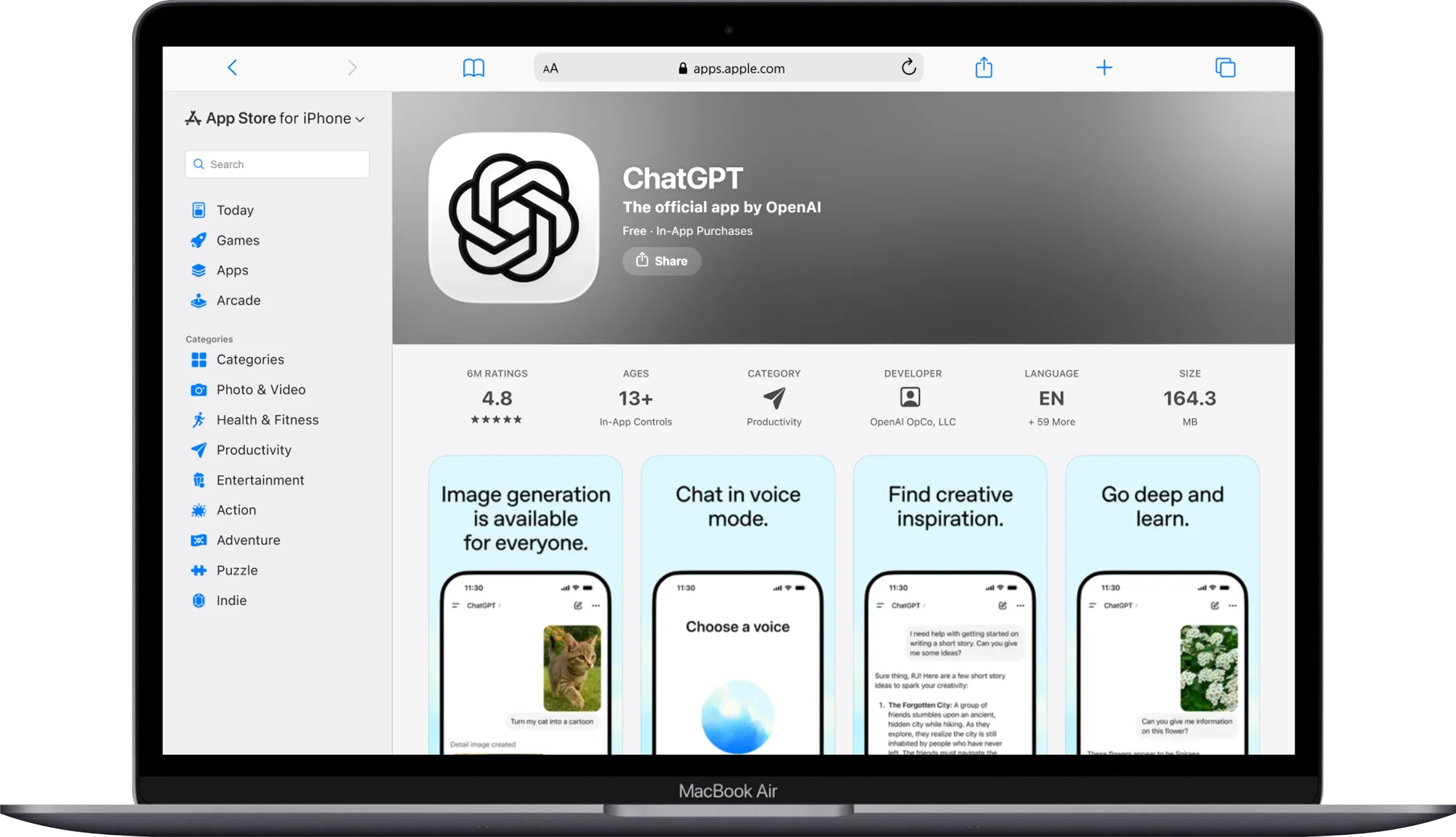
- Visit the official site. Go to chatgpt.com on your laptop, tablet, or phone. Always use the official site – For my experince i love using Apps you can download via App Store or Google Play Store.
- Create your free account. Click “Sign Up” and use your school email or a personal Google account. Using Google sign-in is fastest — it literally takes one click and skips the email verification step entirely.
- Explore the interface. Once you’re in, you’ll see a clean chat window with a text box at the bottom. That’s it. No complicated menus. No technical setup. You’re ready to start immediately.
- Download the mobile app. I personally use the ChatGPT app on my phone constantly — during commutes, lunch breaks, and late-night study sessions. Download it from the official App Store or Google Play. Make sure the developer is listed as OpenAI before downloading.
- Understand your plan limits. The Free plan gives you access to GPT-5.3 Instant — which is incredibly capable — with 10 messages every 5 hours. For most students, this is more than enough for daily use. If you find yourself hitting that limit regularly, the Go plan at $8/month is a genuinely affordable upgrade.
✅ My Personal Tip: Use your school or university email to sign up. OpenAI offers free ChatGPT for Teachers access for verified US K–12 educators, and student-friendly programs are expanding in 2026.
How Can Students Use ChatGPT for Essay Writing Without Cheating?
You can use ChatGPT ethically for essay writing by using it as a brainstorming partner, outline builder, and revision editor — never as a tool to write your final essay for you. This is the most important distinction every student needs to understand upfront.
I’ve personally used ChatGPT to improve dozens of essays. Not once did I submit AI-generated content as my own work. Instead, I use it as a smart study partner who helps me think more clearly and write more effectively.
How Do You Use ChatGPT to Plan and Structure an Essay?
- Start with a brainstorming prompt. Before writing a single word of your essay, ask ChatGPT to help you explore the topic. For example: “I’m writing an essay about the causes of World War I for a 10th-grade history class. Give me 8 possible argument angles I could explore. Don’t write the essay — just give me ideas.” This generates starting points in seconds that would take you 30+ minutes of research to develop on your own.
- Build a solid outline. Once you’ve chosen your angle, ask ChatGPT to help structure your argument: “Help me create a detailed essay outline for a 5-paragraph persuasive essay arguing that social media negatively affects teenage mental health. Include a thesis statement and three supporting argument points.” Your outline is now done. You still write every paragraph yourself.
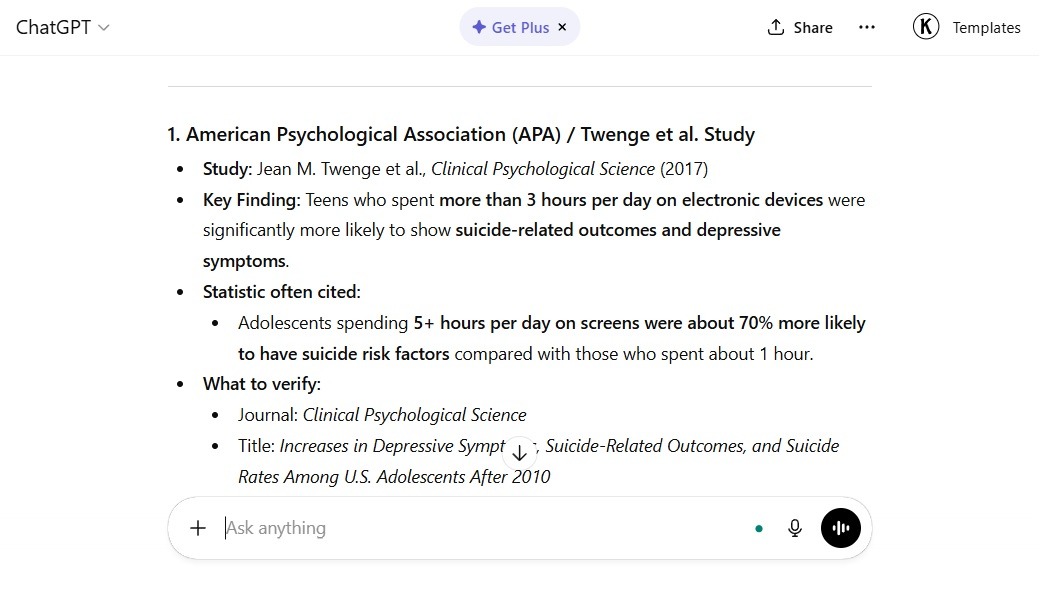
- Research supporting evidence. Ask ChatGPT: “What are three well-known research studies or statistics about social media and teenage depression I should look for and verify?” It points you toward real evidence to find and confirm in actual academic sources — not fabricated statistics.
- Use it to strengthen your own writing. After you write your own draft, paste individual paragraphs and ask: “Is this argument logically sound? What’s the weakest part of this paragraph and how could I strengthen it?” ChatGPT acts as your personal editor giving detailed, constructive feedback.
- Run a final proofreading pass. Paste your completed essay and ask: “Proofread this essay for grammar errors, awkward sentences, and unclear phrasing. Explain each suggested change so I understand why it’s better.” This teaches you better writing habits over time — not just fixes your mistakes in isolation.
📌 Important reminder: Always run your final essay through your school’s plagiarism checker and verify that your institution’s AI policy permits these uses. Academic integrity always comes first.
How Do You Use ChatGPT to Understand Difficult Subjects Faster?
You use ChatGPT to understand difficult subjects by asking it to act as a tutor, explain concepts in simple language, use real-world analogies, and break complex material into smaller digestible parts. This is honestly where I get the most value from ChatGPT as a student.
I remember sitting with a 40-page calculus chapter at 11 PM the night before an exam, completely lost. I opened ChatGPT, pasted the concept I didn’t understand, and within minutes it walked me through the entire idea using everyday analogies I actually understood. That exam went from feeling impossible to feeling manageable.
Here are the exact prompt structures I use for subject-specific understanding:
- For Science and Math: “Explain the concept of photosynthesis as if I’m a complete beginner. Use a simple everyday analogy and then walk me through the step-by-step process in order.” The analogy instruction is critical — it forces ChatGPT to connect abstract ideas to things you already understand intuitively.
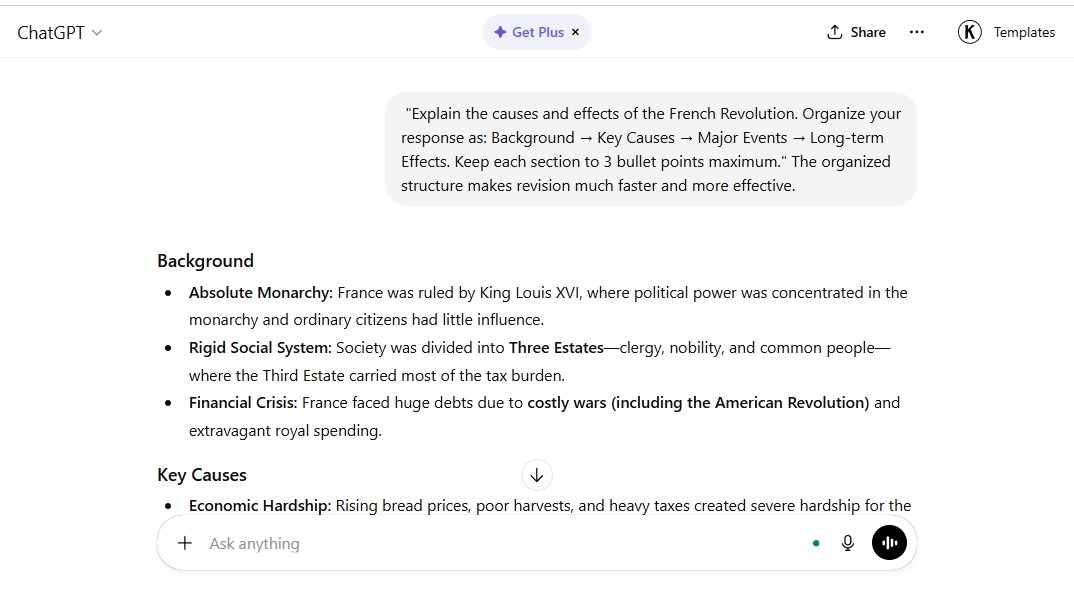
- For History and Social Studies: “Explain the causes and effects of the French Revolution. Organize your response as: Background → Key Causes → Major Events → Long-term Effects. Keep each section to 3 bullet points maximum.” The organized structure makes revision much faster and more effective.
- For Literature and English: “I’m studying Shakespeare’s Macbeth. Explain the theme of ambition in the play. Give me three specific quotes that support this theme and explain what each one means in plain English.” Perfect for essay prep and deep understanding at the same time.
- For Economics and Business Studies: “Explain supply and demand as if you’re teaching a 14-year-old. Give me a real example using a product I would actually buy, like sneakers or a smartphone.” Grounding abstract economic theory in real consumer products makes it click instantly.
- For Languages: “I’m learning Spanish at a beginner level. Have a short conversation with me about ordering food at a restaurant. After every exchange, tell me what grammar rule I used correctly and what I got wrong.” This turns ChatGPT into a full interactive language tutor at no cost whatsoever.
How Do You Build an Effective Study Plan Using ChatGPT?
You build an effective study plan with ChatGPT by giving it your exam date, subjects, available study hours, and asking it to generate a structured day-by-day revision schedule. I’ve used this exact approach before every major exam cycle and it consistently reduces my stress levels dramatically.
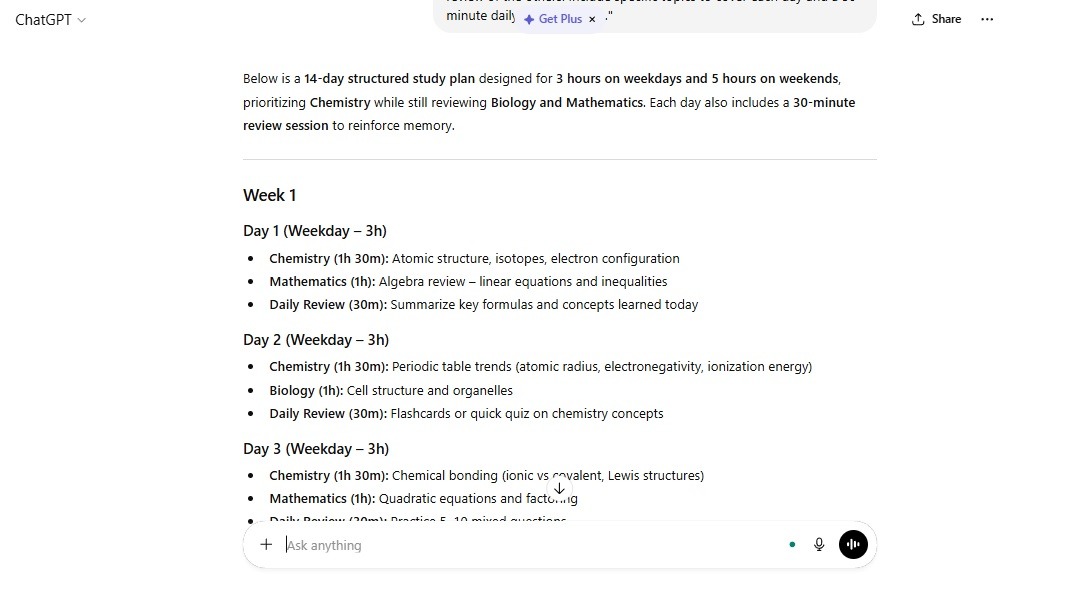
Here’s the exact prompt I use personally:
“Act as an expert academic tutor. I have exams in Biology, Chemistry, and Mathematics in 14 days. I can study for 3 hours every weekday and 5 hours each day on weekends. Create a detailed day-by-day study plan that prioritizes my weakest subject (Chemistry) while maintaining review of the others. Include specific topics to cover each day and a 30-minute daily review session.”
That single prompt generates a complete, personalized study roadmap in under 30 seconds. You can then ask it to go deeper on any specific topic or day that feels overwhelming.
Here are additional study planning prompts worth saving:
- For creating flashcard content: “Generate 20 flashcard question-and-answer pairs covering the key concepts in Chapter 5 of cell biology. Format them clearly as Q: and A: for easy review.”
- For turning notes into summaries: “Here are my class notes from today’s lecture on the Cold War: [paste notes]. Summarize them into 10 key bullet points organized chronologically that I can use for exam revision.”
- For practice exam questions: “Generate 10 exam-style multiple choice questions on the topic of Newton’s Laws of Motion. After each question, provide the correct answer and a brief explanation of why it’s correct.”
- For identifying knowledge gaps: “Quiz me on the topic of the human digestive system. Ask me one question at a time. If I get something wrong, explain the correct answer clearly and ask a follow-up question on the same concept until I understand it fully.”
How Does ChatGPT’s Study Mode Help Students Specifically?
ChatGPT’s Study Mode is a dedicated feature designed to guide students through material using the Socratic method — asking questions rather than just giving answers — to develop deeper understanding. OpenAI launched this feature specifically because students learn better through guided discovery than passive reading.

I personally love Study Mode for subjects that require genuine understanding rather than memorization. Instead of just telling you the answer, ChatGPT asks you questions that lead you to discover it yourself. This feels more like a real tutoring session than a Wikipedia lookup.
Here’s a quick comparison of how regular ChatGPT chat and Study Mode differ for students:
| Feature | Regular Chat Mode | Study Mode |
|---|---|---|
| Response Style | Provides complete answers directly | Guides you with questions to reach the answer yourself |
| Best Use | Quick lookups, drafting, summarizing | Deep concept understanding, exam prep |
| Learning Depth | Surface-level information retrieval | Deep conceptual engagement and retention |
| Feedback Type | Answers your question | Challenges your thinking and builds comprehension |
| Ideal For | Research tasks, writing help | Science, math, history, language arts |
To activate Study Mode, click the compass icon in the interface or type “Enter study mode and help me understand [topic]” at the start of any conversation.
What Are the Best ChatGPT Prompts for Students in 2026?
The best ChatGPT prompts for students are specific, role-based instructions that give context, define the task clearly, and specify the output format you need. After months of personal testing, here are my absolute favorite prompts organized by academic use case:
For Essay Writing and Research
- “Act as an academic writing coach. Review my thesis statement and tell me if it’s strong, debatable, and specific enough: [paste your thesis here]”
- “I’m writing a research paper on climate change for a 10th-grade science class. Give me 5 credible research angles I should investigate and the type of sources I should look for to support each one.”
- “Explain the difference between a primary source and a secondary source. Give me two examples of each that I could use in a history essay about World War II.”
For Exam Preparation and Revision
- “Create a one-page revision cheat sheet for the topic of organic chemistry reactions. Use bold headers, bullet points, and include the key formulas I need to memorize.”
- “I have a biology exam in 3 days. Quiz me on the topic of genetics and heredity. One question at a time. Don’t reveal the answer until I respond.”
- “Explain the difference between mitosis and meiosis in a simple comparison table. Include: purpose, number of divisions, end result, and where it occurs in the body.”
For Reading Comprehension and Summarization
- “Here is a passage from my textbook: [paste text]. Summarize it in 5 bullet points and highlight the two most important ideas I should remember for the exam.”
- “I need to read a 30-page chapter on economic theories. What are the 10 key concepts from macroeconomics I should focus on as a beginner student?”
For Creative Projects and Presentations
- “Help me create a 10-slide presentation outline on the topic of renewable energy for a school science fair. Include: slide title, key talking point, and one visual idea for each slide.”
- “I need to write a short creative story for English class. Give me 5 unique opening sentences that immediately grab attention and set up an interesting conflict.”
How Does ChatGPT Compare to Other AI Tools Students Use?
ChatGPT is the most versatile AI tool for students overall, but different tools excel in different specific tasks. Here’s an honest comparison based on my personal experience using multiple AI platforms:
| Tool | Best For Students | Limitations | Cost |
|---|---|---|---|
| ChatGPT (GPT-5.3) | Writing, explaining, studying, coding, planning | Verify facts independently | Free / $8–$200/mo |
| Google Gemini | Image-based tasks, Google integration, visual content | Less conversational depth | Free / Paid |
| Perplexity AI | Real-time research with live source citations | Less useful for writing tasks | Free / $20/mo |
| Grammarly AI | Grammar checking and writing polish | Limited to editing, not creating | Free / $12/mo |
| Wolfram Alpha | Advanced math and science calculations | No conversational learning | Free / $5/mo |
For most students, ChatGPT remains the best single tool because of its versatility. It handles writing, explaining, summarizing, coding, planning, and tutoring all in one place.
What Are the Ethical Rules Every Student Must Follow When Using ChatGPT?
The core ethical rule is simple: use ChatGPT to enhance your thinking and learning, never to replace it entirely. Submitting AI-generated content as your original work without disclosure violates academic integrity policies at virtually every school and university worldwide.
Here are the clear ethical boundaries I personally follow and recommend to every student:
- Always declare AI assistance when your school requires it. Many institutions now have specific AI disclosure policies. Read your school’s policy carefully and follow it. When in doubt, ask your teacher directly before submitting any AI-assisted work.
- Use ChatGPT for ideation and feedback — write the final work yourself. Let ChatGPT help you brainstorm, outline, and edit. But every sentence in your final submission should come from your own mind and your own keyboard. That’s where the actual learning happens.
- Never paste another person’s work into ChatGPT. If someone shares private notes, essays, or unpublished research with you, do not feed that into any AI tool. This raises serious privacy and intellectual property concerns.
- Always verify facts ChatGPT gives you. ChatGPT can confidently state incorrect information — this is called “hallucination.” Before including any specific statistic, date, or claim in your academic work, confirm it through a reliable source like a textbook, academic journal, or official website.
- Use it to learn, not to skip learning. The greatest long-term benefit of ChatGPT isn’t getting faster answers — it’s building deeper understanding faster. Use it to genuinely engage with material, not to bypass it entirely.
How Can You Use ChatGPT for Creative School Projects?
You can use ChatGPT for creative school projects by combining its text generation abilities with AI image tools to produce visually compelling, original project materials. This combination is where students in 2026 are producing the most impressive project work.
Here’s how I personally approach creative assignments:
For written creative projects, ChatGPT handles the storytelling, scripting, and narrative structure. Ask it to generate creative writing prompts, story outlines, character descriptions, and dialogue — then build on those foundations with your own creative input.
For visual creative projects, ChatGPT pairs incredibly well with AI image generation tools. Once you understand what makes a great AI prompt, you can create stunning visual assets for school posters, presentations, and science fair displays.
What Are the Most Useful ChatGPT Features Students Overlook?
The most overlooked ChatGPT feature for students is the persistent Memory function, which remembers key facts about you across different conversations. Most students never activate or use it, and they miss out on a massively personalized experience as a result.
Here are four powerful ChatGPT features that most students overlook completely:
- Memory (Plus and above). You can tell ChatGPT: “Remember that I’m a 10th-grade student studying in the US, my weakest subject is chemistry, and I prefer explanations with real-world analogies.” From that point on, every response is automatically tailored to your academic level and learning style — without repeating yourself every single session.
- File and document upload (Go, Plus, Pro). You can upload your actual textbook chapters, lecture slides, or reading assignments as PDF files. Then ask ChatGPT: “Summarize the key exam topics from this chapter” or “Create 15 practice quiz questions from this document.” This is an absolute game-changer for efficient studying.
- Image analysis for STEM subjects. Upload a photo of a math problem, a chemistry diagram, a hand-drawn graph, or even a page from your textbook and ask ChatGPT to explain it. I’ve photographed confusing diagrams from my biology textbook and had ChatGPT walk me through them visually in real time.
- Custom Instructions for consistent responses. Go to Settings → Custom Instructions and add: “I am a high school student. Always explain concepts at a Grade 10 level. Use bullet points for key information. Always give a real-world example for abstract concepts.” Every single future response will automatically follow these instructions — permanently improving your experience without repeated setup.
How Do You Use ChatGPT for Coding and Computer Science Homework?
You use ChatGPT for coding homework by asking it to explain programming concepts, debug your code, walk you through algorithms step by step, and help you understand why a solution works — not just what the solution is. As a student studying computer science, this is one area where ChatGPT genuinely feels like having a patient, knowledgeable senior developer available around the clock.
Here are the most useful coding-specific prompts I’ve personally tested:
- For understanding a concept: “Explain what a for loop is in Python. Give me a simple real-world example using a shopping list. Then show me the code and explain each line one by one.”
- For debugging your code: “Here is my Python code. It’s supposed to [describe what it should do] but instead it [describe the error]. Find the bug and explain exactly why it’s causing the problem: [paste your code here]”
- For learning algorithms: “Explain the bubble sort algorithm as if I’ve never heard of it. Walk me through each step with a simple example using 5 numbers. Then show me the Python code with comments on every line.”
- For improving your own code: “Review my code and suggest three improvements for readability, efficiency, or best practices. Explain each suggestion clearly: [paste your code here]”
The critical rule for coding homework: always understand what the code does before you submit it. Ask ChatGPT to explain every line. The learning is in the understanding, not the copying.
Conclusion
After months of daily use as a student, I can say with complete confidence that ChatGPT is the most powerful study tool I’ve ever used — and I’ve tried almost everything. It’s not about cutting corners or avoiding hard work. It’s about working smarter, learning faster, and getting more out of every hour you spend studying.
Here’s a quick summary of everything this tutorial covered:
- Set up your free account at chat.openai.com in under three minutes using your Google account or school email.
- Use ChatGPT ethically — for brainstorming, outlining, explaining, and feedback — never for submitting AI-generated work as your own.
- Specific prompts always beat vague ones. Use the Role + Task + Context + Format framework for every important request.
- Study Mode and Memory are two underused features that dramatically improve the depth and consistency of your learning experience.
- ChatGPT pairs powerfully with visual AI tools. For creative projects, combine ChatGPT’s text abilities with AI image
- Always verify important facts from ChatGPT through textbooks, academic journals, or authoritative websites before submitting any academic work.
Your next step: Open ChatGPT right now and type your first student-specific prompt using this exact structure: “Act as a [subject] tutor. Explain [topic] at a Grade [your grade] level using a real-world analogy and three bullet points.” That single prompt will immediately show you what ChatGPT is capable of — and you’ll never study the same way again.
For more AI tools, tips, and creative resources for students, explore the full library at AIPrixa.com.
Frequently Asked Questions
Is ChatGPT free for students to use?
Yes, ChatGPT is completely free for students on the Free plan. You get access to GPT-5.3 Instant — OpenAI’s current standard model — with 10 messages every 5 hours at zero cost. No credit card is needed. The Go plan at $8/month is an affordable upgrade if you need more daily messages.
Is it cheating to use ChatGPT for schoolwork?
No, using ChatGPT for schoolwork is not automatically cheating — it depends entirely on how you use it and what your school’s policy states. Using it to brainstorm ideas, understand concepts, get feedback on your own writing, or create study guides is completely ethical. Submitting AI-generated text as your original written work without disclosure is considered academic dishonesty at most institutions.
Can ChatGPT write my essay for me?
Yes, ChatGPT can technically write an essay — but submitting that essay as your own work violates academic integrity policies at virtually every school worldwide. More importantly, having AI write your essay means you miss the actual learning that writing develops. Use ChatGPT to plan, outline, research, and revise — but always write the final essay in your own words.
Is ChatGPT accurate enough for student research?
No, you should never rely solely on ChatGPT as a research source without verification. While it’s highly capable and knowledgeable, it can occasionally produce confident-sounding incorrect information. Always cross-reference important claims with your textbook, academic databases like Google Scholar, or official educational sources before including them in your academic work.
Can students use ChatGPT on their phone?
Yes, ChatGPT has official free apps for both iOS and Android devices. The mobile app includes all the same features as the web version — including voice mode, file uploads, and image analysis. Download it only from the official App Store or Google Play, and confirm the developer is listed as OpenAI before installing.
Is ChatGPT better than a real tutor for students?
No, ChatGPT is not a full replacement for a qualified human tutor, especially for complex subjects requiring deep personalized instruction. However, it is an incredibly powerful supplementary tool available 24/7 at no cost. For instant concept explanations, practice questions, writing feedback, and study planning, ChatGPT outperforms most on-demand alternatives in terms of accessibility and speed.
You May Also Like
 AI Tool Reviews
How to Use ChatGPT for Beginners: The Complete Step-by-Step Guide (2026)
 ChatGPT
How to Use ChatGPT at Work: Productivity Tips That Actually Save You Hours
 ChatGPT
How to Use ChatGPT Best Prompts
 AI Tool Reviews
GPTZero vs ZeroGPT: Which AI Detector Actually Holds Up in the Real World?
 AI Models
GPT-5.5 vs Claude Opus 4.7 vs Gemini 3.1 Pro: Real Benchmark Results Compared
 ChatGPT