

If you’ve ever typed something personal into ChatGPT, you’ve probably wondered — does ChatGPT save your chats? The short answer is yes, ChatGPT saves your conversations by default when you’re logged into your OpenAI account. Your chat history appears in the sidebar on the left side of the screen, and you can revisit those saved chats anytime you want. If you’re curious whether ChatGPT trains on your data, the answer is closely tied to how your chats are stored and used.
But there’s more to this than a simple yes or no. OpenAI, the company behind ChatGPT, stores your conversation data on its servers.
This data can be used for several purposes, including improving the model, monitoring for misuse, and maintaining service quality.
The way ChatGPT handles your chat history depends on your account settings, whether you use features like Temporary Chat, and how you configure your privacy settings inside your account dashboard. Your plan type also plays a role — there are different data controls depending on whether you use the free or paid version of ChatGPT.
Privacy concerns around AI tools have grown significantly over the past couple of years. Whether you’re using ChatGPT for work, school, or personal conversations, understanding how your data is stored, retained, and potentially deleted gives you control over your digital footprint.
If you want a broader look at whether your information is protected, our guide on whether ChatGPT is safe covers the full security picture. This guide covers every detail about ChatGPT data storage, retention policies, and the exact steps you can take to manage or delete your chat history.
How Does ChatGPT Save Your Conversations by Default?
ChatGPT saves every conversation to your account automatically when you are logged in. Your chats appear in the sidebar on the left side of the screen, organized by date. OpenAI retains this data on its servers for as long as you keep your account active, unless you choose to delete specific conversations.
When you open ChatGPT and start typing, the system records 4 types of data from your session. First, it stores your prompts and questions.
Every word you type into the chatbox is recorded as user content on OpenAI’s servers. Second, it saves ChatGPT’s responses.
The AI-generated replies are logged alongside your input. Third, it keeps uploaded files, documents, images, and spreadsheets you share during a conversation are tied to that chat’s lifecycle. Fourth, it collects account metadata — your name, email address, IP address, browser type, and approximate location are all recorded.
OpenAI states that this data collection serves 3 primary purposes: improving model performance, monitoring for misuse, and maintaining service quality. Your conversation data may be reviewed by human AI trainers as part of OpenAI’s quality assurance process. This means a real person could read parts of your saved chats if they are flagged for review.

What Happens to Your Data After ChatGPT Saves It?
OpenAI uses your saved conversation data to train and improve its AI models, including GPT-5 and future versions. Your chats are anonymized and fed into machine learning algorithms that help the system generate better, more accurate responses over time.
When you type something into ChatGPT, that information does not disappear after you close the browser tab. It stays in the system and may contribute to how the model learns.
OpenAI has stated that it does not sell your data to third parties or use it for advertising campaigns. However, the company does share data with authorized vendors and affiliates for what it calls “service optimization.”
There is also a legal dimension worth knowing about. In 2025, a U.S. federal judge ordered OpenAI to preserve all ChatGPT conversation logs, including deleted and temporary chats, as part of a lawsuit filed by The New York Times.
That legal retention order was lifted in October 2025 for most users. But the situation revealed that your deleted data might not always be gone when you expect it to be.
What Types of Data Does OpenAI Collect From Your Chats?
OpenAI collects both your direct inputs and background metadata during every ChatGPT session. Here is a breakdown of the specific data types:
| Data Type | What It Includes | How Long It’s Stored |
|---|---|---|
| Prompts and Responses | Every question you ask and every answer ChatGPT gives | Indefinitely, until you delete |
| Uploaded Files | Documents, images, spreadsheets shared in chat | Tied to the conversation lifecycle |
| Account Info | Name, email, phone number, payment details | As long as your account is active |
| Technical Metadata | IP address, browser type, operating system, location | Collected per session |
| Usage Analytics | Session duration, feature usage, interaction patterns | Ongoing collection |
This data collection applies to all users, whether you are on the free plan, ChatGPT Plus, or ChatGPT Pro. Enterprise and Team subscribers get additional data controls, including custom retention schedules and the option to exclude all conversations from model training.
How to Check if ChatGPT Saved Your Conversation
You can verify your saved chats by looking at the chat history sidebar on the left side of the ChatGPT interface. Every conversation you’ve had while logged in appears there, listed by title and date.
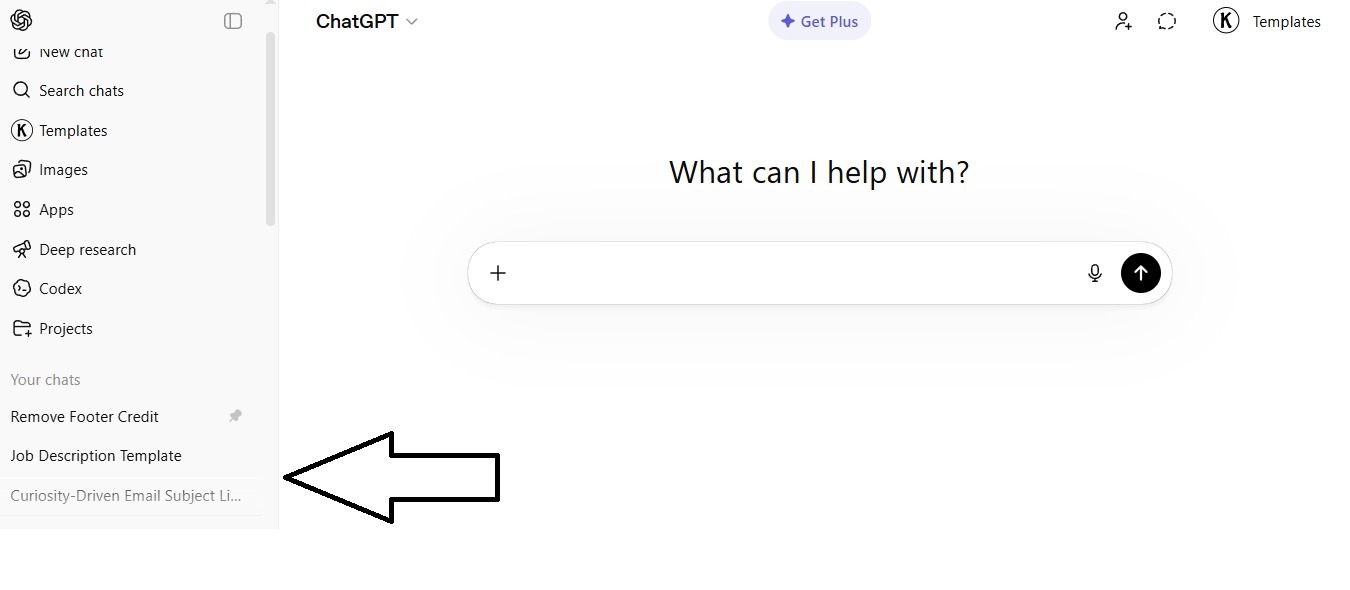
Here are 4 steps to check your saved conversations:
- Log into your ChatGPT account at chatgpt.com
- Look at the left sidebar where your conversation history is listed
- Click on any chat title to reopen and review the full conversation
- Scroll through the list to see older chats organized by date
If a conversation does not appear in your sidebar, there are 3 possible reasons. You may have deleted it, started it in Temporary Chat mode, or you were not logged in when the conversation took place. It’s worth noting that if you use ChatGPT without logging in, your conversations are not saved to any account at all.
How to Stop ChatGPT From Saving Your Chats
You can prevent ChatGPT from saving your conversations by using Temporary Chat mode or by adjusting your data controls in the settings menu. These 2 methods give you direct control over whether your chats are stored and whether they contribute to model training.

How Does Temporary Chat Mode Work?
Temporary Chat is a new feature that lets you have a conversation with ChatGPT that starts with a blank slate. ChatGPT will not remember anything from a Temporary Chat, and the conversation will not appear in your history sidebar.
To start a Temporary Chat, open a new conversation and click the pill-shaped “Temporary” button in the top-right corner of the page. While this mode is active, ChatGPT will not access your saved memories or reference previous conversations. OpenAI retains a copy of Temporary Chats for up to 30 days for safety purposes, but these chats are not used to train the model.

There are 3 things to keep in mind about Temporary Chat. First, the conversation disappears from your account once you leave it — you cannot go back and reopen it. Second, if you use a custom GPT with actions inside Temporary Chat, data sent to third parties through those actions is subject to the third party’s privacy policy. Third, Enterprise customers can still access Temporary Chats through the Compliance API for up to 30 days.
How Do You Turn Off Chat History and Model Training?
You can disable model training while keeping your chat history visible by changing one setting in your account. Navigate to Settings > Data Controls > Improve the model for everyone, and switch the toggle to “Off.”
Here are 5 steps to turn off ChatGPT chat saving for model training:
- Click your profile icon in the bottom left corner of the ChatGPT screen
- Select Settings from the dropdown menu
- Click Data Controls to expand your privacy options
- Find the toggle labeled “Improve the model for everyone”
- Switch it to Off to stop your conversations from being used for training
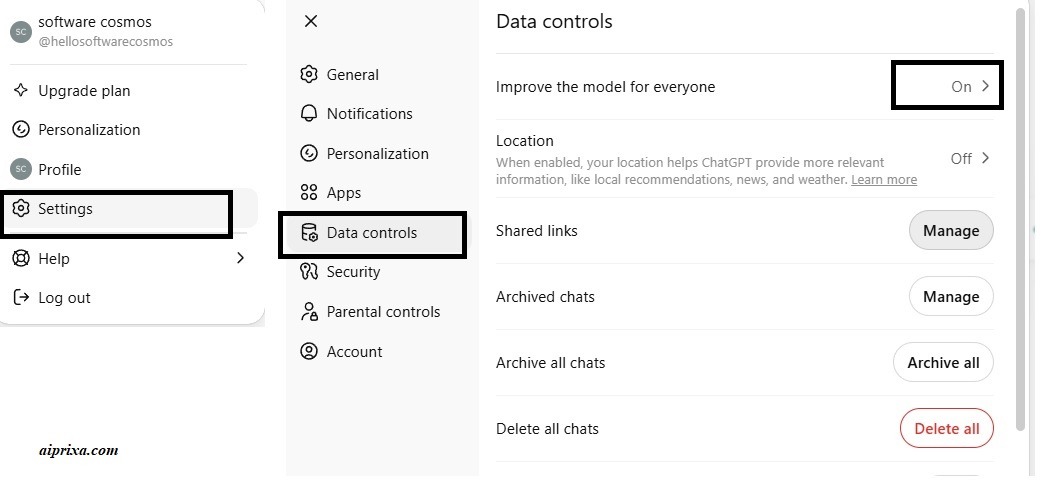
Once you opt out, new conversations created while this setting is off will not be used to train OpenAI’s models. However, your chats will still be saved to your sidebar and stored on OpenAI’s servers. This setting only controls whether your data feeds into future model improvements — it does not stop chat storage entirely.
How Long Does ChatGPT Keep Your Data?
ChatGPT retains your conversations indefinitely until you manually delete them from your account. There is no automatic expiration for regular chats. Once you delete a chat, OpenAI schedules it for permanent removal from their servers within 30 days.
The ChatGPT data retention timeline works in 3 stages. Your chat remains in your account sidebar for as long as you want. When you delete a chat, it is removed from your visible history immediately. Then OpenAI takes up to 30 days to permanently erase it from their backend systems, unless the data has already been de-identified or OpenAI must retain it for security or legal obligations.
For Temporary Chats, the timeline is shorter. These conversations are automatically deleted from OpenAI’s systems within 30 days, even without manual deletion. For Enterprise and Team users, custom retention policies can be set — some organizations configure automatic deletion after 7, 14, or 30 days.
Does Deleting a ChatGPT Chat Remove Your Data Permanently?
Deleting a chat removes it from your account immediately, but OpenAI keeps a copy on its servers for up to 30 additional days. After that 30-day window, the data is scheduled for permanent deletion.
There are 2 exceptions to this rule. First, if your chat data has already been de-identified and disassociated from your account, it may exist in an anonymized form within training datasets. Second, if OpenAI is under a legal obligation to retain data — such as a court order or government investigation — your deleted chats may be preserved beyond the normal 30-day window.
Once you delete a chat, you cannot recover it. There is no “undo” button or trash folder for removed conversations. This applies to both the web interface and the mobile app.
How to Delete Your ChatGPT Chat History
You can delete individual chats or your entire conversation history through the ChatGPT settings menu. The process takes less than 1 minute on both desktop and mobile.
How Do You Delete a Single Chat?
Here are 5 steps to delete single conversation:
- Go to your chat history sidebar on the left side of the screen
- Hover over the conversation you want to remove
- Click the three dots (⋯) next to the chat title
- Select Delete from the dropdown menu
- Confirm your deletion when the prompt appears
The chat disappears from your sidebar right away. OpenAI then removes it from their servers within 30 days.
How Do You Delete All Chats at Once?
Here are 4 steps to clear your entire history:
- Click your profile icon in the bottom left corner
- Select Settings from the menu
- Navigate to General and find the option to delete all chats
- Click Delete All and confirm when prompted
This removes every saved conversation from your account. Remember, OpenAI still retains the data on its backend for up to 30 days before permanent deletion.
How to Export Your ChatGPT Conversations Before Deleting Them
You can download a complete copy of all your ChatGPT conversations through the Data Controls section in your settings. OpenAI sends the export file to your registered email address, usually within 24 hours.
Here are 6 steps to export your ChatGPT data:
- Sign into your ChatGPT account on your browser
- Click your profile icon in the bottom left corner
- Select Settings from the dropdown
- Click Data Controls to expand the options
- Click Export Data and confirm your request
- Check your email for a download link from OpenAI
The export file arrives as a zip folder containing your conversations in JSON format. The download link expires within 24 hours, so make sure you save the file promptly. This export includes your full chat history, prompts, responses, and any saved memories.
How Does the ChatGPT Memory Feature Affect Your Privacy?
The Memory feature allows ChatGPT to save specific facts about you across different conversations. If you mention your job, your preferences, or personal details, ChatGPT may store those as “memories” and reference them in future chats.
This is different from regular chat saving. Your conversation history stores the full text of every chat. The Memory feature, on the other hand, pulls out specific pieces of information — like your name, where you work, or your writing style — and keeps them in a separate saved list. ChatGPT uses these stored facts to personalize future responses.
You can manage your saved memories by going to Settings > Personalization > Memory > Manage Memories. From there, you can view every fact ChatGPT has stored about you and delete individual memories or turn off the feature entirely. If you delete a memory, OpenAI may retain a log of it for up to 30 days for safety and debugging purposes.
One thing to keep in mind: deleting a conversation does not automatically delete the memories that were created during that conversation. To fully remove personal information that ChatGPT knows about you, you need to delete both the saved memories in Settings and the original chats where you mentioned that information.
ChatGPT Chat Saving Compared to Claude and Gemini
ChatGPT, Claude, and Gemini all handle conversation storage differently, with Claude offering the strongest default privacy protections. If privacy is your top concern, understanding these differences helps you choose the right AI tool for your needs.
| Feature | ChatGPT (OpenAI) | Claude (Anthropic) | Gemini (Google) |
|---|---|---|---|
| Saves chats by default | Yes | Yes | Yes |
| Uses chats for training | Yes (opt-out available) | No (by default) | Yes (opt-out available) |
| Temporary/private chat mode | Yes (Temporary Chat) | No dedicated mode | Yes (activity controls) |
| Data retention after deletion | Up to 30 days | Up to 90 days | Varies by setting |
| Human review of conversations | Yes (flagged chats) | Yes (flagged chats) | Yes (flagged chats) |
| Export conversation data | Yes | Yes | Yes |
ChatGPT saves chats indefinitely and uses them for model training unless you opt out. Claude, built by Anthropic, does not use your conversations for training by default — this makes it a stronger option if data privacy is a priority. Gemini, built by Google, saves chats and can use them for training, but you can adjust this through Google’s activity controls.
All 3 platforms retain data after deletion for safety monitoring. All 3 also allow human reviewers to read flagged conversations. The key difference is that Claude requires no action from you to keep your chats out of training data, while ChatGPT and Gemini require you to manually change your settings.
What Are the Best Practices to Protect Your Privacy on ChatGPT?
You can reduce your data exposure on ChatGPT by following 7 specific privacy practices. These steps limit what OpenAI stores, what gets used for training, and what stays tied to your account.
- Turn off model training — go to Settings > Data Controls and disable “Improve the model for everyone”
- Use Temporary Chat for sensitive topics — click the Temporary button when you don’t want a conversation saved
- Delete chats regularly — remove conversations you no longer need from your sidebar
- Manage your memories — review and delete stored facts in Settings > Personalization > Memory
- Avoid sharing sensitive information — never type passwords, health records, financial details, or proprietary business data
- Export your data periodically — download your conversation history so you know exactly what OpenAI has stored
- Review your privacy settings monthly — OpenAI updates its policies and features regularly, so check your data controls often
These steps do not make your ChatGPT usage completely private. OpenAI still retains deleted data for up to 30 days and may keep de-identified versions of your conversations for longer. But these 7 practices significantly reduce the amount of personal data tied to your account.
What Should Enterprise Users Know About ChatGPT Data Storage?
ChatGPT Enterprise and Team plans offer stronger data controls than free and Plus accounts. Enterprise users get end-to-end encryption, custom retention policies, and a guarantee that conversations are not used for model training by default.
Enterprise accounts can set automatic deletion schedules that range from 7 to 30 days. This means conversations are wiped from OpenAI’s servers on a regular cycle without manual action. Team accounts also exclude chat data from training, though their retention settings are less customizable than Enterprise.
If your organization handles confidential data like legal documents, patient records, or financial reports, the Enterprise plan offers the most protection. Free and Plus users do not get the same level of control. If you’re deciding between account types, understanding how ChatGPT plans differ can help you pick the right one for your privacy needs.
Conclusion
ChatGPT saves your chats by default, retains them indefinitely, and may use them to improve future AI models. This is the core fact every user should understand before typing anything into the chatbox. Your prompts, responses, uploaded files, and personal details are all stored on OpenAI’s servers unless you take specific steps to limit that data collection.
The good news is that you have real control over your ChatGPT data privacy. You can turn off model training in your data controls, use Temporary Chat mode for sensitive conversations, delete individual chats or your entire history, manage your saved memories, and export your data whenever you want. Each of these tools reduces the amount of personal information tied to your OpenAI account.
If you use ChatGPT regularly — for writing, coding, research, or daily tasks — take 5 minutes to review your privacy settings today. Go to Settings > Data Controls and make sure your preferences match your comfort level. Turn off model training if you don’t want your conversations feeding into GPT-5 or future models. Use Temporary Chat for anything you’d rather keep private. And delete old conversations you no longer need.
Your data is yours. Understanding how ChatGPT stores, retains, and uses your conversation history puts you in the driver’s seat. Take the steps outlined in this guide, and you’ll have a much clearer picture of exactly where your chats go — and how to make sure they stay under your control.
You May Also Like
 AI Tool Reviews
How to Use ChatGPT for Beginners: The Complete Step-by-Step Guide (2026)
 ChatGPT
How to Use ChatGPT at Work: Productivity Tips That Actually Save You Hours
 ChatGPT
How to Use ChatGPT Best Prompts
 AI Models
GPT-5.5 vs Claude Opus 4.7 vs Gemini 3.1 Pro: Real Benchmark Results Compared
 ChatGPT
ChatGPT 5.5 Is Here: Benchmarks, What’s New, What’s Different, and Is It Actually Worth the Hype?
 ChatGPT