

Writing a resume feels stressful for most people. You stare at a blank page, unsure how to describe your experience without sounding boring or overdone. Then you have to write a cover letter on top of that. If you’ve been in that situation, you’re not the only one — and that’s exactly where ChatGPT changes things.
ChatGPT helps you write, edit, tailor, and optimize your resume and cover letter for any job application — in a fraction of the time it would take to do it alone. It reads job descriptions, pulls out the keywords hiring managers care about, and rewrites your experience in a way that actually sounds professional. Whether you’re writing your first resume as a student, switching careers, or just updating an old CV, it gives you a real starting point instead of a blank page.
This guide walks you through every step. You’ll learn how to write a resume with ChatGPT, craft a cover letter that feels personal, pass the ATS (Applicant Tracking System) filter, and use specific prompts that actually produce results. By the time you reach the end, you’ll have a clear process you can repeat for every job you apply to.
What Is ChatGPT and Why Does It Work for Resume Writing?
ChatGPT is an AI writer developed by OpenAI that generates, edits, and restructures text based on your instructions. Its latest models, including GPT-5 and GPT-5.4, are trained on enormous amounts of professional writing — job postings, career guides, cover letter samples, and HR documentation. It understands what recruiters look for, what ATS systems flag, and how to structure an application document correctly.
For job seekers, this is important because the average recruiter spends about 6 to 7 seconds scanning a resume before deciding whether to read it fully. Your words need to be tight, relevant, and clearly structured. ChatGPT helps you get there faster than editing alone would, especially when you’re dealing with a stack of different applications for different roles.
If you’ve never used the platform before, starting with a beginner’s walkthrough of how ChatGPT works is worth a few minutes before jumping into resume prompts.
How to Prepare Before You Start Writing Your Resume with ChatGPT
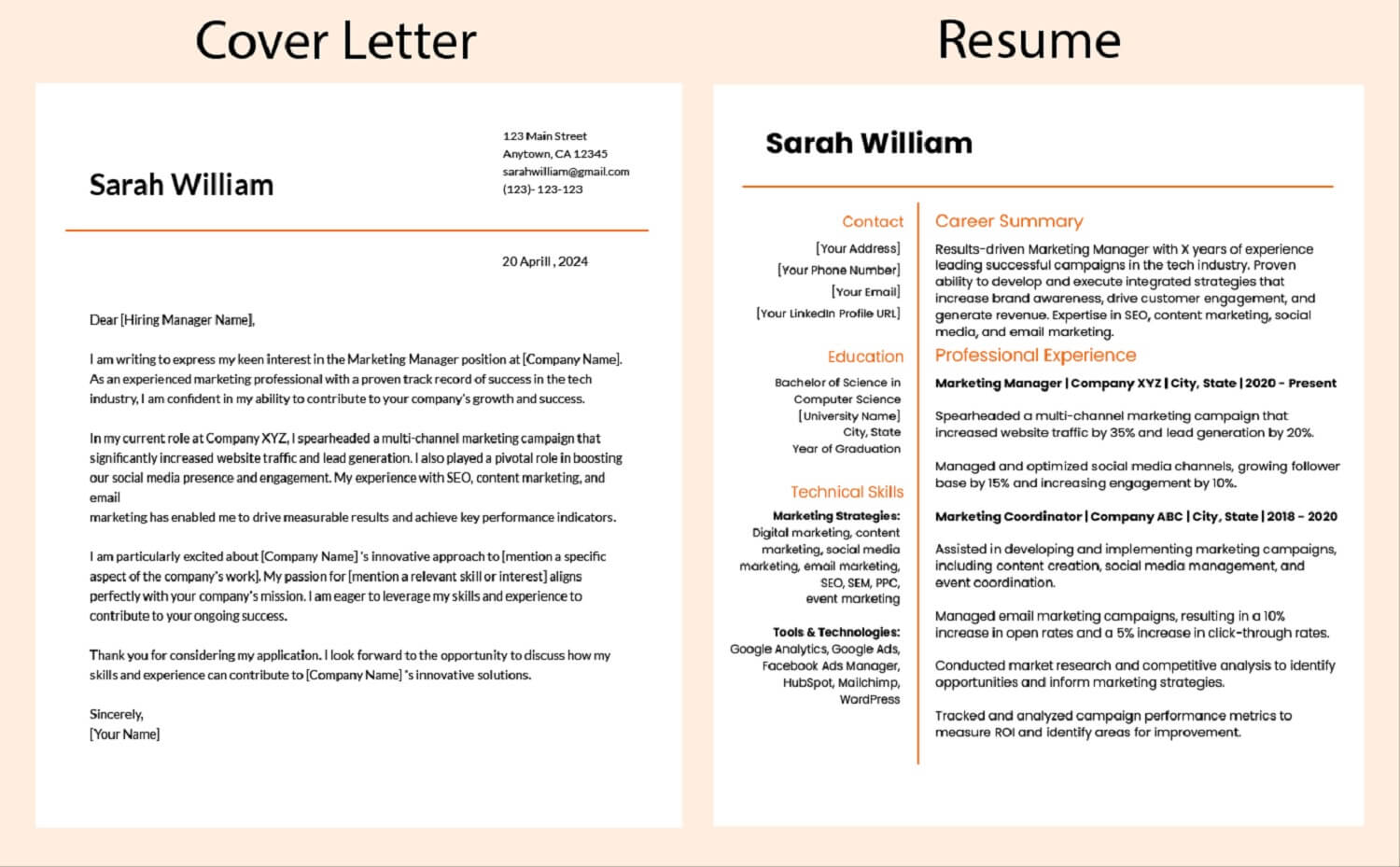
Gather your information first — ChatGPT produces better results when you give it specific details to work with, not vague descriptions.
Before you open a chat, collect these 4 things:
- Your job history — titles, companies, start and end dates, and key responsibilities
- Your skills — both hard skills like data analysis, Python, or Adobe Photoshop and soft skills like communication or project management
- The job description for the role you’re applying to
- Any quantifiable achievements — numbers, percentages, revenue figures, or team sizes
That last point matters more than most people realize. ChatGPT can frame your experience well, but it can’t invent numbers it doesn’t have. When you say “I managed a team of 8 people and reduced processing time by 30%”, it can turn that into a strong bullet point. When you say “I did project management work”, the result will be generic.
Once you have your information ready, go to chatgpt.com and open a new conversation. You’re ready to start.
How to Write a Resume with ChatGPT: 5 Clear Steps
Writing a resume with ChatGPT takes 5 steps: set the context, generate the professional summary, build your work experience section, add skills and education, then tailor everything to the job description.
Step 1: Set the Context with a Strong Opening Prompt
Before asking ChatGPT to write anything, tell it what you need. Don’t just say “write me a resume.” Give it the full picture.
Here’s an opening prompt that works well:
“I’m applying for a [Job Title] role at [Company Name]. My background is in [your field]. I have [X] years of experience. My past roles include [list 2–3 titles]. I want a resume that is ATS-friendly, uses strong action verbs, and highlights quantifiable achievements. I’ll share my experience details and the job description below.”
Then paste in the job description and your experience notes. That one setup prompt changes the quality of everything ChatGPT generates after it.
Step 2: Generate a Professional Summary
Your professional summary sits at the top of your resume. It’s the first thing a hiring manager reads. It needs to be short — 3 to 4 lines at most — and it needs to communicate who you are, what you do, and what value you bring.
Use this prompt to generate yours:
“Based on my experience below and this job description, write a professional summary for my resume. Keep it under 100 words. Include my years of experience, 2 core skills relevant to this role, and one measurable achievement. Avoid clichés like ‘team player’ or ‘results-driven.'”
Review what it produces. If the tone doesn’t sound like you, tell it: “Rewrite this in a more direct tone, less formal.” ChatGPT adjusts based on your feedback — treat the first draft as a starting point, not a finished product.
Step 3: Build Your Work Experience Section
This is the most important part of your resume. Each job should have 3 to 5 bullet points that describe what you did, how you did it, and what the result was. Strong bullets start with action verbs like managed, reduced, launched, built, improved, or increased.
Use this prompt for each role:
“Write 4 resume bullet points for my role as [Job Title] at [Company Name]. I was responsible for [describe responsibilities]. Key achievements include: [list any numbers or outcomes]. Match the language and keywords from this job description: [paste description]. Use strong action verbs and include metrics where possible.”
If a bullet point comes back weak or vague, ask: “Rewrite bullet point 2 to include a specific outcome and be more direct.” Keep refining until each line earns its place.
Step 4: Add Your Skills Section
ChatGPT identifies the most relevant hard and soft skills for your target role by analyzing the job description directly.
Use this prompt:
“Based on this job description, what are the top 10 skills I should include in my skills section? Separate them into hard skills and soft skills. Only include skills I could realistically have based on my experience [paste your background].”
This keeps your skills section accurate and relevant instead of just a random list of keywords. Skills like data visualization, Salesforce CRM, SQL, agile methodology, or stakeholder communication carry far more weight than vague terms like “good communicator.”
Step 5: Tailor the Full Resume to the Job Description
Generic resumes don’t perform well with ATS systems. An ATS-friendly resume includes specific keywords from the job description matched to your actual experience. ChatGPT helps you do this without stuffing keywords in unnaturally.
Use this prompt:
“Here is my full resume draft: [paste resume]. Here is the job description: [paste description]. Identify the top 8 keywords from the job description that are missing from my resume. Suggest where and how to naturally add them without changing the meaning of my experience.”
This step alone significantly improves how your resume performs when it goes through platforms like Indeed or ZipRecruiter’s automated screening.
How to Optimize Your Resume for ATS with ChatGPT
An ATS (Applicant Tracking System) scans your resume for specific keywords and phrases before a human ever reads it. Studies show that up to 75% of resumes get filtered out by ATS before reaching a recruiter. ChatGPT helps you clear that filter honestly — without tricks like white fonting, which involves hiding invisible keywords in white text. That practice is dishonest, and many ATS systems and recruiters now detect it. Avoid it entirely.
Here’s a practical ATS optimization prompt:
“Review my resume for ATS compatibility. Check for: standard section headings like Work Experience, Education, and Skills; relevant keywords from this job description [paste it]; no tables, images, or unusual formatting that ATS can’t read; and consistent date formatting. Suggest specific changes.”
Also note: ChatGPT recommends saving your resume as a plain .docx file for most job platforms. Google Docs and Microsoft Word both work well for formatting. Canva resumes look visually appealing but often produce PDF layouts that confuse ATS parsers — save the design version for roles where a human will open your file directly.
How to Write a Cover Letter with ChatGPT

ChatGPT drafts a professional cover letter by combining your background, the job description, and the tone of the company’s communication into one cohesive document.
A strong cover letter has 4 parts:
- An opening that names the role and connects your interest to the company specifically
- A middle section that links 2–3 of your achievements to the job requirements
- A forward-looking line that expresses what you’d bring to the team
- A short, professional closing
Use this full cover letter prompt:
“Write a cover letter for a [Job Title] role at [Company Name]. Here is the job description: [paste]. Here is my resume: [paste]. Keep the tone professional but not stiff. Open with a strong first sentence that’s not ‘I am writing to apply for.’ Mention 2 specific achievements from my resume that directly match the job requirements. Close with a confident but not arrogant sentence. Aim for 3 short paragraphs and no longer than 350 words.”
How to Personalize Your Cover Letter for Each Application
One thing ChatGPT handles efficiently is personalizing letters for different companies. When you apply to 10 roles, rewriting a full letter each time takes hours. Instead:
“Take this cover letter: [paste]. Now rewrite it for [New Company Name] applying for [New Job Title]. Change the company-specific references, adjust the tone to match a [startup / corporate / creative] environment, and swap in the most relevant keyword from this new job description [paste it].”
This process takes about 3 minutes per application instead of 30.
ChatGPT Prompts for Every Resume Situation
Here are 12 copy-paste prompts for common resume challenges:
| Situation | ChatGPT Prompt to Use |
|---|---|
| Writing from scratch | “Build a resume for a [title] with [X] years of experience in [industry]. Use this job description: [paste].” |
| Explaining a career gap | “Write a brief, honest explanation for a 14-month employment gap in 2025–2026, where I was caring for a family member. Keep it professional and suitable for a resume or interview.” |
| Career change | “I’m switching from [Current Field] to [New Field]. Rewrite my work experience to highlight transferable skills relevant to [New Role].” |
| Entry-level with no experience | “I have no formal work experience. Write a resume for a [job title] role using my education at [school], volunteer work at [place], and these skills: [list].” |
| Making bullets stronger | “Rewrite these 3 bullet points to be more impactful. Use strong action verbs and add specific outcomes where possible: [paste bullets].” |
| Removing clichés | “Identify and replace all cliché phrases in this resume: [paste]. Replace each with more specific, original language.” |
| Simplifying overwritten language | “Simplify any overly formal or wordy phrases in this resume. Keep it clear and direct: [paste].” |
| Writing a LinkedIn summary | “Turn this professional summary into a LinkedIn About section. Make it slightly more conversational but still professional: [paste summary].” |
| Salary expectations | “How should I respond to a salary expectations question in a cover letter for a [job title] role in [city]? Write a one-sentence, professional response that doesn’t lock me into a number.” |
| Cold email for a job | “Write a cold email to the hiring manager at [Company] expressing interest in a [job title] role. Keep it under 120 words and include a clear reason why I’m reaching out.” |
| Executive-level resume | “Rewrite this experience section with a senior executive tone. Focus on strategic impact, team leadership, and business outcomes: [paste].” |
| Proofreading | “Proofread this resume for grammar, spelling, punctuation, and consistency. List any issues you find and suggest corrections: [paste].” |
Special Situations: Student Resumes and Career Changes
How Students Can Use ChatGPT to Write Their First Resume
If you’re building your first resume with little or no formal work experience, ChatGPT helps you frame your education, internships, volunteer work, and extracurricular activities as relevant experience.
Use this prompt:
“I’m a recent graduate from [University] with a degree in [subject]. I have no full-time work experience but I completed an internship at [place], volunteered at [organization], and led [club or project]. Write a one-page resume for a [job title] role using these details and this job description: [paste].”
ChatGPT surfaces the skills you already have, just not packaged in a way that reads well on paper yet. The ChatGPT tutorial for students covers additional ways to use it across academic and career tasks, which pairs well with this process.
How to Use ChatGPT for a Career Change Resume
Career changes come with a real challenge: your past titles don’t match your future goal. ChatGPT bridges that gap by identifying transferable skills — the abilities you used in one field that apply directly to another.
Use this prompt:
“I’m moving from [Current Role/Field] to [Target Role/Field]. Here is my current resume: [paste]. Here is the job description I’m targeting: [paste]. Rewrite my work experience section to highlight transferable skills. Reframe my past responsibilities using language from the target job description.”
This works particularly well for transitions like teacher to instructional designer, accountant to financial analyst, or customer service representative to product manager.
Is It Ethical to Use AI for Job Applications?
Yes, using ChatGPT for your resume and cover letter is ethical — with one clear boundary. ChatGPT should help you express your real experience better. It should not fabricate skills you don’t have, invent achievements that never happened, or create an entirely false professional identity.
Recruiters know AI tools exist. Many hiring managers use AI themselves to screen resumes. The concern isn’t that you used a tool — it’s whether the content reflects who you actually are. When ChatGPT helps you phrase your genuine 5-year project management experience in a clearer, stronger way, that’s the tool doing its job. When it writes a resume for a person who doesn’t have the experience it describes, that becomes a problem you’ll face in the interview.
Use it to enhance your real story. Not to replace it.
Which ChatGPT Plan Is Best for Job Seekers?
The free plan handles most resume and cover letter tasks well. You can generate drafts, refine bullet points, run ATS checks, and write tailored cover letters without paying anything.
If you’re applying to a high volume of roles — say, 20 to 30 applications a week — or working on a complex executive-level resume with lots of context, ChatGPT Plus gives you faster response times and access to more advanced models. This comparison of ChatGPT Go, Plus, and Pro breaks down what each plan actually includes, so you can decide whether upgrading fits your job search needs right now.
For most active job seekers, the free plan is more than enough to get started and land interviews.
ChatGPT vs. Resume Builders: Which One Produces Better Results?
| Tool | Personalization | ATS Optimization | Cost | Speed |
|---|---|---|---|---|
| ChatGPT (Free) | High — adapts to your input | Strong with right prompts | Free | Fast |
| ChatGPT Plus | Very High — GPT-5/5.4 access | Very Strong | $20/month | Very Fast |
| Resume Builder (e.g., Canva) | Medium — template-based | Limited for PDF exports | Free/Paid | Fast |
| Professional Human Writer | Very High | Depends on writer | $100–$500 | Slow |
| Jasper AI | Medium | Limited | $49+/month | Fast |
ChatGPT’s strength over dedicated resume builders is flexibility. It rewrites, restructures, tailors, and refines based on your specific conversation. A template-based builder gives you a fixed layout — ChatGPT gives you a process.
6 Mistakes to Avoid When Using ChatGPT for Your Resume
These 6 mistakes reduce the quality of your resume when using ChatGPT for job applications:
- Giving vague prompts — “Write me a resume” produces something generic. Always include the job title, company, and your actual experience
- Skipping the personalization step — A resume that isn’t tailored to the job description rarely gets past ATS filters
- Not reviewing what ChatGPT produces — It sometimes adds achievements or metrics it invented. Always fact-check every line
- Using the same resume for every job — Use the tailoring prompt to adjust your resume for each application. It takes 5 minutes
- Keeping the cover letter too long — Anything over 400 words risks losing the reader. Ask ChatGPT to cut it down if needed
- Ignoring the proofreading step — Ask ChatGPT to proofread your final draft before submitting. Typos in a professional document cost you interviews
FAQ: How to Use ChatGPT for Resume and Cover Letter Writing
Can ChatGPT write a resume for me?
Yes — ChatGPT generates a full resume draft when you provide your job history, target role, and job description. It structures sections correctly, writes bullet points with action verbs, and formats content for ATS compatibility. The key is giving it enough detail about your real experience so it can produce something accurate and personalized.
Is it ethical to use AI for job applications?
Yes — Using ChatGPT to write or improve your resume is no different from using a professional resume writer or a template. The content still reflects your genuine experience. The line is crossed when you fabricate skills or achievements you don’t have. Use it to express your real background more effectively, not to misrepresent yourself.
Will recruiters know I used ChatGPT to write my resume?
Not necessarily — A well-edited, personalized resume written with ChatGPT reads like any other professionally written document. The issue arises when someone pastes a raw ChatGPT output without reviewing it — those tend to sound stiff or generic. Take the time to read it, adjust the tone, and make it sound like you.
How do I make my resume pass ATS with ChatGPT?
Yes, ChatGPT helps with ATS optimization — Ask it to analyze your resume against a specific job description and identify missing keywords. It suggests where to add them naturally without keyword stuffing. Save your final resume as a plain .docx file and use standard section headings like Work Experience, Skills, and Education so ATS parsers can read it correctly.
Can ChatGPT help with a cover letter for an entry-level job?
Yes — Entry-level cover letters require a different structure than experienced hires. ChatGPT tailors the letter to highlight your education, transferable skills, and genuine interest in the role. Give it your academic background, any internships or volunteer work, and the job description, and it produces a focused, professional letter even with limited work history.
Should I use ChatGPT Plus or the free version for resume writing?
Free version is enough for most users — The free ChatGPT plan handles resume drafting, tailoring, ATS optimization, and cover letter writing well. ChatGPT Plus becomes more useful if you’re writing many applications at once or need access to advanced reasoning models for complex career documents. See the full ChatGPT Plus features page to decide based on your specific situation.
Can ChatGPT help explain a career gap on a resume?
Yes — ChatGPT helps you frame a career gap honestly and professionally. Whether the gap involved caregiving, personal health, travel, freelance work, or a long job search, it suggests how to address it on your resume and in a cover letter without drawing unnecessary attention to it while staying truthful.
Conclusion
Your resume and cover letter are the first impression you make on any employer. ChatGPT gives you the tools to make that impression count — by tailoring your content to the job description, cutting out weak language, strengthening your bullet points, passing ATS filters, and personalizing your cover letter for each application.
The process works because it’s built on your real experience. You bring the facts. ChatGPT helps you structure and present them in the most effective way possible. Start with one resume section today — your professional summary is usually the best place to begin. Paste in your experience, your target role, and the job description, and let the first draft give you something to react to. Most people find it takes less than 20 minutes to go from a blank page to a full draft they can actually work with.
Use it as a career tool, not a shortcut. The interviews follow.
You May Also Like
 AI Tool Reviews
How to Use ChatGPT for Beginners: The Complete Step-by-Step Guide (2026)
 ChatGPT
How to Use ChatGPT at Work: Productivity Tips That Actually Save You Hours
 ChatGPT
How to Use ChatGPT Best Prompts
 AI Models
GPT-5.5 vs Claude Opus 4.7 vs Gemini 3.1 Pro: Real Benchmark Results Compared
 ChatGPT
ChatGPT 5.5 Is Here: Benchmarks, What’s New, What’s Different, and Is It Actually Worth the Hype?
 ChatGPT