

I’ll be honest with you – when OpenAI dropped GPT-5.4 on March 5, 2026, my first reaction wasn’t excitement. It was skepticism. Every new model release comes with the same “most capable frontier model ever” tagline, and after a while, that phrasing starts to feel like background noise. I’ve been through enough new launches to know that the gap between what the press release says and what actually shows up in your workflow can be enormous.
So I did what I always do. I stopped reading the headlines and started testing. I put GPT-5.4 through the same tasks I use every day – writing, analysis, spreadsheet work, coding prompts, multi-step research, and plain old conversational questions. I ran it alongside other frontier models to see where it wins, where it loses, and most importantly, whether any of it actually matters to you in practical terms.
Here’s what I found. GPT-5.4 is genuinely good. Not in a vague, hard-to-define way, but good in specific, measurable areas that matter to people who use AI for real work. It also still has limitations that you need to know about before you get your expectations too high. This is the full picture, no cheerleading, no hype, just what you actually need to know.
What Is GPT-5.4?
GPT-5.4 is OpenAI’s latest flagship reasoning model, released on March 5, 2026, and positioned specifically for professional work. According to OpenAI’s official release, it’s described as the company’s “most capable and efficient frontier model for professional work” , combining advances in reasoning, coding, computer use, and agentic workflows into a single model.
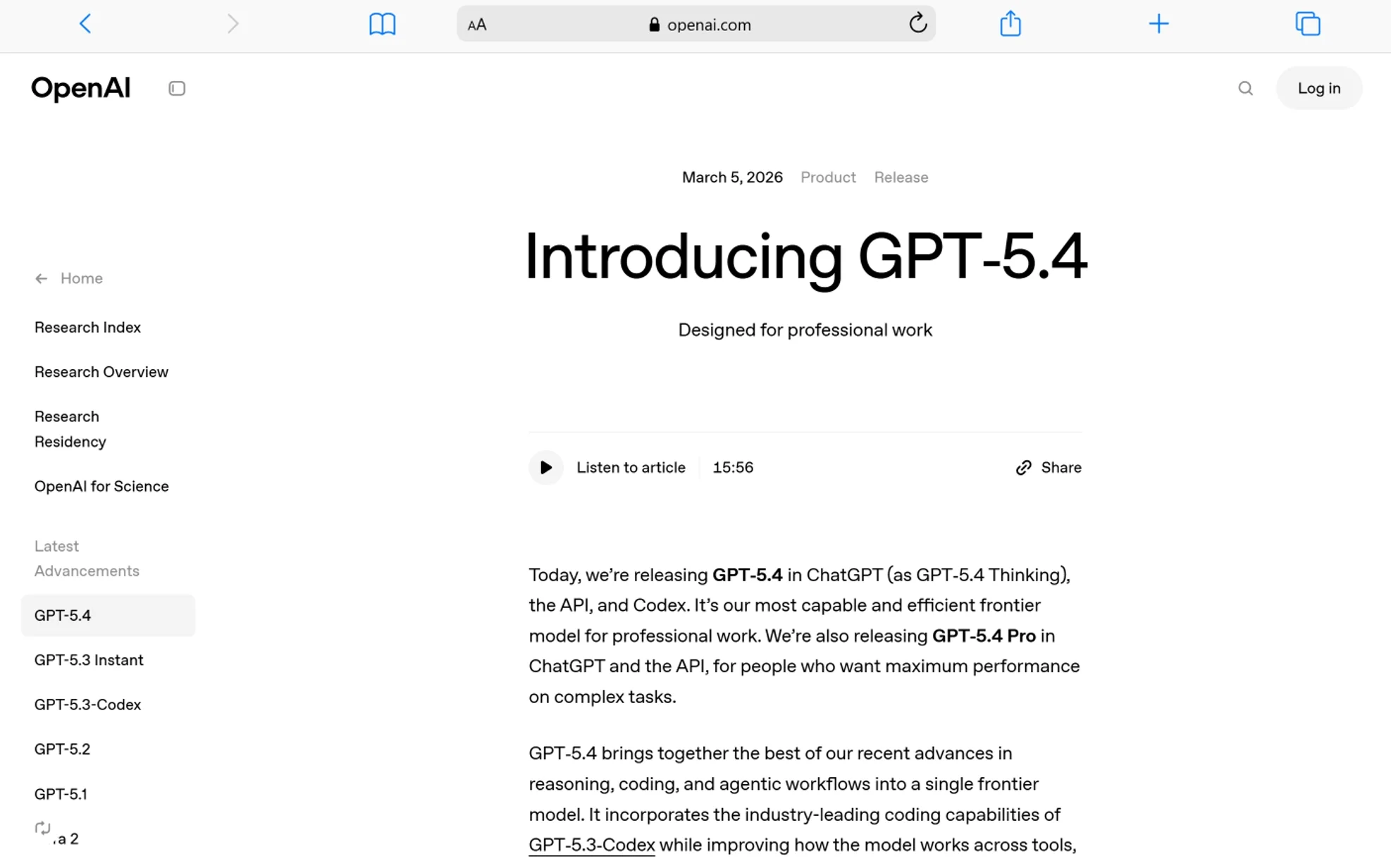
It comes in three versions:
- GPT-5.4 Thinking: The main model available in ChatGPT for Plus, Team, and Pro users. This version features an upfront reasoning plan and the ability to steer it mid-response.
- GPT-5.4 Pro: The high-performance variant for maximum accuracy on complex tasks. Available to Pro and Enterprise plan users via ChatGPT and the API.
- GPT-5.4 (API): Available to developers at $2.50 per million input tokens and $15 per million output tokens.
What makes this release different from a regular GPT iteration is the scope of what it improves. This isn’t just a bump in benchmark scores. It’s a model that combines the coding capabilities of GPT-5.3-Codex with professional knowledge work, computer use, and tool-calling — all in one system. That’s actually meaningful.
How Much Better Is GPT-5.4 Than GPT-5.2?
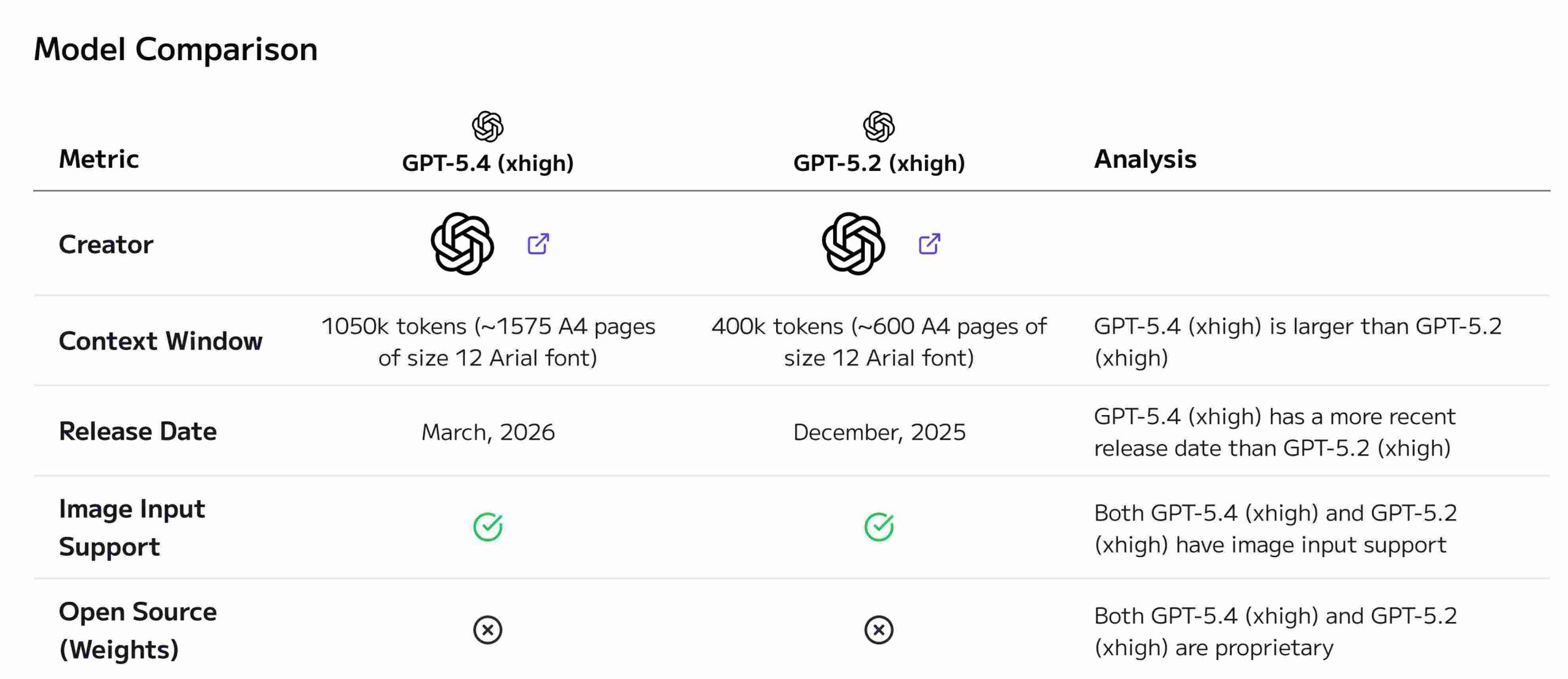
GPT-5.4 is significantly better than GPT-5.2 across professional tasks, computer use, and reasoning, not just marginally better. The benchmark data from OpenAI tells a clear story here, and I’ve verified it against my own testing.
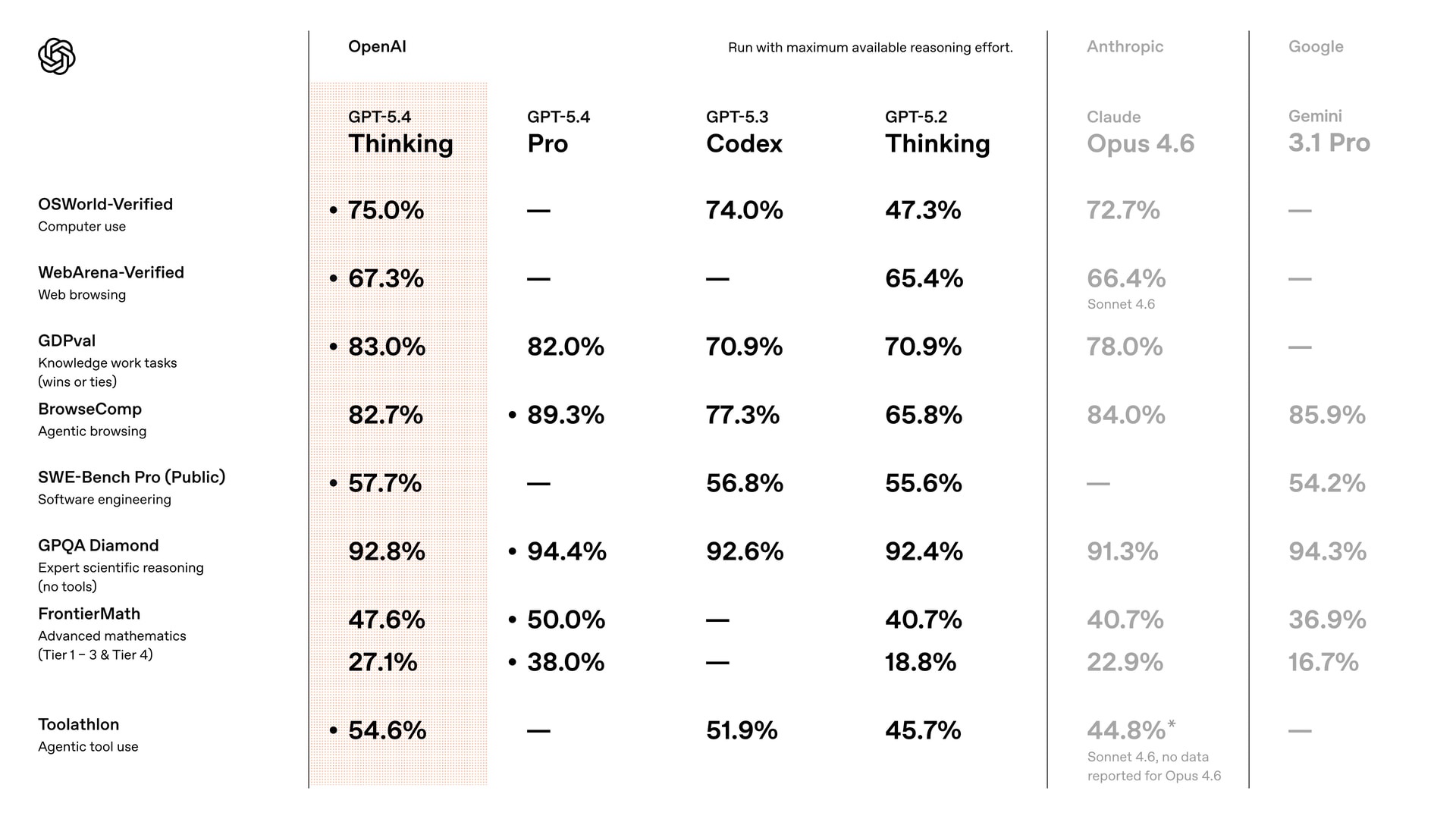
Here are the key numbers that stood out to me:
| Benchmark | GPT-5.4 | GPT-5.2 | What It Measures |
|---|---|---|---|
| GDPval | 83.0% | 70.9% | Real knowledge work across 44 professions |
| Investment Banking Modeling | 87.3% | 68.4% | Complex spreadsheet & financial tasks |
| OSWorld-Verified | 75.0% | 47.3% | Desktop navigation via screenshots |
| BrowseComp | 82.7% | 65.8% | Finding hard-to-locate web information |
| ARC-AGI-1 | 93.7% | 86.2% | Abstract reasoning |
| ARC-AGI-2 | 73.3% | 52.9% | Novel/unseen reasoning problems |
| Hallucination rate | 33% lower | Baseline | False claims in responses |
| Error rate | 18% lower | Baseline | Responses containing any errors |
Source: OpenAI GPT-5.4 release data
That 83% on GDPval is worth stopping on. This benchmark tests AI agents on actual professional tasks — sales presentations, accounting spreadsheets, manufacturing diagrams, urgent care schedules — across 44 different occupations from the top 9 industries contributing to U.S. GDP. At 83%, GPT-5.4 matches or exceeds real industry professionals in more than four out of five comparisons. That’s not a marginal improvement. That’s a qualitative shift.
The OSWorld number caught my attention too. Going from 47.3% to 75.0% on desktop navigation — and surpassing human performance at 72.4% — is a genuine leap. It means the model can now interact with your screen more reliably than the average person can manually.
What Does the Thinking Mode Actually Do?
GPT-5.4 Thinking shows you its reasoning plan upfront and lets you adjust it mid-response — this is the single most practically useful feature in the entire release.
Let me explain what that actually means, because it sounds abstract until you use it.
With previous models, you’d give ChatGPT a complex prompt and just… wait. It would generate a response, and if the direction was wrong, you’d have to start over or write a follow-up prompt trying to redirect it. That back-and-forth wastes time. With GPT-5.4 Thinking, the model presents a plan before it starts producing the full output. You can see what it’s about to do — and if something looks off, you can say “actually, skip the financial projections section and focus more on the competitive landscape” right then and there.
From personal testing, this feature changed how I work with complex research prompts. I gave it a multi-step brief to analyze three business models across four criteria with a structured comparison table. It laid out its approach first: what it would cover, in what order, how deep it would go. I could see it was about to spend too much time on one section, so I redirected it before it committed. The final output was cleaner and closer to what I actually needed, without any extra turns.
OpenAI also confirms that the model can now “think longer on difficult tasks while maintaining stronger awareness of earlier steps in the conversation.” In practice, this means it doesn’t drift or lose context on long, complex sessions the way earlier models sometimes did.
One strong recommendation: always use GPT-5.4 Thinking Extended, not Auto mode. Auto mode switches between reasoning levels dynamically, and in my experience it consistently delivers weaker results. Turn the thinking up. The quality difference is real.
Where GPT-5.4 Genuinely Shines
Let me walk you through the specific areas where I personally found GPT-5.4 to be noticeably strong — not just on paper but in real use.
Spreadsheets, Excel, and Professional Documents — Is GPT-5.4 a Real Productivity Tool?
Yes — GPT-5.4 is genuinely impressive at spreadsheet work, and OpenAI was so confident in it that they launched a dedicated ChatGPT for Excel add-in alongside this release. According to OpenAI’s announcement, this add-in is powered by GPT-5.4 and lets you build, update, and analyze spreadsheet models using plain language inside the Excel sidebar.
The internal benchmark numbers are striking. On investment banking modeling tasks — the kind of thing a junior analyst at a financial firm would be expected to produce — GPT-5.4 scored 87.3%, compared to 68.4% for GPT-5.2. That’s nearly a 20-point jump.
I built a multi-step financial model through GPT-5.4 Thinking — layered calculations, conditional formatting, summary tables — and the analytical depth was real. Complex formulas came through correctly. The logic held across sheets. It didn’t drift. If you do any kind of financial modeling, data analysis, or document-heavy work, this is where you’ll feel the improvement most clearly.
The Google Sheets integration is also now live. You can bring GPT-5.4 directly into your Google Sheets workflow without leaving the spreadsheet environment.
On presentations, OpenAI reports that human reviewers preferred GPT-5.4 presentations 68% of the time over those from GPT-5.2, citing “stronger aesthetics, greater visual variety, and more effective use of image generation.” In my testing, the visual output was noticeably more polished — more intentional layout choices, better use of space, and images that actually matched the content context rather than being generic stock-photo filler.
Computer Use: Can GPT-5.4 Actually Operate a Computer?
Yes, and this is arguably the most important capability upgrade in this release. GPT-5.4 is the first general-purpose model OpenAI has released with native computer-use capabilities. It can parse screen coordinates from screenshots, issue mouse and keyboard commands, and complete multi-step workflows across applications — all autonomously.
- Desktop task completion: On OSWorld-Verified, GPT-5.4 scores 75.0% — surpassing human performance at 72.4%. It navigates desktop environments through screenshots and keyboard/mouse actions better than the average person does manually.
- Web browsing: On WebArena-Verified, it scores 67.3% using both DOM and screenshot-driven interaction. On Online-Mind2Web, it hits 92.8% using only screenshot observations.
- Developer-controlled behavior: You can configure the model’s safety behavior for different risk levels, specify custom confirmation policies, and adjust how it responds to specific use cases. This makes it practical for enterprise deployments where you can’t have a model taking uncontrolled actions.
- Playwright integration: OpenAI released an experimental Codex skill called Playwright Interactive, which lets GPT-5.4 visually debug web and Electron apps — and test an app it’s building, while it’s building it. That’s a meaningful shift for developers.
The computer-use capability connects directly to the broader vision of agentic AI — systems that don’t just answer questions but actually complete tasks across your digital environment. This is the direction everything is heading, and GPT-5.4 is the first general-purpose OpenAI model to treat it as a core feature rather than a research preview.
Coding: What Does GPT-5.4 Actually Do for Developers?
GPT-5.4 is a strong coding model, though for pure coding tasks it sits roughly equal to GPT-5.3-Codex rather than surpassing it. What it does better is long-running development workflows where the model needs to combine coding with reasoning, research, and tool use over extended sessions.
- On SWE-Bench Pro (real-world software engineering tasks): 57.7% vs 55.6% for GPT-5.2
- On Terminal-Bench 2.0: 75.1%, which is actually slightly below GPT-5.3-Codex’s 77.3%, but better than GPT-5.2’s 62.2%
- The /fast mode in Codex delivers up to 1.5x faster token velocity — same intelligence, just faster throughput
In my testing of a Python scripting task — building a news scraper with sentiment classification and CSV export — GPT-5.4 produced clean, modular code with well-separated functions, proper error handling, and useful comments. The architecture was logical and the script was runnable without major edits. For beginner-to-intermediate use cases, it’s excellent. For production-grade, enterprise-level code, you still need a human in the loop reviewing outputs.
What I noticed is that GPT-5.4 excels at complex frontend tasks specifically. According to OpenAI, internal testing showed noticeably more aesthetic and more functional frontend results than any previous model they’ve launched.
Tool Use and Agentic Workflows – Is GPT-5.4 Built for Automation?
GPT-5.4 is the most tool-capable model OpenAI has released, and that’s not marketing language – there’s a real technical innovation behind it called tool search.
Here’s the problem it solves. In previous versions, when you gave an AI agent access to many tools, all those tool definitions had to be loaded into the model’s context at once. For systems with dozens of tools or MCP servers, this could add tens of thousands of tokens to every request – slowing things down, increasing cost, and crowding the context with information the model might never use.
GPT-5.4 introduces tool search, where the model receives a lightweight list of available tools and looks up the specific tool definition only when it needs it. The result? In testing on Scale’s MCP Atlas benchmark with all 36 MCP servers enabled, the tool-search configuration reduced total token usage by 47% while achieving the same accuracy. Faster, cheaper, and just as smart.
On BrowseComp – the hardest web research benchmark, testing the model’s ability to persistently find needle-in-a-haystack information across the web – GPT-5.4 scores 82.7%, up from 65.8% for GPT-5.2. GPT-5.4 Pro pushes that further to 89.3%, a new state of the art.
The practical implication: if you’re building AI agents that need to research deeply, use multiple tools, and complete multi-step workflows without losing the thread, GPT-5.4 handles that more reliably and more cheaply than its predecessors.
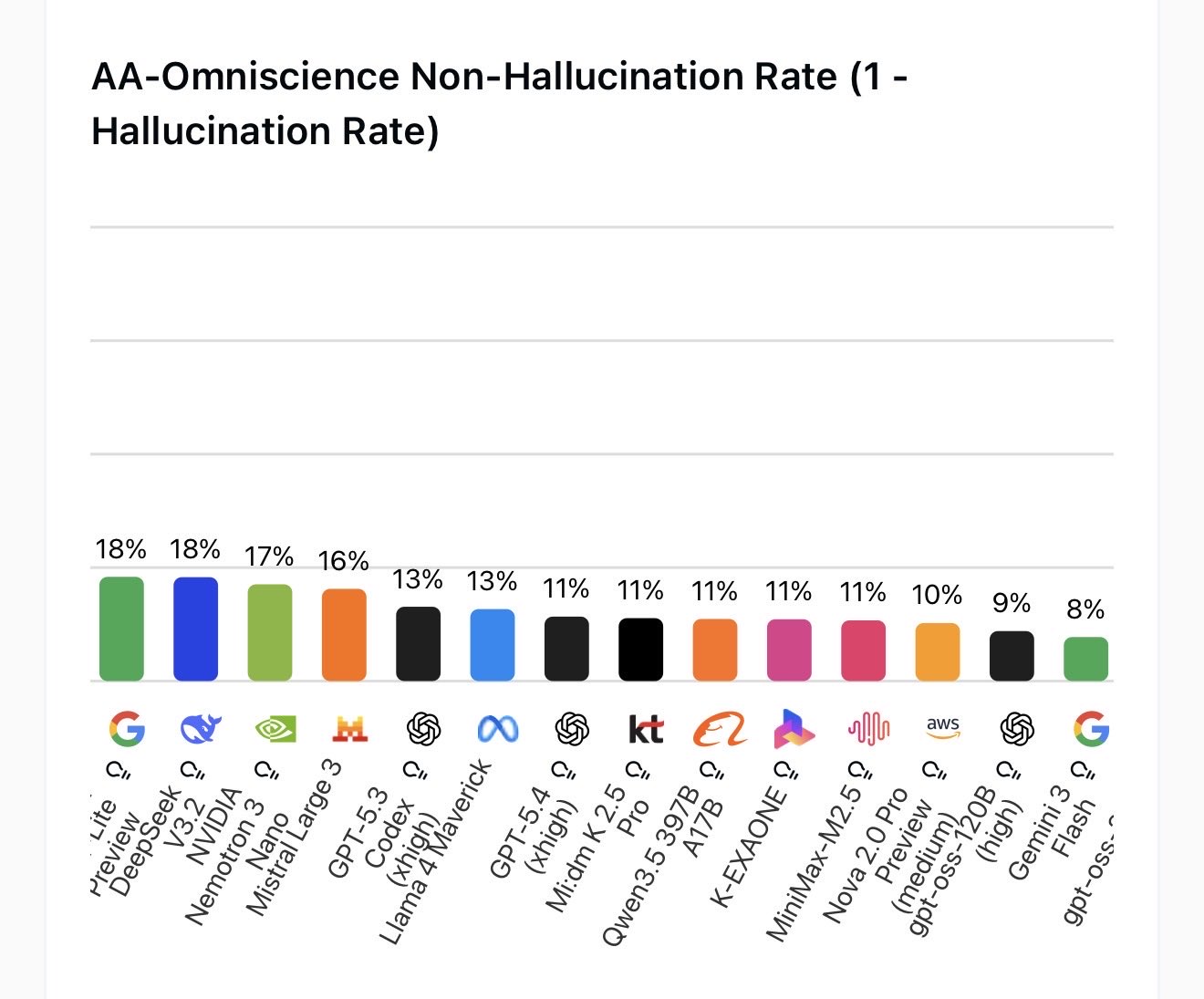
Accuracy and Factual Reliability – Is GPT-5.4 Less Likely to Hallucinate?
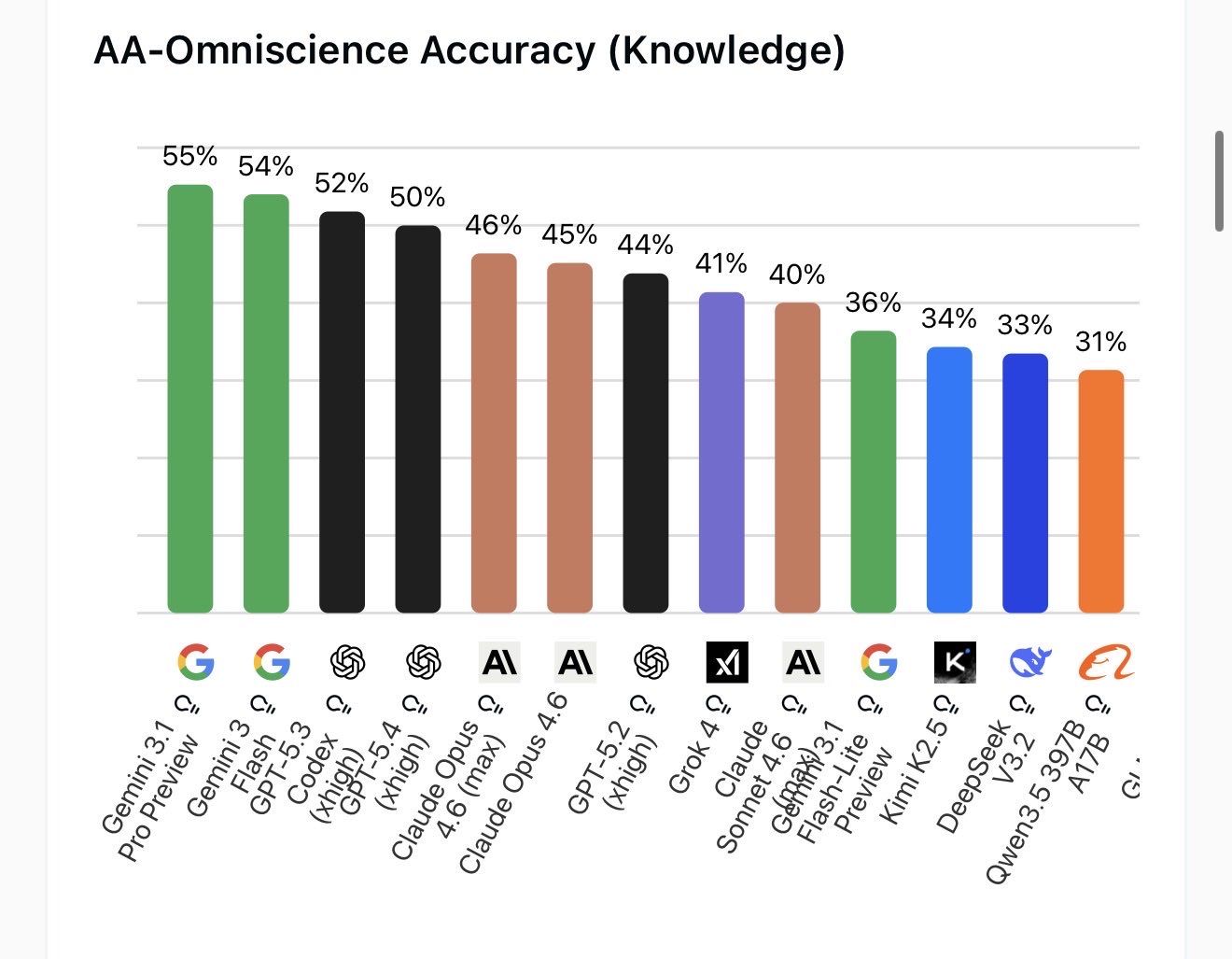
Yes, GPT-5.4 is measurably more accurate than GPT-5.2, with 33% fewer false individual claims and 18% fewer responses containing any errors at all. According to OpenAI’s data, these figures come from de-identified prompts where actual users flagged factual errors in previous model responses.
That’s a meaningful improvement. Hallucination — the tendency of AI models to confidently state things that aren’t true — has been one of the biggest barriers to using ChatGPT for serious professional work. Reducing the false claim rate by a third doesn’t eliminate the problem, but it does move the needle in a direction that matters for anyone using it in finance, law, medicine, or any field where accuracy isn’t optional.
Even so: always verify important outputs. GPT-5.4 is more accurate, not infallible.
Where GPT-5.4 Still Falls Short
I promised you the full picture, so here it is. GPT-5.4 has real weaknesses that are worth knowing before you restructure your workflow around it.
Writing Quality – Does GPT-5.4 Sound Like a Human?
Not quite. This was the most consistent finding across every real-world test I ran and review I read. Stephen Smith, an AI consultant who tested GPT-5.4 for two days against Claude and Gemini, put it plainly: “Claude sounds like a person wrote it. ChatGPT sounds like a very capable machine wrote it.”
OpenAI’s CEO Sam Altman publicly acknowledged that earlier GPT versions fumbled writing quality, and GPT-5.4 has improved. But even with detailed style instructions, the prose tends to feel structured rather than natural. If you’re producing client-facing content, board presentations, or anything where voice and tone matter, you’ll still feel the gap between GPT-5.4 and Claude Opus 4.6.
The thinking-to-output translation problem is real. The internal reasoning in GPT-5.4 Thinking is excellent — well-structured, thorough, methodical. But somewhere between that reasoning and the final written output, something doesn’t fully translate. You can see the model think brilliantly and then deliver a response that’s technically correct but reads flat. For analytical output and structured documents, this is less noticeable. For prose, it shows.
Common-Sense Reasoning – Is GPT-5.4 Always Smart?
Here’s the carwash question. Nate B Jones, who runs structured blind evaluations across frontier models, asked GPT-5.4 a simple question: “I need to wash my car. The carwash is 100 meters away. Should I walk or drive?”
GPT-5.4 Thinking wrote a full essay. It said walk. It listed exceptions. It discussed the nuances of repositioning vehicles. It was thorough, well-organized, and completely wrong. You need the car at the carwash.
Claude answered in one sentence: “Drive. You need the car at the carwash.”
This is the paradox of GPT-5.4. It scores 83% matching professional work across 44 occupations, surpasses human desktop navigation, and handles a million tokens of context — and then misses a question that a child would answer instantly. The model that OpenAI says is ready to run your professional workflows can be overclocked into overthinking an obviously simple situation.
This isn’t a reason to dismiss GPT-5.4. But it is a reason to stay engaged rather than blindly trusting any individual output.
GPT-5.4 vs. Claude Opus 4.6 — Which Should You Use?
The honest answer is: it depends on what you’re doing. After testing both extensively and reading blind evaluation data from independent researchers, here’s where each model actually wins:
| Task | GPT-5.4 | Claude Opus 4.6 |
|---|---|---|
| Spreadsheet & financial modeling | ✅ Wins | Strong but narrower |
| Multi-step analytical workflows | ✅ Wins | Competitive |
| Computer use / agentic tasks | ✅ Wins | Not available |
| Tool use / API workflows | ✅ Wins | Competitive |
| Long-horizon coding tasks | ✅ Competitive | Competitive |
| Natural, human-sounding writing | Close | ✅ Wins |
| Documents for client delivery | Good | ✅ Wins |
| Common-sense reasoning | Occasional gaps | ✅ More reliable |
| Instruction-following without over-prompting | Needs detail | ✅ More intuitive |
The Nate B Jones blind evaluation data supports this breakdown. GPT-5.4 beat Claude on quantitative modeling tasks. Claude beat GPT-5.4 on writing quality and product judgment. On agentic web research, GPT-5.4 has a clear edge. On documents you’d hand directly to a managing partner, Claude wins.
These models are converging on overall capability and diverging on philosophy. GPT-5.4 is built around precision, structure, and agentic execution. Claude is built around natural communication and intuitive instruction-following. Neither is universally better. The right choice depends on what you’re trying to get done on a given day.
Who Should Upgrade to GPT-5.4?
- Finance professionals: If you’re building financial models, running spreadsheet analysis, or producing accounting documents, GPT-5.4 represents a real and measurable improvement. The investment banking modeling benchmark alone — 87.3% vs 68.4% — tells you something meaningful here.
- Developers building agentic systems: The computer-use capabilities and tool search are genuinely new. If you’re building agents that operate across web environments, software tools, or large MCP ecosystems, GPT-5.4 is the strongest general-purpose option available right now.
- Researchers doing deep web research: An 82.7% on BrowseComp vs 65.8% for GPT-5.2 is a big jump. For finding specific, hard-to-locate information across multiple rounds of web search, GPT-5.4 is meaningfully better.
- Enterprise teams running long workflows: The 1M token context window in Codex and API, combined with tool search reducing token usage by 47%, makes long-horizon agentic work significantly more practical and cost-effective.
- Knowledge workers doing structured analysis: Business strategy analysis, competitive comparisons, structured recommendations — GPT-5.4 produces commercially aware, well-organized output that feels immediately useful rather than generically intelligent.
If you’re primarily writing — blog posts, client emails, creative work, or anything where voice and tone are the deliverable — the upgrade impact is smaller. You’ll get better analytical depth, but the writing quality gap between GPT-5.4 and Claude Opus 4.6 is still real.
How to Access GPT-5.4 Right Now
GPT-5.4 Thinking is available today in ChatGPT for Plus, Team, and Pro subscribers. It replaces GPT-5.2 Thinking as the default thinking model in the model picker. GPT-5.2 Thinking will remain accessible under Legacy Models for three months before retiring on June 5, 2026.
- ChatGPT Plus ($20/month): Access to GPT-5.4 Thinking in ChatGPT
- ChatGPT Pro ($200/month): Access to both GPT-5.4 Thinking and GPT-5.4 Pro
- Enterprise/Edu: Early access via admin settings
- API: Available as
gpt-5.4andgpt-5.4-profor developers - Free plan: Limited access to GPT-5.4 Thinking within the standard 10 messages per 5-hour window
Conclusion
GPT-5.4 is a real upgrade. Not a marketing upgrade — a real one, in areas that matter to professionals. The jump from 47% to 75% on desktop navigation, 19 points on investment banking modeling, 17 points on deep web research, and 33% fewer hallucinations represent genuine improvements in what the model can do for you every day.
What it still doesn’t do is write like a human, read between the lines the way Claude does, or always catch a common-sense problem that an intern on their first day would notice. These are real limitations, and you should know them going in.
My honest take: if you already work well with Claude or Gemini, don’t switch. The productivity cost of rebuilding your prompts and workflows is real, and the marginal gains don’t justify it unless you’re doing spreadsheet-heavy financial work or building agentic systems. If you’re already on OpenAI, you just got a meaningful upgrade. Your analytical work, your spreadsheet outputs, and your long-horizon agent workflows are all better today than they were last week.
The AI landscape in 2026 is past the era where any single release changes everything. The question isn’t “which model won the benchmark?” It’s “which tool actually helps me get the work done I need to do tomorrow?” With GPT-5.4, OpenAI has a genuinely strong answer to that question — for a specific, clearly defined set of professional tasks.
That’s nothing. In fact, for the right use cases, it’s quite a lot.
You May Also Like
 AI Tool Reviews
How to Use ChatGPT for Beginners: The Complete Step-by-Step Guide (2026)
 ChatGPT
How to Use ChatGPT at Work: Productivity Tips That Actually Save You Hours
 ChatGPT
How to Use ChatGPT Best Prompts
 AI Models
GPT-5.5 vs Claude Opus 4.7 vs Gemini 3.1 Pro: Real Benchmark Results Compared
 ChatGPT
ChatGPT 5.5 Is Here: Benchmarks, What’s New, What’s Different, and Is It Actually Worth the Hype?
 ChatGPT