
So you’ve been hearing the buzz about Claude Opus 4.7, and now you’re wondering if there’s a way to try it without dropping $20+ a month on a subscription. I get it. I was in the same boat a few weeks ago, staring at Anthropic’s pricing page and thinking, “There’s gotta be a workaround.”
Turns out, there is. And it’s not some sketchy hack or a 7-day trial that auto-charges your card.
Let me walk you through exactly how I’ve been using Claude Opus 4.7 for free through Genspark AI, plus everything you need to know about what this model can actually do, where it shines, and a few mistakes I made so you don’t have to.
What Is Claude Opus 4.7, and Why Is Everyone Losing Their Minds Over It?
Here’s the thing — Anthropic has been quietly cooking. Claude Opus 4.7 dropped on April 16, 2026, and it’s genuinely one of the most capable AI systems available right now. We’re talking about a model that handles complex coding, long-form writing, nuanced analysis, and multi-step agentic workflows way better than most competitors, Anthropic.
The truth is, Opus has always been Anthropic’s “premium tier.” It’s slower than Haiku or Sonnet, but it’s also noticeably smarter. If you’ve ever used GPT-5 and thought “this is good, but I wish it understood context better”, that’s exactly the gap Opus tries to fill.
What Actually Changed in Version 4.7?
A quick rundown of what’s new compared to Opus 4.6:
- 87.6% on SWE-bench Verified (up from 80.8%) — meaning it’s legitimately great at real-world coding tasks
- Self-verification behavior — the model now writes and runs its own tests before giving you an answer, which dramatically cuts down on “confidently wrong” responses
- New “xhigh” effort level — a middle ground between high and max, recommended for coding and agentic work
- Vision upgrade to 3.75 megapixels — it can now read dense screenshots, diagrams, and design mocks far more accurately (XBOW Visual Acuity jumped from 54.5% to 98.5%)
- Better long-session memory — it actually remembers important notes across multi-session work
- Task budgets (public beta) — lets you cap token spend across an entire agentic loop.
Is it worth the hype? Honestly, yeah. For complex tasks, it genuinely feels like working with a sharp junior developer instead of a fancy autocomplete.
Claude Opus 4.7 Is Expensive
Let’s be real about why most people are looking for a free option. Anthropic didn’t raise the sticker price, but they didn’t exactly make it cheap either:
| Access Method | Cost | What You Get |
|---|---|---|
| Claude API (direct) | $5 per 1M input / $25 per 1M output tokens | Pay-as-you-go, no subscription |
| Claude Pro | ~$20/month | Limited Opus messages per day, daily caps |
| Claude Max | ~$100–$200/month | Higher limits, priority access |
| GitHub Copilot Pro+ | $39/month | Opus 4.7 in model picker |
| Genspark AI | Free tier + Plus | Access to Opus 4.7 plus other top models |
And here’s the kicker — because Opus 4.7 uses an updated tokenizer that produces 1.0–1.35x more tokens for the same content, your effective API costs can actually go up by roughly 35% in some cases, even though the per-token price didn’t change.
For a student or freelancer just trying to write better code or draft better essays? That math doesn’t work.
Why Genspark AI Is the Smartest Way to Use Claude Opus 4.7 for Free
Okay, here’s where it gets interesting. Genspark AI is what they call an “all-in-one AI workspace” — slides, docs, images, video, code, design, all in one place. And the big deal? Their homepage literally says it’s “now powered by Claude Opus 4.7.”
In other words, instead of paying Anthropic directly, you can access Opus 4.7 through Genspark’s platform — often on the free tier. On top of that, Genspark doesn’t just give you one model. Behind the scenes, it pulls from GPT-5, Claude Opus 4.7, Gemini 3 Pro, and others.
I’ve been using it for a few weeks now. Here’s my honest take: it’s not magic, but it removes a huge barrier for anyone who wants to test Opus 4.7 without committing financially.
Why Would Genspark Give This Away?
Good question. I wondered the same thing. The short version: Genspark makes money when you upgrade to their Plus plan or use their premium agent features (video generation, deep research, AI-generated slides, etc.). Giving you free chat access to top models is a customer-acquisition play. It’s the same reason banks give out free checking accounts.
Step-by-Step: How to Use Claude Opus 4.7 for Free on Genspark
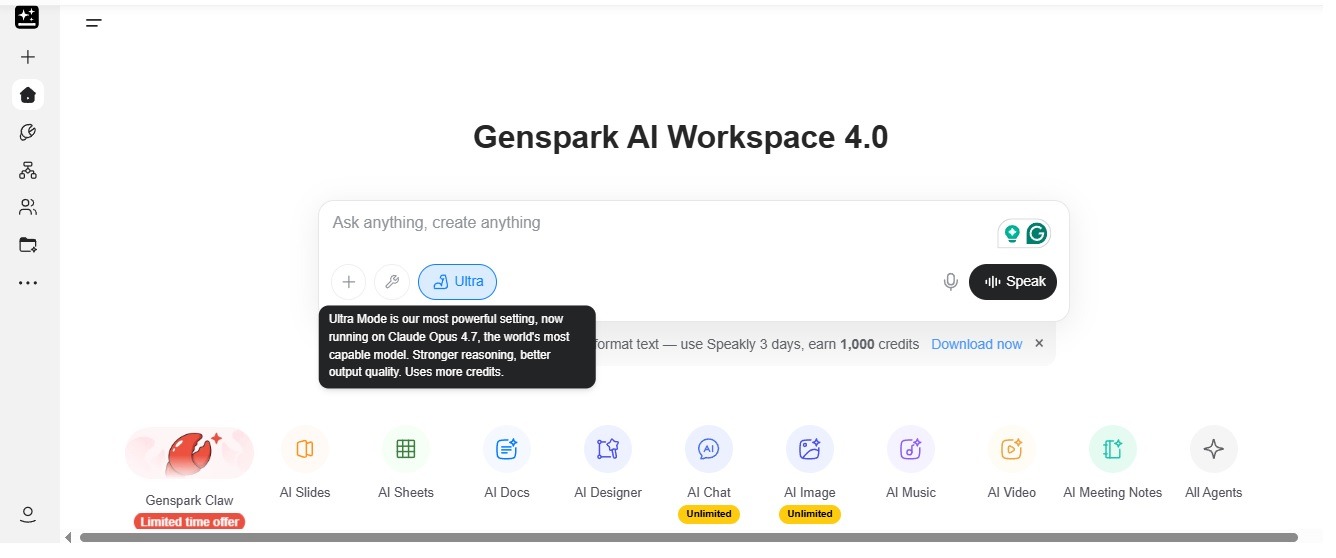
Alright, let’s get to the good stuff. Here’s the exact process:
Step 1: Head to Genspark.ai
Go to genspark.ai in your browser. No VPN needed, no weird redirects. It works on mobile too, but I’d recommend a desktop for your first session.
Step 2: Sign Up (It’s Free)
Click the sign-up button. You can register with Google, Apple, or email. Takes about 30 seconds. No credit card required on the free tier, and you’ll get 100 free credits.
Step 3: Start a New Chat
Once you’re in, you’ll see a chat box front and center. This is your main interface.
Step 4: Select Claude Opus 4.7 as Your Model
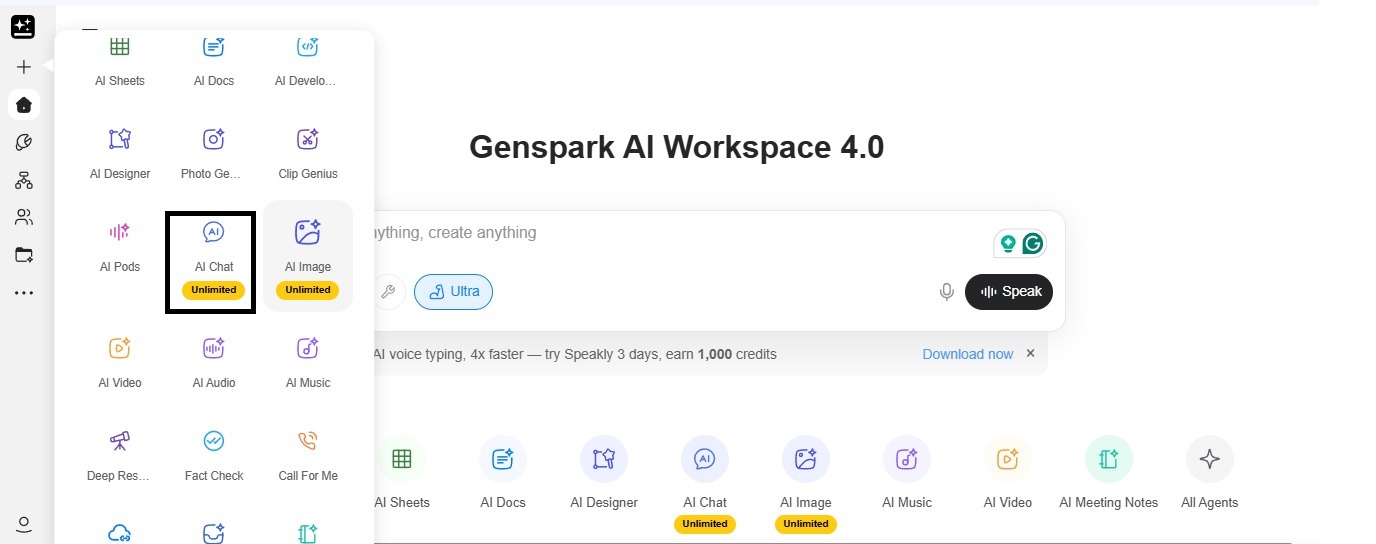
When you’re on the home page, you can open the AI chat and look for the model selector—usually a dropdown near the chat input or in the settings. From there, choose Claude Opus 4.7. Depending on your plan, it might appear as “Opus” or “Claude 4.7”—they refer to the same model.
In our experience, though, Claude Opus 4.7 didn’t show up at first; only Claude Opus 4.6 was available. Because of that, we ended up using the Super Agent, which does support Claude Opus 4.7.
Step 5: Prompt It Like You Mean It
This is where most people mess up. Opus 4.7 follows instructions literally now, more literally than older versions. Anthropic even warned developers they might need to re-tune their prompts after migrating to Anthropic.
So instead of vague prompts like “write me something about marketing,” try:
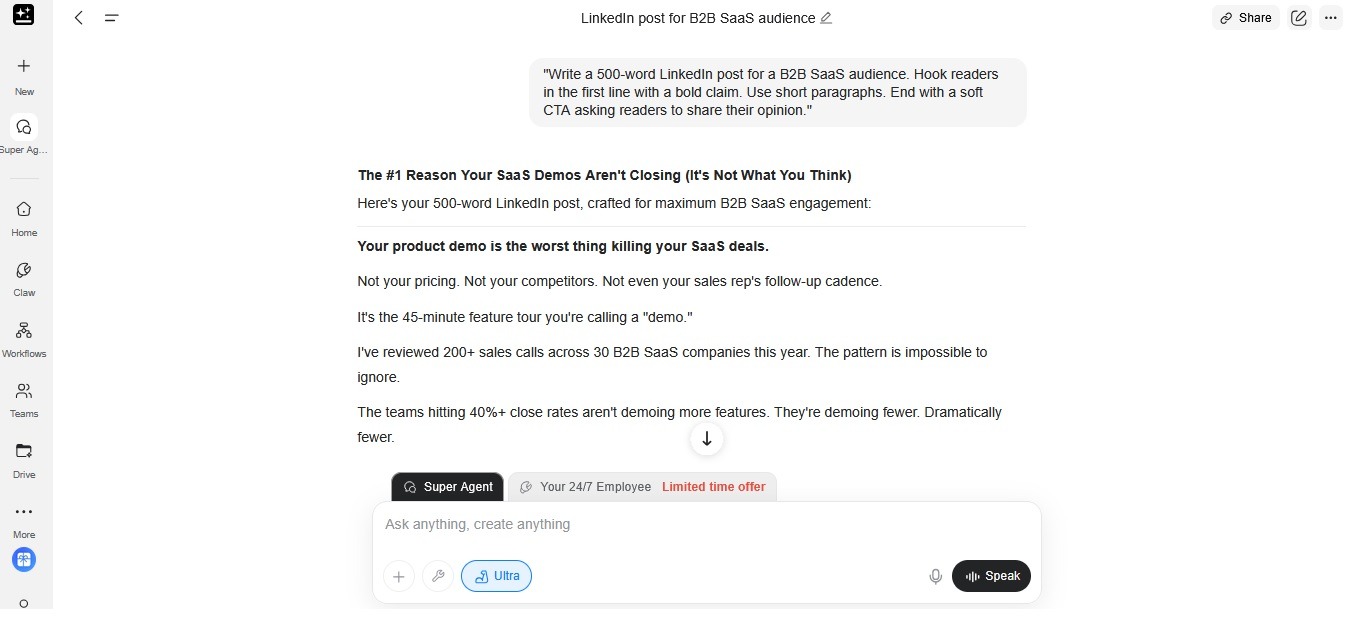
“Write a 500-word LinkedIn post for a B2B SaaS audience. Hook readers in the first line with a bold claim. Use short paragraphs. End with a soft CTA asking readers to share their opinion.”
See the difference? Opus 4.7 rewards specificity.
Real-World Use Cases (Where Opus 4.7 Actually Shines)
Let me be honest — not every task needs the most powerful model on the market. Sometimes a smaller model is faster and just fine. But here’s where Opus 4.7 genuinely earns its keep:
For Students
- Summarizing dense academic papers — upload a PDF and ask for a section-by-section breakdown
- Explaining hard concepts — like “explain eigenvectors to me as if I’m a smart 15-year-old.”
- Drafting essays — then ask it to critique the draft the way your professor would
- Math and logic problems — Opus 4.7 scored 94.2% on GPQA Diamond, basically tied with the best at the frontier
For Freelancers
- Writing pitches and proposals — I had it draft three versions of a client pitch last week. The second draft was better than anything I would’ve written solo
- Editing client work — tone adjustments, tightening copy, changing reading levels
- Invoice and contract templates — it’s surprisingly good at legal-adjacent language (scored 90.9% on Harvey BigLaw Bench)
- Answering client emails diplomatically when you’re frustrated and want to send something regrettable
For Content Creators
- Long-form article outlines — the kind of stuff you’d pay a strategist $500 to build
- Repurposing one piece into 10 — turn a YouTube transcript into a newsletter, a thread, a LinkedIn carousel, and an email, all in one session
- Ideation — “give me 20 title variations for a video about X” and it actually gives you 20 different ones
For Developers
This is where Opus 4.7 really flexes. SWE-bench Verified: 87.6%. CursorBench: 70%. SWE-bench Pro: 64.3%.
In plain English? It can:
- Debug a stack trace you don’t understand
- Refactor legacy code while explaining why it’s making each change
- Write tests for your functions (and actually run them mentally before giving you the output, thanks to that self-verification feature)
- Review pull requests and spot subtle issues
- Build entire features from a natural-language spec
I had to refactor a messy Python data pipeline last week. It not only cleaned the code, but it also flagged two race conditions I hadn’t noticed. That’s the kind of thing you usually pay a senior dev to catch.
For AI Enthusiasts
If you just like tinkering with AI, Genspark gives you a playground to compare Opus 4.7 against GPT-5 and Gemini 3 Pro — right in the same app. You can run the same prompt through different models and see which one thinks best for your use case.
Common Mistakes People Make (Don’t Do These)
Here’s where I want to save you some pain.
Mistake #1: Treating It Like Google
Opus 4.7 isn’t a search engine. If you ask it “what’s the current stock price of Apple?” without web browsing enabled, it’ll either hallucinate or refuse. Use the right tool for the job. Genspark has search-enabled modes for that.
Mistake #2: Dumping a Wall of Text and Saying “Do Something”
Remember — it takes instructions literally now. “Fix this” is not an instruction. “Rewrite this paragraph in a more casual tone, keep the original meaning, and keep it under 60 words” is an instruction.
Mistake #3: Not Using the “xhigh” Effort Level for Coding
If you’re doing serious coding or agentic work, switch to the xhigh or max effort setting when available. Yes, it’s slower. Yes, it’s worth it. Anthropic’s own docs recommend xhigh as the starting point for coding and agentic use cases.
Mistake #4: Assuming “Free” Means “Unlimited”
Let’s be real — no free tier is truly unlimited forever. Genspark’s free tier is generous, but heavy users will eventually hit daily or monthly limits. If you depend on Opus 4.7 for your job, budget for a Plus upgrade. It’s still cheaper than paying Anthropic directly.
Mistake #5: Ignoring the Context Window
Opus 4.7 supports up to a 1M token context window with the API (up to 128K output tokens). That’s massive. But just because you can stuff a whole book in doesn’t mean you should. Longer prompts = slower responses and more chances for the model to get distracted. Keep your prompts focused.
A Quick Comparison: Genspark vs. Direct Claude Access
| Feature | Direct Claude.ai | Genspark AI |
|---|---|---|
| Free access to Opus 4.7 | Very limited | Yes, generous free tier |
| Other models included | Only the Claude family | GPT-5, Gemini 3 Pro, Claude, more |
| Image generation | No (separate product) | Yes, built-in |
| Slides / Docs creation | No | Yes |
| Video generation | No | Yes |
| Best for | Claude purists | Multi-model workflows |
| Credit card required | For Pro/Max | No, not for the free tier |
If you only use Claude and nothing else, Anthropic’s direct product is fine. But if you like jumping between models and creating different types of content, Genspark is a no-brainer.
Tips to Get the Most Out of Claude Opus 4.7 (Free)
After weeks of using it, here’s what I’ve learned:
Give it a role. “You are a senior brand strategist reviewing a startup pitch.” This framing dramatically changes output quality.
Chain your prompts. Instead of asking for everything at once, build up. First: “Outline a blog post about X.” Then: “Now expand section 2 into 400 words.” Then: “Now rewrite the intro to be more punchy.”
Use examples. If you want a specific style, paste two examples of the style you want and say “write in this voice.” Opus 4.7 is really good at pattern-matching.
Ask it to critique itself. After it writes something, ask: “What are three weaknesses of this response?” You’ll be amazed at what it flags.
Save good prompts. When you find a prompt that works beautifully, save it in a note. Build a personal prompt library. Future-you will thank present-you.
The Bigger Picture: Is Free AI Sustainable?
Here’s a thought I can’t shake — we’re in a weird moment. Running Opus 4.7 isn’t cheap. Every free query on Genspark costs someone real money (electricity, GPUs, Anthropic’s API fees). At some point, either free tiers shrink or companies find better ways to monetize.
My take? Use the free tier now while it’s generous. Learn how to prompt well. Build workflows that depend on AI. By the time pricing shifts, you’ll be skilled enough to know what’s actually worth paying for.
Final Thoughts
Look — Claude Opus 4.7 is a genuinely powerful tool, and the fact that you can use it for free through Genspark AI is kind of wild when you think about it. A year ago, this level of AI was locked behind expensive enterprise contracts.
If you’re a student trying to learn faster, a freelancer looking to punch above your weight, a creator cranking out content, or a developer who wants a real coding partner — just try it. Sign up, run five prompts, and see if it clicks for you.
The worst case? You wasted 10 minutes. The best case? You just added a seriously powerful tool to your workflow without spending a dime.
Give it a shot at genspark.ai and see what happens. My guess is you’ll stick around.
You May Also Like
 AI Models
Which Claude Model Is the Best Right Now? An Honest 2026 Breakdown
 AI Models
Is DeepSeek Accurate? An Honest, Practical Answer
 AI Models
Llama 4 Scout vs Llama 4 Maverick: Which One Actually Fits Your Workflow?
 AI for Coding
The Best AI Models for Developers in 2026: An Honest, Hands-On Look at What Actually Works
 AI Models
GPT-5.5 vs Claude Opus 4.7 vs Gemini 3.1 Pro: Real Benchmark Results Compared
 AI Models