

If you have used a voice assistant lately, listened to a training video, audiobook preview, or heard a smart device read something back to you, there is a good chance you already know what neural TTS sounds like, even if you have never heard the term before. Neural TTS is the reason many modern AI voices no longer sound stiff, flat, or oddly stitched together. They sound smoother. More confident. Sometimes surprisingly human.
That shift matters more than it seems. A voice is not just decoration. It changes how people feel about a product, how long they keep listening, and whether the message feels helpful or annoying. In real life, people do not say, “This uses an outdated synthesis method.” They just think, that voice sounds weird, and move on. That is exactly why neural text-to-speech became such a big deal.
Here’s where things get interesting. Neural TTS is not only for giant tech companies anymore. It now shows up in apps, video tools, online courses, support bots, audiobooks, accessibility products, and creator workflows. So if you are tech-curious, building something, or trying to make digital content feel more polished, this is one of those technologies worth actually understanding.
What Is Neural TTS?
Neural TTS is a modern text-to-speech system that uses deep learning and artificial intelligence to turn written text into natural-sounding spoken audio. In plain English, it takes written language and turns it into a voice that sounds much closer to a real person.
The phrase TTS means text-to-speech. The word neural means the system is powered by deep learning models that were trained on large amounts of speech and text data. Instead of following only simple rules or piecing together tiny clips of recorded speech, the system learns speech patterns from real examples.
That shift changed everything.
Older TTS systems often got the job done, but they sounded rough. Words could feel disconnected. Pauses could land in odd places. Stress on the wrong syllable could make a sentence sound unnatural. Neural TTS improved those weak spots by learning how speech flows across a full sentence, not just word by word.
Traditional text-to-speech often worked by joining many tiny recorded sound pieces together. That approach could work, but it often sounded mechanical, especially over longer passages. Neural TTS changed the game by learning patterns from real human speech and generating audio in a more fluid way. That is why the output usually feels less choppy and more believable.
For you, the practical takeaway is simple. Neural TTS is not just “computer voice, but newer.” It is the reason today’s AI voices can handle narration, customer support, accessibility, and conversational products without sounding like they came from an old GPS unit.
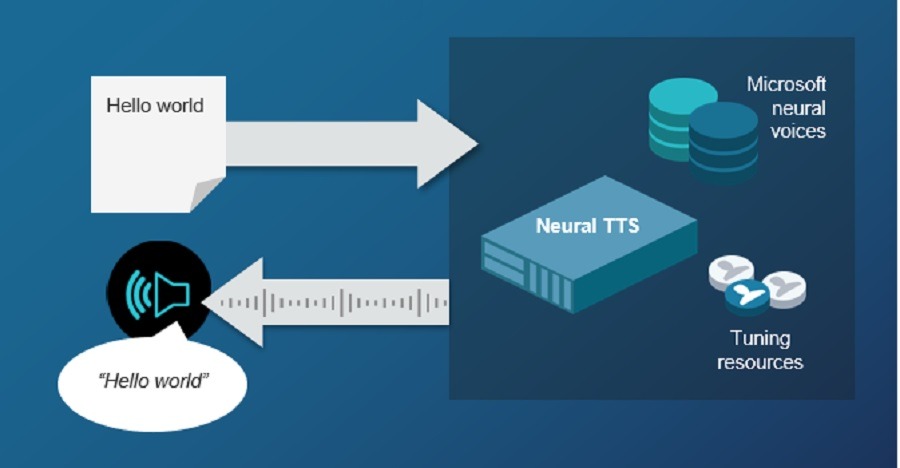
Why Does the “Neural” Part Matter?
The “neural” part matters because the system learns speech patterns instead of only replaying recorded fragments. That learning makes a huge difference. Human speech is full of subtle signals. We stress certain words. We pause in the middle of thoughts. We change pitch when we ask a question. We slow down when something is important. A neural model can learn more of those patterns, which helps the voice sound more natural.
From experience, this is the point where a lot of people finally get why neural TTS feels different. It is not only about pronunciation. It is about delivery. Two systems can read the same exact sentence, but the better one sounds like it has a pulse.
Why Does Neural TTS Sound More Human Than Older Text-to-Speech?
Neural TTS sounds more human because it models the flow of speech instead of assembling speech like a puzzle. That old puzzle-piece method had limits. Many earlier systems used what is called concatenative synthesis.
They stitched together recorded pieces of speech. The result could sound okay in short phrases, but it often broke down when the sentence got longer or more complex. You would hear odd transitions, unnatural pauses, or a tone that stayed flat the whole time. DeepMind described older systems as often sounding mechanical and containing artifacts like glitches, buzzes, and whistles.
Neural TTS took a different route. Instead of just reusing recorded chunks, it learned how speech behaves. That includes things like:
- Intonation: how the voice rises and falls
- Prosody: the rhythm and stress pattern of speech
- Pacing: how quickly a person would naturally say something
- Context: how the meaning of a sentence affects delivery
And that is why it feels more natural. The voice is not simply “reading.” It is producing speech with more realistic timing and sound patterns.
DeepMind’s WaveNet was one of the big turning points here. When it was introduced, it showed that AI-generated speech could close the gap with human speech in a serious way. DeepMind says its early American English and Mandarin voices narrowed the gap between machine and human speech by 50 percent.
What Makes People Notice the Difference So Fast?
People notice the difference fast because the brain reacts to rhythm and tone before it judges technical accuracy. This is one of those things most product teams learn the hard way. A voice can pronounce every word correctly and still sound wrong. If the pacing is awkward or the emphasis lands in strange places, listeners lose trust almost instantly.
Think about a phone system that says, “Your call is very important to us,” in a flat, lifeless tone. You hear the words, but you do not feel anything helpful behind them. Now compare that with a smoother voice that pauses naturally and sounds clear without overdoing emotion. Same sentence. Totally different effect.
That is why neural TTS is not just a technical upgrade. It is a user experience upgrade.
How Does Neural TTS Actually Work Behind the Scenes?
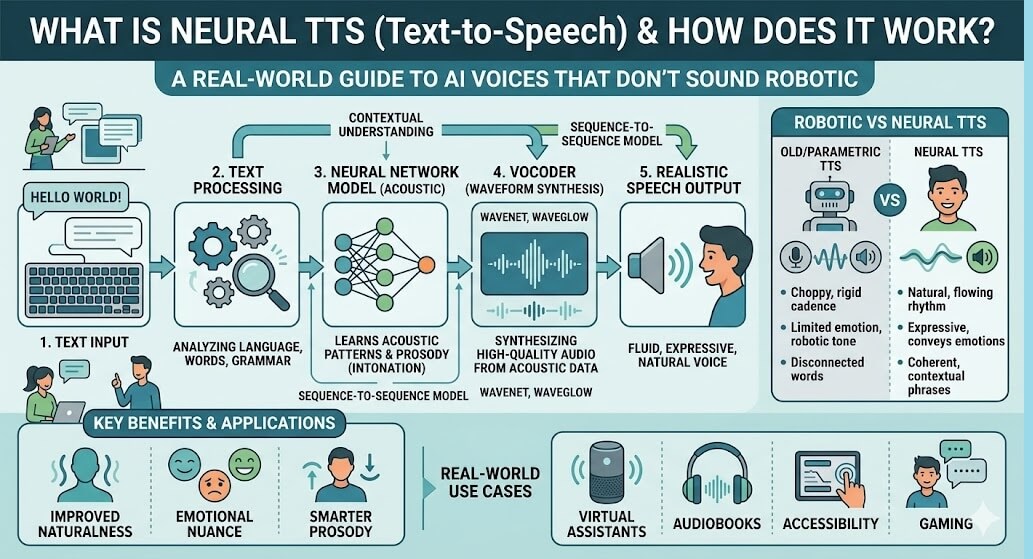
Neural TTS works by reading text, predicting how it should sound, and then generating the final audio waveform.
The good news is you do not need a machine learning degree to understand the basics. Most neural TTS systems follow a similar path, even if the exact architecture changes.
At a high level, the process looks like this:
- Text analysis: the system figures out what the text means and how it should be spoken
- Acoustic modeling: the system predicts speech features such as timing, pitch, and energy
- Waveform generation: a vocoder turns those features into actual audio
NVIDIA describes modern TTS in much the same way, with text analysis, acoustic modeling, and vocoder stages in a cascaded system.
What Happens Before the Voice Speaks?
Before the voice speaks, the system has to understand the text well enough to say it correctly. This part is bigger than it sounds. Text is messy. Humans handle that naturally. Machines need help. A TTS engine has to decide things like:
- Is “Dr.” short for doctor or drive?
- Should “2026” be read as “twenty twenty-six” or “two thousand twenty-six”?
- Is “lead” the metal or the verb?
- Should a comma create a short pause here?
That step often includes text normalization and grapheme-to-phoneme conversion. In plain English, the system converts written text into speech-friendly instructions. If this part fails, even the best voice model cannot fully save the result.
Google’s text-to-speech documentation also highlights support for SSML, which helps shape pronunciation, pauses, acronyms, and other speaking details.
What Do Acoustic Models and Vocoders Actually Do?
The acoustic model plans how the voice should sound, and the vocoder turns that plan into audio. This is the heart of the system. The acoustic model creates a representation of speech, often a mel spectrogram. You can think of that as a kind of sound blueprint. It tells the system what the speech should feel like over time, including pitch, timing, and energy.
Then the vocoder takes that blueprint and turns it into the final waveform you hear. AWS explains that its neural TTS engine has two parts: a neural network that converts phonemes into spectrograms, and a vocoder that converts those spectrograms into a nearly continuous audio signal.
If you have ever wondered why modern voices sound less clipped and more fluid, this is a big reason why.
Where Do You Already Hear Neural TTS in Real Life?
You already hear neural TTS in voice assistants, navigation apps, customer support tools, accessibility products, videos, and digital content workflows.
Sometimes it hides in the background so well that you barely notice it. That is usually a good sign.
Here are a few real-life scenarios where neural TTS shows up:
How Is Neural TTS Used in Everyday Products?
Neural TTS is used whenever text needs to become clear, scalable, spoken audio.
- Voice assistants: smart devices read back answers, reminders, and commands
- Navigation apps: directions sound clearer and easier to follow
- Customer support systems: IVR menus and support bots feel less robotic
- Screen readers: users with visual impairments get more natural audio output
- Online learning: lessons, tutorials, and explainers use AI voice narration
- Audiobooks and articles: long-form text becomes easier to consume as audio
- Content creation: creators produce voiceovers faster without booking studio time
Google says its text-to-speech service supports uses such as voice generation in devices and accessible electronic program guides, and it currently offers 380+ voices across 75+ languages and variants.
That scale matters. If you want one product to speak to users across markets, you need voice coverage, not just a nice demo voice in English.

What Does This Look Like in a Relatable Scenario?
A relatable scenario is a small course creator using neural TTS to narrate updates without re-recording every lesson.
Picture someone who sells short software tutorials. They update lessons often. Recording everything by hand every single time is slow and expensive. Basic text-to-speech sounds too robotic for paid content. Neural TTS lands in the middle. It gives them a cleaner voice, faster revisions, and enough control to sound professional.
Or think about a startup building a support bot. The product is decent, but the old voice makes every response sound cold. They switch to a neural voice with better pacing, improve pronunciation with SSML, and suddenly, the same bot feels easier to deal with.
That is the real story with neural TTS. It is often less about “wow” and more about removing friction people can feel but do not always name.
Why Are Developers, Creators, and Product Teams Paying Attention Now?
People are paying attention now because neural TTS has become more usable, more scalable, and more realistic at the same time.
A few years ago, AI voice still felt like something that was either experimental or obviously fake. That changed quickly. Today, the quality is good enough for serious use, and the tools are easier to access through APIs and platforms.
The major vendors have pushed this hard:
| Platform | What stands out |
|---|---|
| Google Cloud | 380+ voices across 75+ languages and variants, plus prompt, text, and SSML support |
| Microsoft Azure AI Speech | Standard neural voices in 100+ languages and locales |
| Amazon Polly | Neural voices in 36 languages and language variants |
| NVIDIA NeMo | Strong framework for building and studying advanced TTS pipelines |
Google also says its voices are built on DeepMind speech synthesis expertise and designed for high-fidelity speech. Microsoft says its neural voices use deep neural networks to produce audio that is nearly indistinguishable from human recordings. AWS positions neural voices as higher quality than its standard voices.
From experience, the real reason teams pay attention is not because the tech is trendy. It is because users have become less forgiving. If your product talks, people expect it to sound decent now.
What Most People Get Wrong About Neural TTS?
Most people get neural TTS wrong by thinking a better voice alone solves the whole problem.
It does not.
A lot of people assume the secret is just picking the “most human-sounding” voice. That helps, sure. But natural output depends on much more than the voice model. Text formatting, punctuation, sentence length, pronunciation controls, pacing, and context all matter.
Here are a few common misunderstandings that show up again and again.
Is the Best Neural Voice Always the Right Choice?
No, the most impressive demo voice is not always the right choice for your actual use case.
A voice that sounds amazing in a short marketing demo may feel too dramatic for a help center. A lively voice may work for social content but feel distracting in a medical app. A rich, slow voice may sound premium in an audiobook but drag in a navigation product.
In real life, fit matters more than wow factor.
Does Neural TTS Automatically Understand Your Content?
No, neural TTS still needs help with formatting, pronunciation, and context.
People sometimes paste raw scripts into a TTS tool and expect perfect output. Then they wonder why dates, acronyms, product names, or brand terms sound off. That is not a sign that neural TTS “doesn’t work.” It usually means the input was not prepared properly.
This is where things get interesting, because many teams blame the model for problems caused by the script.
Is Neural TTS the Same as Voice Cloning?
No, neural TTS and voice cloning are related, but they are not the same thing.
Neural TTS is the general technology for generating speech from text. Voice cloning is a specific use case where the system tries to match a particular voice. Some platforms support custom voice creation, but that is a separate layer, with its own quality, safety, and permission issues.
Microsoft, for example, separates standard neural voices from custom voice options. Google also offers custom voice capabilities in some products.
What Are the Biggest Benefits and Trade-Offs of Neural TTS?
The biggest benefits of neural TTS are quality, scale, and flexibility, while the biggest trade-offs are control, cost, and setup complexity.
Let’s be honest about both sides. Neural TTS is strong, but it is not magic.
| Benefit | Why it matters | Trade-off |
|---|---|---|
| More natural sound | Easier listening, better user trust | Premium voices may cost more |
| Faster content production | Useful for creators and teams | Setup still takes testing |
| Better multilingual support | Helps global products | Voice quality varies by locale |
| Easier updates | Change text instead of re-recording audio | Raw scripts may need editing |
| Stronger accessibility support | Makes text more available in audio form | Some edge pronunciations still need manual fixes |
AWS pricing gives a simple example of the cost side. Its neural voices are priced per 1 million characters, with listed pricing of $16 per 1 million characters outside the free tier at the time of the referenced pricing page.
That cost is not necessarily high, but it does remind you that voice at scale is a product decision, not just a technical checkbox.
What Common Mistakes Do People Make With Neural TTS?
The most common mistakes are using raw text, choosing the wrong voice, ignoring pronunciation controls, and judging quality too quickly.
This section matters because a lot of disappointing results are avoidable.
What Mistakes Show Up Again and Again?
The same mistakes keep showing up because people treat TTS like a one-click feature instead of part of the user experience.
- They paste unedited text into the system.
Real speech is not written the same way great prose is written. Long sentences, heavy clauses, and awkward punctuation can make even good voices stumble. - They choose a voice for novelty, not fit.
A dramatic or highly expressive voice can get old fast. What sounds exciting in a sample can sound exhausting in a three-minute tutorial. - They ignore SSML and pronunciation tools.
Acronyms, brand names, product terms, and numbers often need guidance. If you skip that, you are leaving quality on the table. - They test only one sentence.
A voice might sound great on a short line and weak over a full script. Always test intros, transitions, lists, and closing sections. - They expect perfect emotional realism.
Neural TTS has improved a lot, but it still has limits. If the script calls for deep emotional nuance, you may still need a human voice actor.
From experience, the first and third mistakes are the most expensive because they make a decent tool look worse than it is.
What Actually Works When You Want Natural AI Voice Output?
What actually works is writing for the ear, not the page, then testing the voice in realistic conditions.
This is the section most people are really looking for, even if they do not phrase it that way.
How Should You Write Text for Neural TTS?
You should write text for neural TTS the way you want it to sound out loud.
That means shorter sentences. Clear punctuation. Fewer stacked clauses. Cleaner transitions. If you would trip over a sentence while reading it aloud, the TTS system probably will too.
Here is what usually works better:
- Break long sentences into two shorter ones.
- Use punctuation to guide natural pauses.
- Spell out tricky brand names or unusual terms when needed.
- Rewrite dense paragraphs into more spoken-friendly language.
A good rule is simple: if the script sounds awkward in your own mouth, fix the script before blaming the voice.
What Practical Tips Make the Biggest Difference?
A few practical habits improve output more than endless voice switching.
- Test full paragraphs, not just sample lines.
The real quality of a voice shows up in transitions, not only in isolated sentences. - Use SSML carefully.
Add pauses where a human would naturally pause. Adjust pronunciation only where needed. Overdoing SSML can make the audio sound forced. - Match the voice to the job.
A support bot, an explainer video, and a wellness app should not all sound the same. - Edit for listening fatigue.
If the voice feels too intense, flat, or fast after 60 seconds, users will feel that too. - Review numbers, dates, acronyms, and names first.
Those are the parts most likely to break immersion.
In real life, these small improvements usually matter more than chasing the newest model.
When Should You Use Neural TTS and When Should You Not?
You should use neural TTS when you need scalable, clear, natural audio, but not when the message depends on deep human performance or emotional nuance.
This is where some realism helps.
Neural TTS is a great fit when you need:
- repeatable voiceovers
- fast content updates
- multilingual audio
- accessible spoken content
- product voice features at scale
It is a weaker fit when you need:
- high-emotion storytelling
- subtle acting performance
- complex character dialogue
- brand-critical narration with zero tolerance for odd phrasing
That does not mean neural TTS cannot help with those projects. It means you should choose it for the right reasons. Speed, consistency, coverage, and flexibility are its strengths. Human acting is still its own thing.
How Can You Choose the Right Neural TTS Tool for Your Project?
You should choose a neural TTS tool based on use case, voice quality, language support, control options, and workflow fit.
A lot of people start with the voice demo. That makes sense, but it is not enough.
What Questions Should You Ask Before Choosing a Platform?
You should ask what you need the voice to do every day, not only how it sounds in a demo.
Here are the questions that usually lead to better choices:
- Do you need many languages or just one?
- Do you need SSML or fine pronunciation control?
- Will this run in real time or offline rendering?
- Do you need custom voice options?
- Will non-technical people use it too?
- How much revision and testing will the workflow require?
If you are a developer, you may care most about API access, latency, and control. If you are a creator, you may care more about voice style, editing speed, and export workflow. If you run a product team, consistency and scale probably matter most.
That is why there is no single best neural TTS tool. There is only the best one for your situation.
What Does the Future of Neural TTS Look Like?
The future of neural TTS looks more expressive, more personalized, and more integrated into everyday digital products.
You can already see the direction. Voices are getting more natural. Control is getting better. Platforms are adding style steering, multilingual delivery, custom voice options, and stronger real-time performance.
Google now promotes prompt-based control for style, accent, pace, tone, and emotional expression in parts of its speech lineup. Microsoft highlights custom voice and SSML-driven control. AWS has moved beyond standard and neural voices into long-form and generative voice options.
Still, the future is not only about sounding more human. It is also about using synthetic voice responsibly. As voices become more realistic, trust, disclosure, consent, and voice rights become more important. That part deserves just as much attention as model quality.
What Questions Do People Still Ask About Neural TTS?
Is neural TTS the same as regular text-to-speech?
No. Regular text-to-speech is a broad category, while neural TTS is a more advanced form of it. Neural TTS uses deep learning to make speech sound smoother, more natural, and less robotic than many older methods.
Does neural TTS always sound fully human?
No. It often sounds much more natural than older systems, but it can still make mistakes with pronunciation, pacing, or emotional nuance. Good scripting and testing still matter.
Can neural TTS help with accessibility?
Yes. Neural TTS can make digital content easier to access for people who prefer or rely on audio, including users of screen readers and spoken interfaces.
Can developers control pronunciation and pauses?
Yes. Many neural TTS platforms support SSML or similar controls for pauses, pronunciation, speaking rate, pitch, and other delivery details.
Is neural TTS useful for content creators?
Yes. It can help creators produce voiceovers faster, update content without full re-recording, and scale audio production across videos, lessons, and short-form content.
Is neural TTS only for big companies?
No. Large companies helped popularize it, but the technology is now widely available through cloud tools, APIs, and creator platforms.
Should you replace all human voice work with neural TTS?
No. Neural TTS is great for speed, scale, and consistency, but human voice talent is still better for emotionally rich storytelling, character work, and high-stakes brand performance.
Conclusion
That is really the big picture. This technology is not important because it sounds futuristic. It is important because it solves a real problem. People are listening to more digital audio than ever, and they are less willing to tolerate voices that sound fake, tiring, or clumsy.
If you are learning the space, here is the simplest way to remember it: neural TTS is what happens when text-to-speech stops sounding like a machine reading words and starts sounding more like a voice delivering meaning.
And if you are building, creating, or experimenting, the smart move is not to obsess over hype. Start with your use case. Write for the ear. Test in real conditions. Fix the script before blaming the model. That alone will put you ahead of a lot of average content—and honestly, ahead of a lot of average implementations too.
You May Also Like
 AI Tool Reviews
How to Use ChatGPT for Beginners: The Complete Step-by-Step Guide (2026)
 AI Tool Reviews
GPTZero vs ZeroGPT: Which AI Detector Actually Holds Up in the Real World?
 AI Tool Reviews
Kimi vs ChatGPT: Is Kimi AI Actually Better Than ChatGPT?
 AI Models
Kimi K2.6 vs Claude Opus 4.7: Which AI Comes Out on Top?
 ChatGPT
Grok vs ChatGPT: Is Grok Actually Better Than ChatGPT?
 AI Tool Reviews