
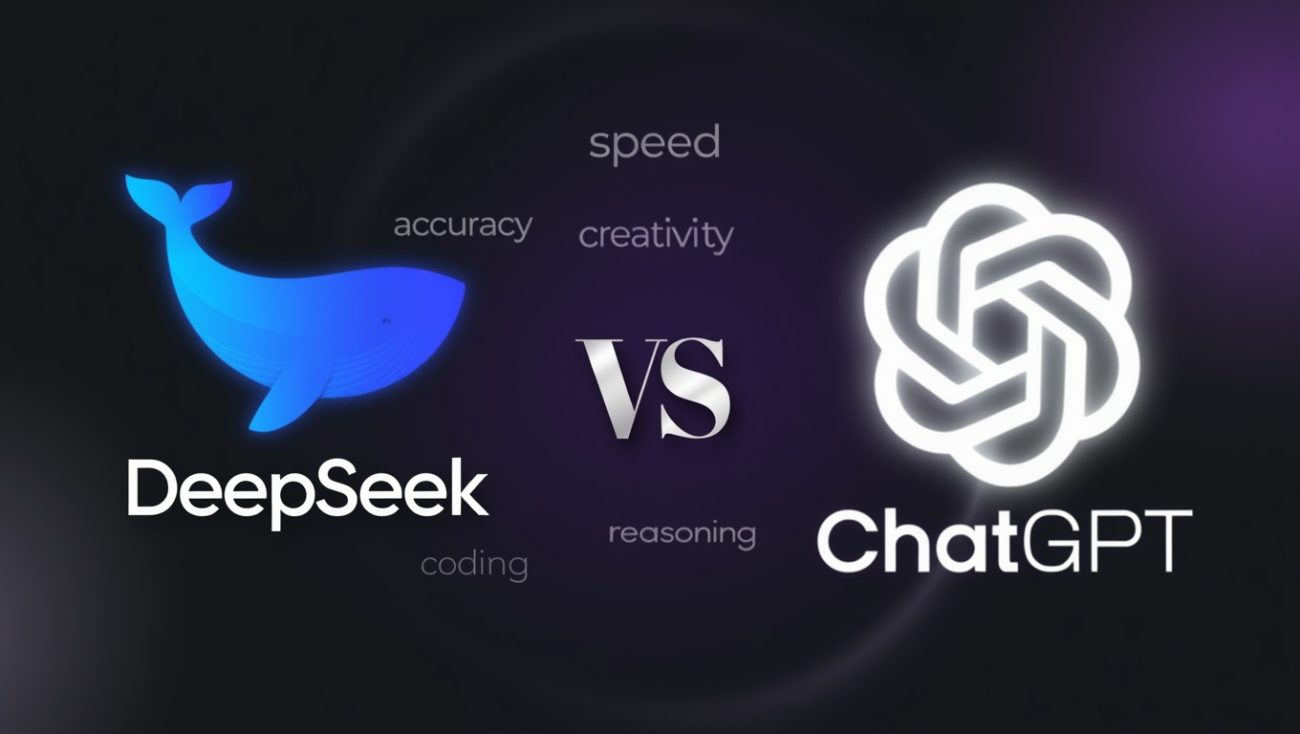
DeepSeek is a free, open-source AI chatbot and language model platform developed by a Chinese AI startup headquartered in Hangzhou, China. It offers capabilities that compete directly with ChatGPT’s latest GPT-5 family models at zero cost through its web interface at chat.deepseek.com and through mobile apps on iOS and Android. The platform runs on multiple models, including DeepSeek-V3.2 for general tasks, DeepSeek-R1 for complex reasoning, and the newly released DeepSeek-V4.
I’ve been using DeepSeek consistently for several months now. For coding. For content writing. For research. For debugging. Honestly, when I first heard about it in early 2025, I didn’t take it seriously. Another AI chatbot from China? I figured it would be a watered-down copy of ChatGPT. I was wrong. The first time I threw a complex Python debugging problem at DeepSeek-R1 with DeepThink enabled, it walked through the logic step by step, found the root cause, and gave me clean, working code. That got my attention fast.
This review is based entirely on my hands-on experience across different DeepSeek models and modes. You’ll get honest comparisons with ChatGPT’s newest models including GPT-5.3 and GPT-5.4, real examples from coding and writing tasks, and a clear look at the platform’s strengths and weaknesses. No fluff. Just what matters.
Who Made DeepSeek and Where Did It Come From?
DeepSeek was founded in 2023 by Liang Wenfeng, a Chinese entrepreneur backed by the hedge fund High-Flyer, and is headquartered in Hangzhou, Zhejiang province, China. The company operates as a self-funded AI research lab without major outside venture capital. High-Flyer, the quantitative trading firm that Liang co-founded, provides the financial backing.

Here’s what makes DeepSeek’s story remarkable. The company trained its flagship models for roughly $5.5 million using 2,048 Nvidia H800 GPUs over about 55 days. By contrast, OpenAI reportedly spent over $100 million training GPT-4 and likely far more on the GPT-5 family. DeepSeek achieved competitive performance at a fraction of the cost. That fact alone sent shockwaves through Silicon Valley when DeepSeek-R1 launched in January 2025.
The company’s approach is radically different from OpenAI’s. DeepSeek is open-source. You can download the model weights, run them locally, and customize them however you want. OpenAI keeps its models closed. This philosophical difference matters for developers, researchers, and anyone who cares about data privacy.
What Models Does DeepSeek Offer?
DeepSeek offers 4 main model generations as of April 2026: DeepSeek-V3, DeepSeek-V3.2, DeepSeek-R1, and the newly released DeepSeek-V4. Each model serves a different purpose. Picking the right one depends on your specific task.
What Is DeepSeek-V3.2?
DeepSeek-V3.2 is the company’s updated general-purpose language model, released in December 2025, with improved reasoning, better agent performance, and efficient long-context processing through a new Sparse Attention system. It handles everyday conversations, content generation, translation, and coding tasks.
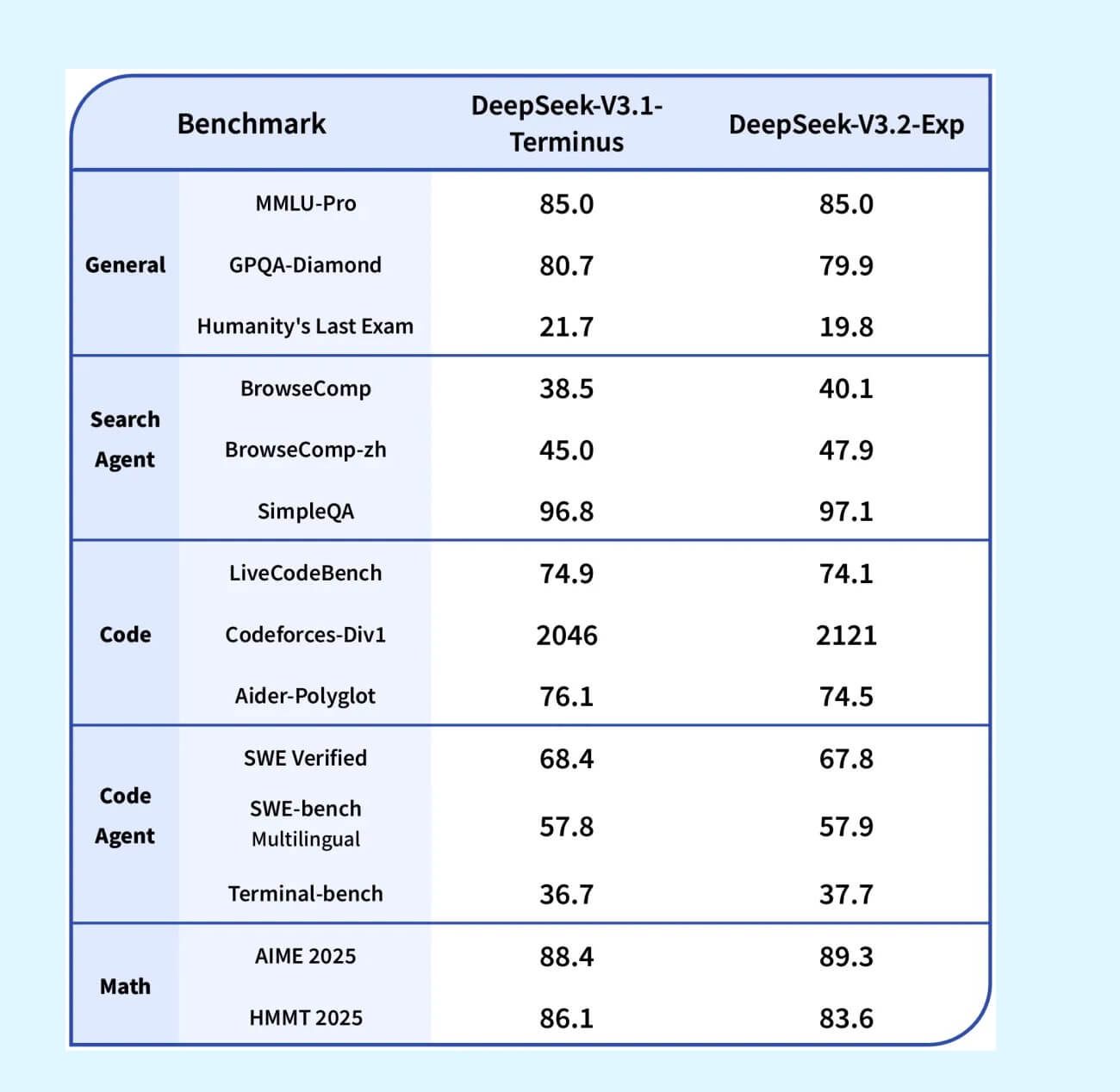
I used V3.2 as my daily driver for weeks. It handles regular conversations well. Summaries. Emails. Outlines. Quick questions. It’s fast and responsive. The quality sits comfortably in the range of what you’d expect from a mid-tier model. Not the sharpest tool for complex logic, but reliable for everyday use.
What stood out about V3.2 is its handling of long documents. The DeepSeek Sparse Attention (DSA) feature makes processing lengthy context windows cheaper and faster. I uploaded a 40-page PDF and asked it to summarize key findings. The result was accurate and well-organized. That’s a task where older models struggled.
What Is DeepSeek-R1?
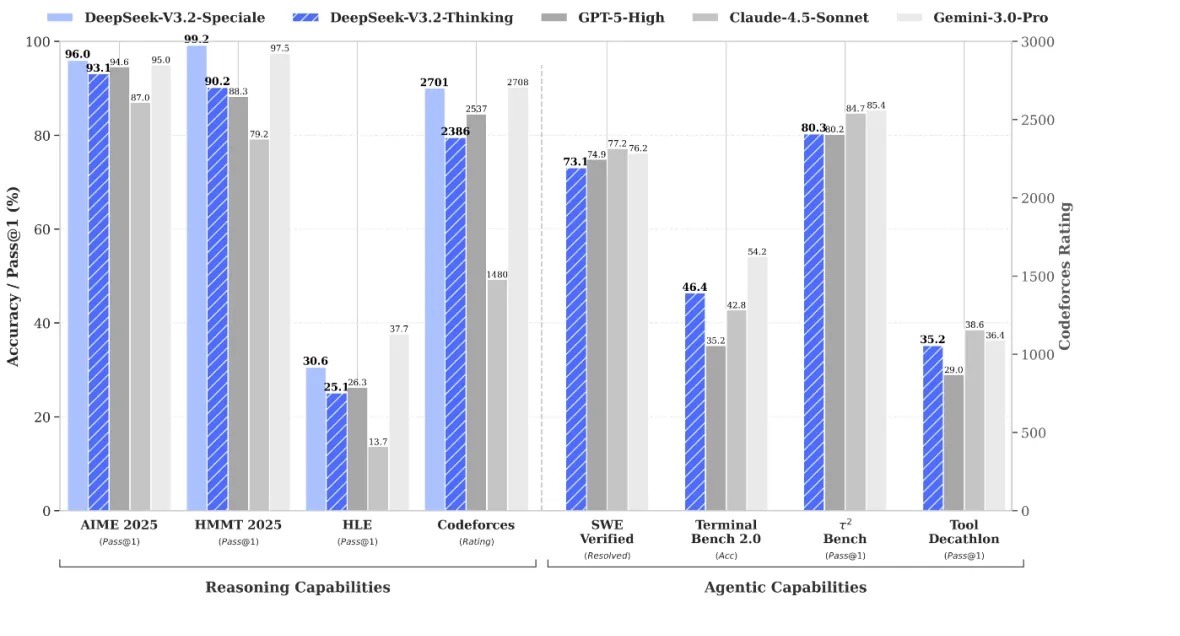
DeepSeek-R1 is DeepSeek’s reasoning-focused model that uses reinforcement learning to solve complex math, coding, and logic problems with visible step-by-step explanations. It launched in January 2025 and is the model that put DeepSeek on the global map. R1 achieves performance comparable to OpenAI’s o1 model across math, code, and reasoning benchmarks.
R1 uses the same architecture as V3 under the hood. The difference is training. R1 went through extensive reinforcement learning post-training that sharpened its ability to think logically. The result is a model that shows its reasoning process. When you give it a hard problem, it doesn’t just give you an answer. It walks you through its thinking. Step by step.
I threw some genuinely difficult challenges at R1. LeetCode hard problems. Complex data structure questions. Multi-step debugging. In the majority of cases, R1 nailed the logic. It didn’t always get syntax perfect on the first try, but the reasoning was sound. That’s the part that hooked me.
What Is DeepSeek-V4?
DeepSeek-V4 is the company’s next-generation flagship model, released in early 2026, featuring a new “Engram” memory architecture, improved coding capabilities, and performance that matches GPT-5 on most major benchmarks. V4 represents a significant leap over V3.2 and R1.
I’ve started testing V4 since it became available, and the improvement over R1 is clear. Code generation is sharper. Context retention is better. The model handles complex multi-step workflows with less hand-holding. Early benchmark reports show V4 matching GPT-5 level performance on reasoning and coding tasks while remaining free and open-source. That’s a remarkable achievement.
What Are the DeepSeek Chat Modes?
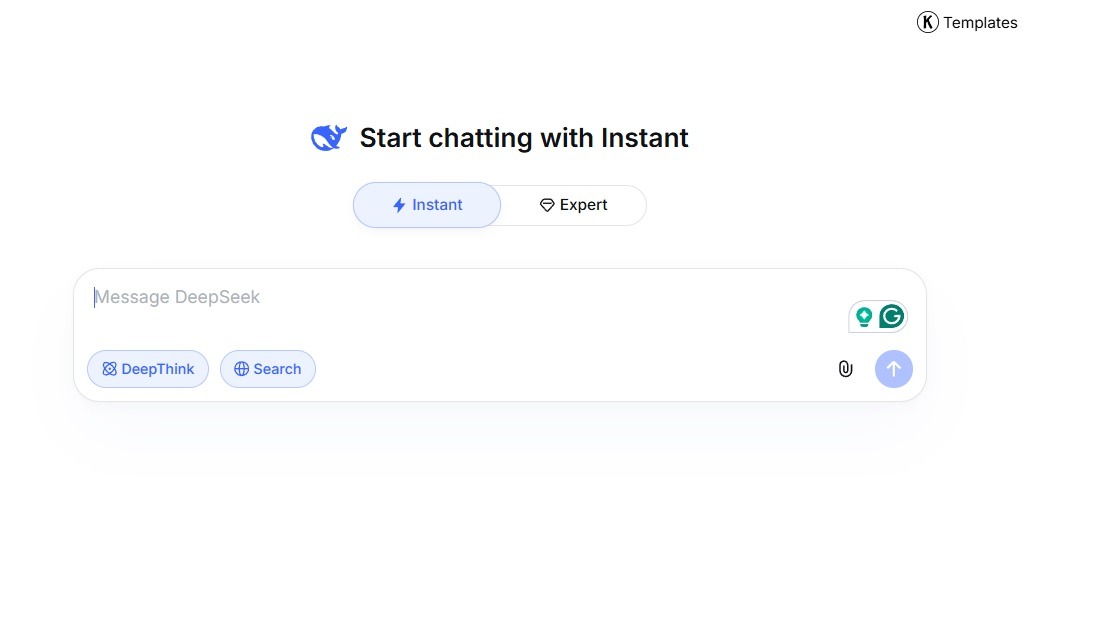
DeepSeek recently introduced 3 chat modes on its web and mobile interface: Instant (Fast Mode), Expert Mode, and DeepThink. This update rolled out in April 2026 and represents the biggest change to DeepSeek’s user interface since the platform gained global recognition.
How Does Instant Mode Work?
Instant Mode is designed for quick replies during everyday conversations, prioritizing speed over reasoning depth. Responses come back in 1 to 3 seconds. File uploads and basic text recognition are supported.
I use Instant Mode for simple tasks. Quick questions. Short summaries. Rephrasing a sentence. It’s snappy. You’re not getting deep reasoning here, but that’s not the point. Basically, think of Instant Mode as the “just give me a quick answer” setting. It’s what I reach for when I’m multitasking and need something without any delay.
How Does Expert Mode Perform?
Expert Mode delivers higher-quality responses with deeper reasoning for complex problems, at the cost of slightly longer processing times. DeepSeek warns this mode may be “busy at peak times” due to higher computational demands.
This is where things get interesting. Expert Mode produces noticeably better output for anything requiring thought. Coding problems. Detailed explanations. Multi-step analysis. Research questions. From my testing, Expert Mode takes about 10 to 40 seconds to respond. During peak hours, I’ve waited over a minute.
The South China Morning Post tested both modes with a JavaScript animation task. Instant Mode produced working code in over a minute. Expert Mode generated code in about 40 seconds but with mixed results on the specific task. In my own experience, Expert Mode is more reliable for complex code, though results vary by task.
For serious work, I almost always pick Expert Mode. The wait is worth it.
What Is DeepThink and When Should You Use It?
DeepThink is DeepSeek’s advanced reasoning mode powered by the R1 model, designed to show its complete chain-of-thought process for challenging math, logic, and coding problems. When you toggle DeepThink on, the AI visibly “thinks” through the problem in a collapsible section before presenting its final answer.
This is the mode I was most excited about. And honestly, it didn’t disappoint. DeepThink literally shows you the reasoning chain. “First, I need to consider X. Then I should check Y. Wait, there’s an edge case with Z.” You can watch the AI work through the problem in real time.
DeepThink is slower. Responses can take 30 seconds to over 2 minutes for complex problems. But the output quality is the highest DeepSeek offers.
Here’s when I turn on DeepThink:
- Complex debugging where I can’t figure out why code is breaking
- Algorithm design where logic needs to be airtight
- Math problems with multiple steps and potential traps
- Tricky writing tasks that need careful structure and argument flow
A common mistake is using DeepThink for simple tasks. Don’t. You’re wasting time. Save it for the hard stuff.
How Good Is DeepSeek for Coding? My Real Experience
DeepSeek delivers strong coding performance, with R1 achieving a 97% success rate on logic tasks in benchmark testing, and V4 matching GPT-5 level performance on most coding benchmarks. For debugging and algorithmic problem-solving, DeepSeek with DeepThink is genuinely competitive with the best paid models.
A Debugging Story That Sold Me
I was working on a Python script that processed CSV files. It needed to handle edge cases with missing data, encoding errors, and duplicate rows. I’d been debugging for about 20 minutes. Couldn’t figure out why certain rows were silently dropping.
I pasted the code into DeepSeek with DeepThink enabled. Within about 45 seconds, it identified the issue. A list comprehension was filtering out rows where a specific field was an empty string, but the actual problem rows had None values, not empty strings. The distinction mattered. DeepSeek caught it, explained why it mattered, and gave me corrected code.
That moment sold me. I would have spent another 30 minutes hunting for that on my own.
Frontend Code and JavaScript
For a JavaScript calculator project, DeepSeek walked through its reasoning before writing the code. The first version needed 2 small corrections. But it adapted quickly when I pointed them out. The final result was clean and functional.
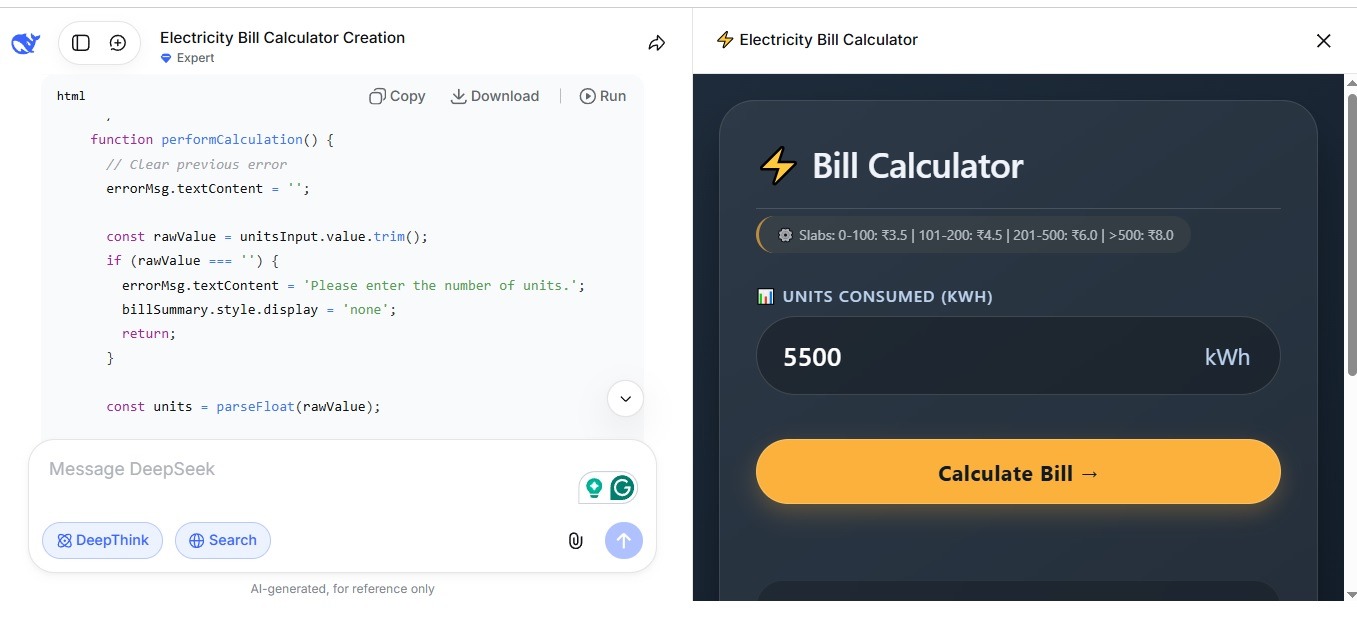
GPT-5.4 handles this kind of task more cleanly on the first attempt. It has what OpenAI describes as “aesthetic sensibility” for frontend work, with better understanding of spacing, typography, and visual design. I’ve noticed this difference myself. When I need a visually polished frontend prototype quickly, GPT-5.4 produces better results with less back-and-forth.
But for backend logic, algorithm challenges, and debugging? DeepSeek’s DeepThink mode competes head-to-head with GPT-5.4 Thinking. The transparent reasoning process is something GPT-5.4 doesn’t offer in the same visible way.
How Good Is DeepSeek for Content Writing?
DeepSeek produces well-structured, logically organized content but tends to be more technical and less conversational than ChatGPT’s writing output, especially compared to GPT-5.4 which was specifically optimized for more natural, less sycophantic writing.
My Writing Tests Across Both Platforms
I tested both platforms with the same prompt: “Write an outline for an article about how large language models work.”
DeepSeek gave me a structured, logical outline. It included sections on the evolution of LLMs, architecture details, comparison with traditional NLP, and real-world applications. What stood out was that DeepSeek showed its reasoning. It explained why it chose those sections. The output felt like it came from an engineer.
GPT-5.4 gave me a cleaner, more reader-friendly outline. The tone was conversational. The section titles were more engaging. OpenAI specifically designed the GPT-5 family to write with “literary depth and rhythm” while reducing the excessive agreeableness that plagued earlier models. In practice, this means GPT-5.4’s writing feels more natural and less robotic.
Here’s how I split my writing between the two:
- DeepSeek for technical content like documentation, how-to guides, and research summaries
- ChatGPT for creative content like blog posts, marketing copy, and reader-friendly articles
The gap has narrowed with V3.2 and V4. But for polished, engaging prose, ChatGPT still has the edge.
DeepSeek vs ChatGPT GPT-5.4: The Full Comparison
GPT-5.4 is OpenAI’s most capable model as of March 2026, combining frontier coding capabilities, computer use, tool search, and up to 1 million tokens of context. Comparing it to DeepSeek reveals clear strengths and weaknesses on both sides.
What Is GPT-5.4 and Why Does It Matter?
GPT-5.4 is OpenAI’s latest flagship model released on March 5, 2026, designed for professional work with state-of-the-art performance in coding, computer use, tool orchestration, and deep web research. It’s the first general-purpose OpenAI model with built-in computer use capabilities, meaning it can operate desktop software, navigate browsers, and complete tasks autonomously.
GPT-5.4 scores 83.0% on GDPval, matching or exceeding human professionals in 83% of comparisons across 44 occupations. It achieves 75.0% on OSWorld-Verified for desktop task completion, which actually surpasses human performance at 72.4%. These numbers represent a massive leap over GPT-5.2, which scored 47.3% on the same desktop benchmark.
On coding specifically, GPT-5.4 hits 57.7% on SWE-Bench Pro and 75.1% on Terminal-Bench 2.0. It also reduces hallucinations by 33% per claim compared to GPT-5.2 and is described by OpenAI as their “most factual model yet.”
The Direct Head-to-Head Comparison
| Category | DeepSeek (V4 / R1 + DeepThink) | ChatGPT (GPT-5.4) |
|---|---|---|
| Price (web) | Free | Free tier / $20/month Plus |
| Price (API input per 1M tokens) | $0.14 to $0.30 | $2.50 |
| Price (API output per 1M tokens) | $0.28 to $0.50 | $15.00 |
| Coding (algorithmic challenges) | Strong | Strong |
| Coding (full software workflows) | Good | Stronger |
| Frontend/UI generation | Good | Stronger (aesthetic sensibility) |
| Debugging | Strong (visible reasoning chain) | Strong |
| Math reasoning | 90%+ on advanced benchmarks | 94.6% AIME 2025 |
| Creative writing | Good but technical | Stronger, more natural tone |
| Context window | 128K tokens | Up to 1M tokens |
| Computer use | No | Yes (native, state-of-the-art) |
| Multimodal (images) | Text-only (V3.2) / Limited (V4) | Full text + image support |
| Tool use / Agents | Improving | State-of-the-art |
| Open-source | Yes | No |
| Offline deployment | Yes | No |
| Reasoning transparency | Shows full chain-of-thought | Partially visible |
| Hallucination rate | Low | Very low (45-80% fewer than GPT-4o) |
| Censorship | Yes (China-related topics) | Minimal |
| Data storage | China-based servers | US-based servers |
Where GPT-5.4 Clearly Wins
GPT-5.4 dominates in 5 specific areas: computer use, tool orchestration, multimodal understanding, factual accuracy, and polished creative writing. These aren’t small gaps. They’re significant differences that affect real-world work.
The computer use capability is something DeepSeek simply doesn’t have. GPT-5.4 can navigate desktop applications, operate browsers, fill out forms, and complete multi-step workflows across software environments. On OSWorld-Verified, it scores 75%, beating even human performance. This opens up entirely new categories of tasks that DeepSeek can’t touch.
The 1 million token context window is another clear advantage. DeepSeek maxes out at 128K tokens. GPT-5.4 supports up to 1M tokens in Codex, which means it can hold entire codebases, lengthy documents, and extended conversation histories in memory simultaneously. For large-scale projects, this matters enormously.
Hallucination reduction is also meaningful. GPT-5.4’s responses are 33% less likely per claim to contain factual errors compared to GPT-5.2, and 80% less likely with reasoning enabled compared to earlier models. OpenAI has made factual accuracy a core priority, and it shows in practice. I’ve noticed fewer made-up citations and incorrect facts compared to my experience with DeepSeek.
From my experience, GPT-5.4 also produces better frontend code with more attention to design aesthetics. When I asked both models to build a landing page, GPT-5.4’s output looked like it was designed by someone who understood whitespace, typography, and visual hierarchy. DeepSeek’s version was functional but visually bland.
Where DeepSeek Clearly Wins
DeepSeek dominates in 4 areas: cost, transparency, open-source flexibility, and API pricing. These advantages are massive for specific user groups.
The cost difference is staggering and cannot be overstated. DeepSeek’s web chatbot is completely free. No subscription. No usage caps that I’ve encountered. GPT-5.4 requires a ChatGPT Plus subscription at $20/month for comfortable access, or a Pro subscription at $200/month for GPT-5.4 Pro.
On the API side, DeepSeek charges approximately $0.14 to $0.30 per million input tokens. GPT-5.4 charges $2.50 per million input tokens. That’s roughly a 10x to 18x price difference. For developers building applications that process high volumes of text, DeepSeek’s pricing makes projects financially viable that would be prohibitively expensive on OpenAI’s API.
Reasoning transparency is another real advantage. DeepThink shows you the complete thinking process in a visible, expandable section. You can see where the AI’s logic goes right or wrong before accepting the output. GPT-5.4 Thinking shows a preamble and lets you adjust mid-response, which is a step forward. But it doesn’t expose the raw chain-of-thought the way DeepSeek does.
Open-source access means you can download DeepSeek’s model weights, run them locally, and keep all data on your own machine. For privacy-sensitive work, medical data, proprietary code, or anything you don’t want leaving your network, this is a critical capability that GPT-5.4 cannot match.
My Real-World Usage Split Between the Two
Here’s honestly how I divide my work between DeepSeek and ChatGPT in 2026:
I use DeepSeek (Expert Mode or DeepThink) for:
- Complex debugging where I need to see the reasoning process
- Algorithm design and logic-heavy coding challenges
- Technical documentation and structured content
- Any task where I want to understand the “why” behind the answer
- Projects where I need API access without high costs
I use ChatGPT (GPT-5.4) for:
- Frontend development where visual quality matters
- Creative writing, blog posts, and reader-facing content
- Tasks requiring image understanding or multimodal input
- Agentic workflows that need computer use or tool orchestration
- Research tasks requiring deep web searching across many sources
In many situations, I use both in the same work session. I’ll start the hard technical thinking in DeepSeek’s DeepThink mode, then switch to GPT-5.4 for polishing the output into something presentable. They complement each other well.
How Much Does DeepSeek Cost vs ChatGPT?
DeepSeek’s web chatbot is completely free. ChatGPT offers a limited free tier, a Plus plan at $20/month, and a Pro plan at $200/month. On the API side, DeepSeek is approximately 10x to 50x cheaper than OpenAI depending on the model.
| Feature | DeepSeek | ChatGPT (GPT-5.4) |
|---|---|---|
| Web chatbot | Free, no limits | Free tier (limited) / $20/mo Plus |
| Pro/Premium access | Free | $200/month Pro |
| API input (per 1M tokens) | $0.14 to $0.30 | $2.50 |
| API cached input | $0.028 | $0.25 |
| API output (per 1M tokens) | $0.28 to $0.50 | $15.00 |
| Free API credits | 5M tokens on sign-up | Limited free tier |
| Open-source download | Yes (free) | No |
The pricing gap is the single biggest reason DeepSeek has gained traction in the developer community. You can process 10x or more volume for the same budget compared to OpenAI. For startups, indie developers, and researchers, that difference changes what’s financially possible.
What Are DeepSeek’s Biggest Weaknesses?
DeepSeek has 5 notable weaknesses: Chinese government censorship, data privacy concerns, weaker creative writing, no computer use capabilities, and peak-hour slowdowns.
The Censorship Problem
DeepSeek censors responses on politically sensitive topics involving China, including Tiananmen Square, Taiwan, Tibet, and criticism of the Chinese Communist Party. Users have observed the chatbot typing a response and then deleting it in real time when censorship triggers activate.
I ran into this myself. I asked a straightforward historical question. DeepSeek started typing, then erased the response mid-sentence and replaced it with a deflection. It was jarring. For everyday tasks like coding, math, and writing, censorship doesn’t surface. But for anything touching Chinese politics or sensitive geopolitical topics, DeepSeek won’t give you straight answers. GPT-5.4 does not have this limitation.
The Data Privacy Question
DeepSeek collects user data including chat logs, IP addresses, and usage information, and stores it on servers in China. Multiple countries have launched regulatory investigations into DeepSeek’s data practices. Chinese law grants the government broad authority to access data stored within its borders.
For sensitive work, the open-source option solves this. Download the model. Run it locally. No data leaves your machine. For casual, non-sensitive tasks through the web chatbot, use the same precautions you’d apply to any free online service. Don’t share passwords, financial details, or personal information in any AI chat.
The Missing Capabilities
DeepSeek lacks computer use capabilities, has a smaller context window (128K vs GPT-5.4’s 1M tokens), and doesn’t support multimodal image input at the same level as GPT-5.4. These gaps matter for specific professional workflows.
GPT-5.4’s ability to operate desktop software, navigate browsers, and complete multi-step agentic tasks is something DeepSeek simply cannot match right now. If your work requires an AI that can interact with applications and tools on your computer, GPT-5.4 is the only choice between the two.
Who Should Use DeepSeek and Who Should Use ChatGPT?
Choose DeepSeek if you prioritize cost, transparency, open-source access, and strong reasoning for technical tasks. Choose ChatGPT GPT-5.4 if you need polished writing, multimodal capabilities, computer use, and agentic workflows.
Here’s a more specific breakdown:
DeepSeek is the better choice for:
- Developers and engineers who need affordable API access for building applications
- Students and learners who want free access to advanced AI without a subscription
- Privacy-conscious users who want to run models locally on their own hardware
- Technical professionals who need visible reasoning chains for debugging and problem-solving
- Budget-conscious teams that can’t justify $20 to $200/month per user for ChatGPT
ChatGPT GPT-5.4 is the better choice for:
- Professionals who need the most capable all-around AI for knowledge work
- Creative writers and content creators who prioritize tone and readability
- Teams that need computer use and agentic task completion
- Users working with images, charts, and visual documents
- Anyone who needs the lowest possible hallucination rate for factual accuracy
Frequently Asked Questions About DeepSeek
Is DeepSeek Free to Use?
Yes. DeepSeek’s web chatbot at chat.deepseek.com is completely free. No subscription. No credit card required. No usage caps that I’ve encountered. The API also offers 5 million free tokens on sign-up, and ongoing pricing is approximately 10x cheaper than OpenAI’s API.
Is DeepSeek Better Than ChatGPT?
It depends on the task. DeepSeek outperforms ChatGPT on cost efficiency, reasoning transparency, and API affordability. GPT-5.4 outperforms DeepSeek on creative writing, factual accuracy, computer use, multimodal understanding, and context window size. For coding specifically, GPT-5.4 is stronger for complete software workflows and frontend design, while DeepSeek excels at algorithm-heavy tasks and transparent debugging.
Is DeepSeek Safe to Use?
DeepSeek is safe for general use with standard precautions, but data is stored on Chinese servers and subject to Chinese law. Don’t share sensitive personal information in any AI chat. For privacy-sensitive work, download the open-source model and run it locally. The censorship of politically sensitive topics is a limitation but doesn’t affect the vast majority of coding, writing, and research tasks.
Which DeepSeek Mode Should You Use?
Use Instant Mode for quick, simple tasks. Use Expert Mode for complex questions and coding. Use DeepThink for the hardest problems where you need visible step-by-step reasoning. Matching the right mode to your task saves time and delivers better results. Don’t use DeepThink for simple questions. Don’t use Instant Mode for complex debugging.
Can DeepSeek Replace ChatGPT?
No, not entirely. DeepSeek can handle most of what ChatGPT does for coding, math, and technical work, often at equal or better quality. But it lacks computer use capabilities, has a smaller context window, produces less polished creative writing, and censors politically sensitive content. For many users, the best approach is using both platforms for their respective strengths.
How Does DeepSeek-V4 Compare to GPT-5.4?
DeepSeek-V4 matches GPT-5 level performance on most reasoning and coding benchmarks while remaining free and open-source. GPT-5.4 still leads in computer use (75% on OSWorld vs no capability for DeepSeek), context window (1M tokens vs 128K), factual accuracy, and multimodal understanding. V4 leads on price (free vs $20+/month) and open-source flexibility. The two models are closer in core intelligence than any previous generation.
Let’s Wrap Up This DeepSeek Review
DeepSeek is a genuinely capable, completely free AI platform that competes with ChatGPT’s best models on technical tasks while costing nothing for web users and a fraction of the price for API users. It’s not a ChatGPT replacement. It’s a powerful complement.
Here’s what I keep coming back to after months of daily use. DeepSeek with DeepThink gave me something ChatGPT doesn’t: the ability to watch the AI think. That transparency changed how I approach debugging and problem-solving. I trust the output more when I can see the reasoning. I catch errors faster. I learn from the process.
At the same time, I’m not giving up ChatGPT. GPT-5.4 is the most capable general-purpose AI model I’ve used. The computer use capabilities are game-changing. The writing quality is better. The factual accuracy is higher. The context window is 8x larger. For professional work where quality matters more than cost, GPT-5.4 justifies the subscription.
The reality in 2026 is that you don’t have to pick just one. DeepSeek for the heavy technical lifting where you need transparency and affordability. ChatGPT for the polished output, creative work, and advanced capabilities. Together, they cover more ground than either one alone. Give DeepSeek a try. It’s free. The worst that happens is you have another powerful tool in your toolkit. And from my experience, that’s exactly what it becomes.
You May Also Like
 AI Tool Reviews
How to Use ChatGPT for Beginners: The Complete Step-by-Step Guide (2026)
 ChatGPT
How to Use ChatGPT at Work: Productivity Tips That Actually Save You Hours
 ChatGPT
How to Use ChatGPT Best Prompts
 AI Models
Which Claude Model Is the Best Right Now? An Honest 2026 Breakdown
 AI Models
Is DeepSeek Accurate? An Honest, Practical Answer
 AI Tool Reviews