

If you just started learning to code and you’re feeling stuck, you’re not alone. Most beginners hit a wall somewhere between understanding variables and actually building something real. The good news? ChatGPT helps beginners learn coding faster by explaining concepts, fixing errors, and generating code samples you can practice with right away.
I remember the first time I asked ChatGPT to explain what a function was in Python. Instead of getting a wall of technical text, I got a clear, step-by-step breakdown with examples. That one moment changed how I approached learning. It felt like having a patient teacher available 24 hours a day, seven days a week, who never got tired of my questions.
This guide covers everything you need to know about using ChatGPT for coding — from writing your first prompt to building full projects. You’ll also learn about vibe coding, a newer approach that developers are using to build things faster than ever. Whether you want to learn Python, JavaScript, HTML/CSS, or SQL, this guide gives you the exact steps to get real results.
What Is ChatGPT and Why Does It Help with Coding?
ChatGPT is an AI chatbot developed by OpenAI that reads and writes code in over 20 programming languages, including Python, JavaScript, Java, C++, SQL, and HTML. It was trained on billions of lines of code, programming documentation, and developer discussions, so it understands not just how to write code, but how to explain it clearly.
For beginners, this matters because most learning resources assume you already know something. Official documentation is dense. Stack Overflow answers can feel like they’re written for experienced developers. ChatGPT, on the other hand, adjusts to your level. You can tell it you’re a total beginner, and it will respond like a patient teacher, not a senior engineer.
It’s also worth knowing what ChatGPT cannot do. It does not run your code in real-time. It reads what you type and responds based on patterns it learned during training. This means you still need to test your code in an editor like Replit, VS Code, or CodePen. Think of ChatGPT as the person who checks your work — you still have to do the work.
If you’re completely new to the platform itself, start with this beginner-friendly ChatGPT overview before diving into the coding side of things.
How to Set Up ChatGPT for Coding Practice
Set up ChatGPT for coding by creating an account at chat.openai.com, selecting the right model, and telling it your experience level before you ask your first question.
The setup takes about 3 minutes. Here’s how to do it:
- Go to chatgpt.com and sign up with your email
- Pick your plan — the free version works well for most beginners
- Open a new chat and paste in this starter prompt before asking anything else:
“I’m a complete beginner learning [Python / JavaScript / HTML — choose one]. I have no prior programming experience. Please explain everything in simple language, avoid jargon unless you explain it first, and always include a code example I can practice with.”
That one prompt sets the tone for your entire session. Everything ChatGPT says after that will be simpler, more direct, and more useful to you as a beginner.

Which ChatGPT Plan Is Best for Coding?
The free plan gives you access to GPT-4o, which handles most coding tasks well. If you want faster responses, longer conversations, and access to advanced models like o3 for complex logic problems, upgrading makes sense. You can read a detailed comparison of what each plan actually offers in this ChatGPT Plus features breakdown to decide if upgrading is worth it for your learning goals.
How to Write Prompts That Actually Get Good Code
Write better coding prompts by being specific: include your programming language, what the code should do, what kind of input it takes, and what result you expect.
This is where most beginners go wrong. They type something like “write me a login page” and then feel frustrated when the result is generic or uses a framework they’ve never heard of. The problem isn’t ChatGPT — it’s the lack of detail in the request.
Here’s the difference between a weak prompt and a strong one:
| Weak Prompt | Strong Prompt |
|---|---|
| “Write a Python script” | “Write a Python function that takes a list of numbers and returns only the even ones. Use a for loop, not a list comprehension.” |
| “Fix my code” | “This Python code should print numbers 1 to 10, but it prints nothing. Here’s the code: [paste code]. Tell me why it’s broken and how to fix it.” |
| “Explain loops” | “Explain what a while loop is in Python. Give me 2 examples — one that works correctly and one with a common beginner mistake.” |
| “Build a to-do app” | “I’m learning JavaScript. Walk me step-by-step through building a to-do list app using only HTML, CSS, and vanilla JavaScript. Start with the HTML structure first.” |
Notice how the strong prompts include the language, the goal, the format you want, and any constraints. The more detail you give, the better the output.
How to Use the “Teach Me Step by Step” Prompt
One of the most useful prompts for learning is this:
“Can you guide me step-by-step to learn [Python / SQL / React]? Make it interactive — ask me questions as we go so I can practice what I’m learning.”
This turns ChatGPT into an interactive tutor. It won’t just dump information on you. It will pause, ask you to try something, wait for your answer, and then correct you or move forward. I’ve used this approach myself when learning SQL, and it’s one of the fastest ways to build real understanding — not just familiarity.

8 Practical Ways to Use ChatGPT for Coding
ChatGPT develops coding skills in 8 key ways: explaining concepts, debugging errors, generating starter code, reviewing your code, building learning roadmaps, creating practice projects, quizzing your knowledge, and recommending the right tools.
1. Explaining Any Coding Concept in Plain Language
Paste any confusing piece of code or concept into ChatGPT and ask it to explain it like you’re 12 years old. This works for everything from basic topics like variables, loops, and functions to more advanced topics like recursion, APIs, object-oriented programming, asynchronous code, and regular expressions.
Example prompt:
“Explain what recursion is in Python. Use a simple real-life comparison and show me a short code example.”
2. Debugging Code Errors
ChatGPT identifies the cause of a bug and explains the fix in plain English. This is one of the biggest time-savers for beginners. Instead of spending 45 minutes Googling a weird error message, you paste it into ChatGPT and get an answer in seconds.
Example prompt:
“I’m getting this error in Python: ‘TypeError: unsupported operand type(s) for +: int and str’. Here’s my code: [paste code]. Tell me what’s wrong and how I’d fix it.”
ChatGPT will not just fix it — it will explain why the error happened so you understand the logic, not just the solution.
3. Generating Starter Code
ChatGPT generates functional starter code for a specific task when you describe clearly what you need. This is great for getting unstuck when you don’t know where to begin.
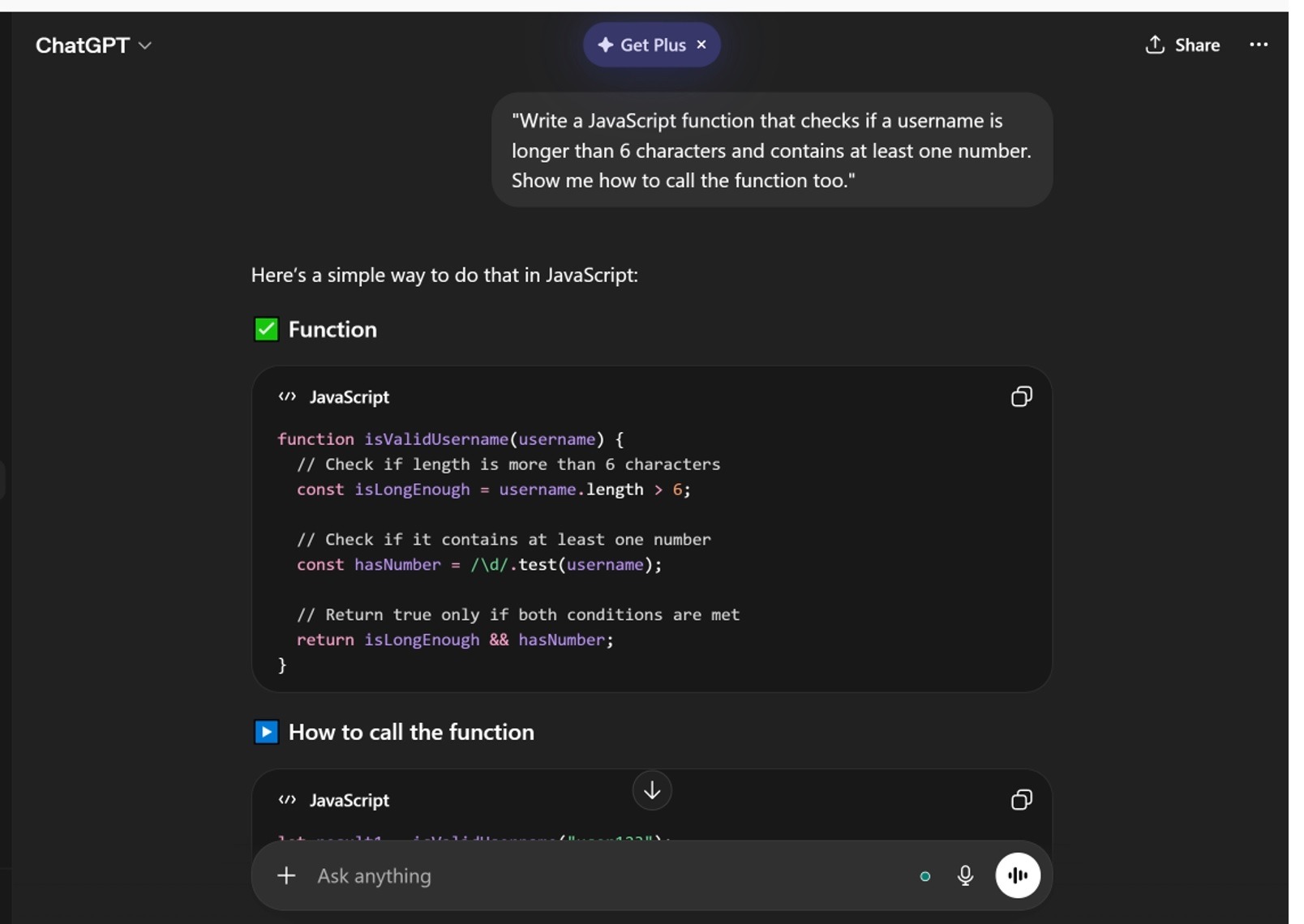
Example prompt:
“Write a JavaScript function that checks if a username is longer than 6 characters and contains at least one number. Show me how to call the function too.”
One important habit: don’t just copy and paste the code. Read through it line by line. Try to understand what each part does. If anything is unclear, ask ChatGPT to explain that specific line.
4. Reviewing and Improving Your Code
Once you’ve written something yourself, you can ask ChatGPT to look it over and suggest improvements. This is one of the most underused features for beginners.
Example prompt:
“Here’s a Python function I wrote: [paste code]. It works, but I want to know if there’s a cleaner or more efficient way to write it. Point out any issues too.”
This builds a habit of code review, which is something every professional developer does daily.
5. Building a Personalized Learning Roadmap
ChatGPT creates a structured learning roadmap based on your current skill level and your end goal. This is far more personalized than any generic tutorial list you’d find online.
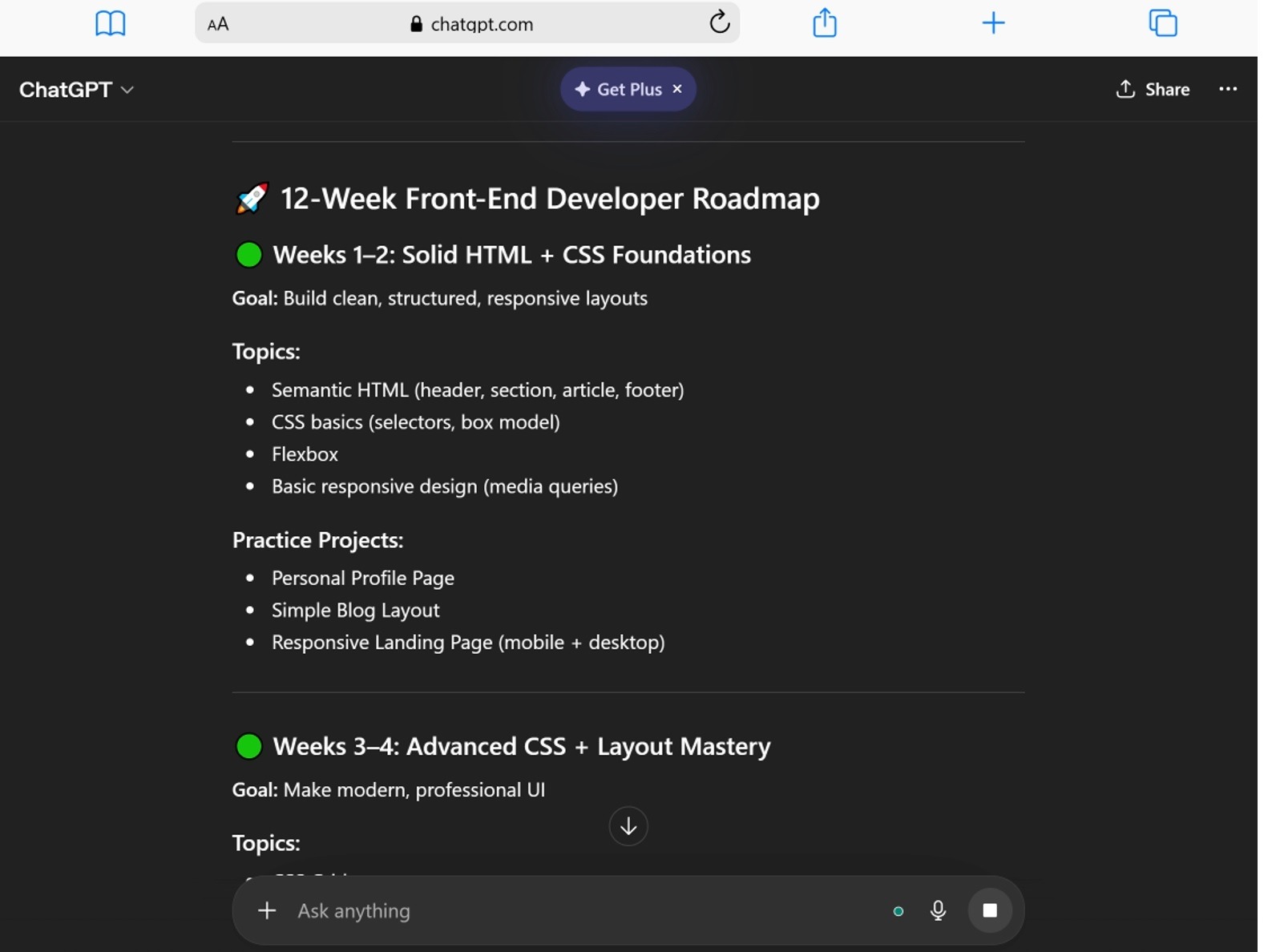
Example prompt:
“I’m a total beginner who wants to become a front-end web developer. I know basic HTML. Create a 12-week learning roadmap with specific topics and suggested practice projects for each week.”
This approach gives you a clear direction, which prevents the common beginner problem of jumping between tutorials and never building anything.
6. Getting Project Ideas That Match Your Level
Projects are the best way to learn coding. Reading about syntax only takes you so far. Building something real is where the skills actually stick.
Example prompt:
“I just finished learning Python basics — variables, loops, functions, and lists. Give me 3 beginner project ideas that use those skills. For each one, give me a short description and 3 hints to help me get started.”
ChatGPT suggestions for beginner Python projects typically include things like a number guessing game, a simple calculator, a to-do list saved to a text file, and a basic quiz app. Each of these uses real logic without requiring libraries or frameworks you haven’t learned yet.
7. Testing Your Knowledge with Quizzes
Most beginners skip self-testing entirely. That’s a mistake. Testing yourself forces your brain to retrieve information, which is how real learning happens.
Example prompt:
“I just finished learning JavaScript array methods like map, filter, and reduce. Build me a 5-question quiz with multiple-choice answers. Walk me through it one question at a time and tell me if I got it right.”
8. Recommending Tools and Libraries for Your Project
When you’re ready to build something bigger, you need to know what tools to use. ChatGPT recommends the right frameworks, libraries, and databases based on what you’re trying to build.
Example prompt:
“I want to build a web app that lets users track their daily water intake. I’m comfortable with basic JavaScript. What technologies should I use for the frontend and backend? Keep it simple and beginner-friendly.”
What Is Vibe Coding and How Do You Use ChatGPT for It?
Vibe coding is an approach to software development where you describe what you want to build in plain English and use AI tools like ChatGPT to generate most of the code for you, iterating quickly until the result feels right.
The term was coined by Andrej Karpathy, former AI researcher at OpenAI and Tesla. The idea is simple: instead of writing every line of code from scratch, you describe the feature you want, review what ChatGPT gives you, test it, and keep refining. It’s a fast, low-barrier way to build working software.
How Using ChatGPT for Vibe Coding Works in Practice
Here’s a real example of using ChatGPT for vibe coding to build a simple webpage:
Step 1: Start with a broad request
“Build me a simple webpage with a dark background, a centered title that says ‘My Portfolio’, and 3 card sections for projects.”
Step 2: Run the code in your browser and see what you get.
Step 3: Refine based on what you see
“The cards are too close together. Add more spacing between them. Also make the title font size bigger — around 48px.”
Step 4: Keep going until it looks the way you want.
This is vibe coding. You’re directing the AI rather than writing every line yourself. The skills you build from reviewing, testing, and adjusting the output are still real coding skills. You learn what CSS properties control spacing, why font-size works the way it does, and how HTML structure holds a page together.
That said, vibe coding works best when you have some foundational understanding. If you use it to skip learning entirely, you’ll eventually hit a wall when something breaks and you have no idea where to start looking. Use it as an accelerator, not a replacement for the basics.
Is Vibe Coding Suitable for Beginners?
It can be, as long as you follow one rule: always try to understand the code ChatGPT gives you before moving on. Ask it to explain the parts you don’t recognize. Over time, you’ll find that you recognize more and more without having to ask, which means you’re actually learning.
10 Copy-Paste ChatGPT Prompts for Coding Beginners
Here are 10 specific prompts you can use right now:
- “Explain what a variable is in Python and show me 3 different examples of using one.”
- “I’m getting a ‘NameError: name is not defined’ in Python. Here’s my code: [paste]. Tell me why this happens and how to fix it.”
- “Teach me how for loops work in JavaScript. Make it interactive and ask me questions as we go.”
- “I know Python basics. What should I learn next if I want to build web apps with Python?”
- “Write a Python function that takes a name as input and prints ‘Hello, [name]! Welcome.’ Test it with 3 different names.”
- “Review my code and tell me what I could improve: [paste your code].”
- “Give me a beginner HTML project I can build in one afternoon. Include the full brief and 3 hints.”
- “Quiz me on CSS basics — 5 questions, one at a time. Wait for my answer before giving the next question.”
- “I want to build a simple budget tracker app. I know HTML, CSS, and basic JavaScript. Walk me through it step by step.”
- “What’s the difference between a function and a method in Python? Give me a code example of each.”
Common Mistakes Beginners Make When Using ChatGPT for Coding
Beginners make 4 main mistakes with ChatGPT for coding: using vague prompts, copying code without understanding it, not testing the output, and using it to skip learning instead of support it.
Mistake 1: Asking Vague Questions
“Fix my code” tells ChatGPT almost nothing. Include the error message, the language, what the code is supposed to do, and what it’s actually doing instead. Specific questions get specific answers.
Mistake 2: Copy-Pasting Without Reading
This is the most common trap. You get code that works, paste it in, move on, and understand nothing. When something breaks later, you’re lost. Take 5 extra minutes to read each line. Ask ChatGPT to explain anything you don’t recognize.
Mistake 3: Not Testing the Code
ChatGPT does not run your code. It generates based on what it was trained on. Errors slip through. Always run the code yourself in your editor before trusting it. When it breaks — and sometimes it will — that’s actually a great learning moment. Debug it using the prompts in this guide.
Mistake 4: Using It as a Shortcut Instead of a Learning Tool
If you ask ChatGPT to build a full project for you from start to finish without being involved, you end up with a project you can’t explain or maintain. Future employers will ask you to walk through your code. If it all came from copy-pasting AI output you never read, you’ll struggle. Use ChatGPT to help you build things — not to build things for you.
How ChatGPT Compares as a Learning Tool
| Learning Resource | Cost | Personalization | Available 24/7 | Adjusts to Level |
|---|---|---|---|---|
| ChatGPT (Free) | Free | High | Yes | Yes |
| YouTube Tutorials | Free | Low | Yes | No |
| Bootcamp | $5,000–$15,000 | Medium | No | Partially |
| Private Tutor | $40–$150/hour | Very High | No | Yes |
| Documentation | Free | None | Yes | No |
ChatGPT sits in a strong position — it’s free, available at any hour, adjusts to your exact question, and goes as deep as you need. The one thing it can’t replace is real human feedback on your work over time, but for day-to-day learning and problem-solving, it’s one of the most useful tools you can have.
If you’re wondering whether upgrading your ChatGPT account is worth it for learning to code, check out this comparison of ChatGPT Go, Plus, and Pro plans to see which features matter most at your stage.
How to Build a Real Learning Habit with ChatGPT
A consistent daily practice with ChatGPT builds stronger coding skills than long irregular sessions. Here’s a simple structure you can follow:
- 15 minutes — Learn one new concept using the “teach me step by step” prompt
- 20 minutes — Try writing the code yourself without ChatGPT’s help
- 10 minutes — Paste your code back in and ask ChatGPT to review it
- 5 minutes — Fix any issues it points out and understand why each fix works
That’s 50 minutes a day. After 30 days at that pace, you’ll have covered a substantial amount of ground — and more importantly, you’ll actually understand what you’ve built.
If you’re also using ChatGPT for studies beyond coding, this ChatGPT tutorial for students covers how to apply similar strategies across other subjects.
My Experience Using ChatGpt To Create Online Applications
I started using ChatGPT to help me build simple online tools, and honestly, it made things much easier than I expected. At first, I only knew basic HTML, so creating something interactive felt a bit out of reach. But with ChatGPT, I could ask for small features step by step, and it would guide me or even generate code that I could test right away. It felt more like learning by doing instead of just reading tutorials.
I experimented with different mini projects like a calculator, a word counter, and even a simple image editor. Some tools were really basic, but they helped me understand how JavaScript works in real situations. For example, building a Pomodoro timer taught me about timing functions, while a notes app helped me learn how local storage works in the browser. Each small project added something new to my skills.
What I like most is that I can tweak or improve the code anytime. If something breaks or doesn’t look right, I just ask ChatGPT again and try a different approach. I also tried building things like a color code generator and a password generator, which pushed me to think more about user input and logic. It’s not always perfect, but it’s a fast way to learn and experiment.
In my experience, using ChatGPT feels like having a coding partner that’s always available. It doesn’t replace learning the basics, but it definitely helps speed things up and keeps me motivated to build more projects.
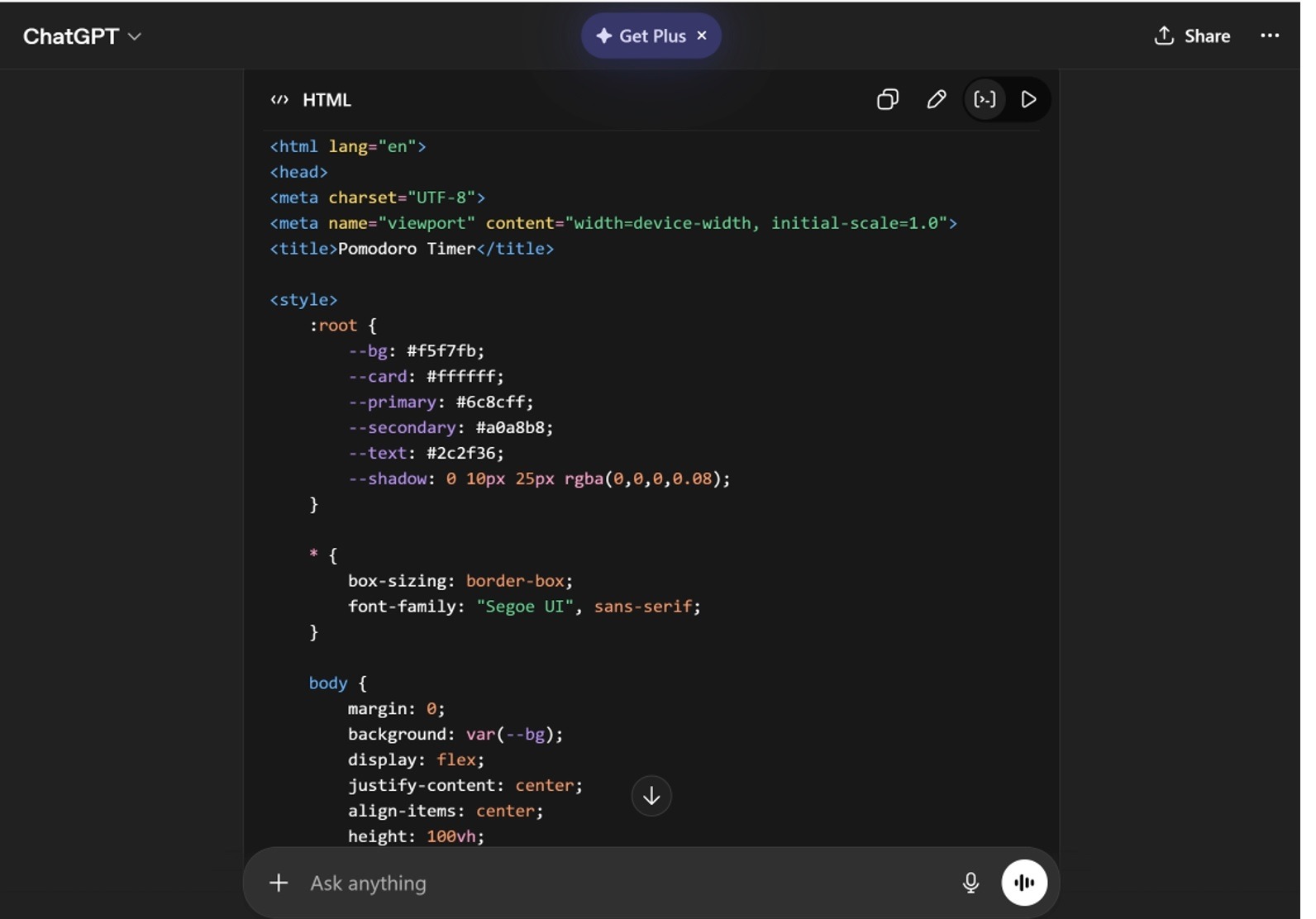
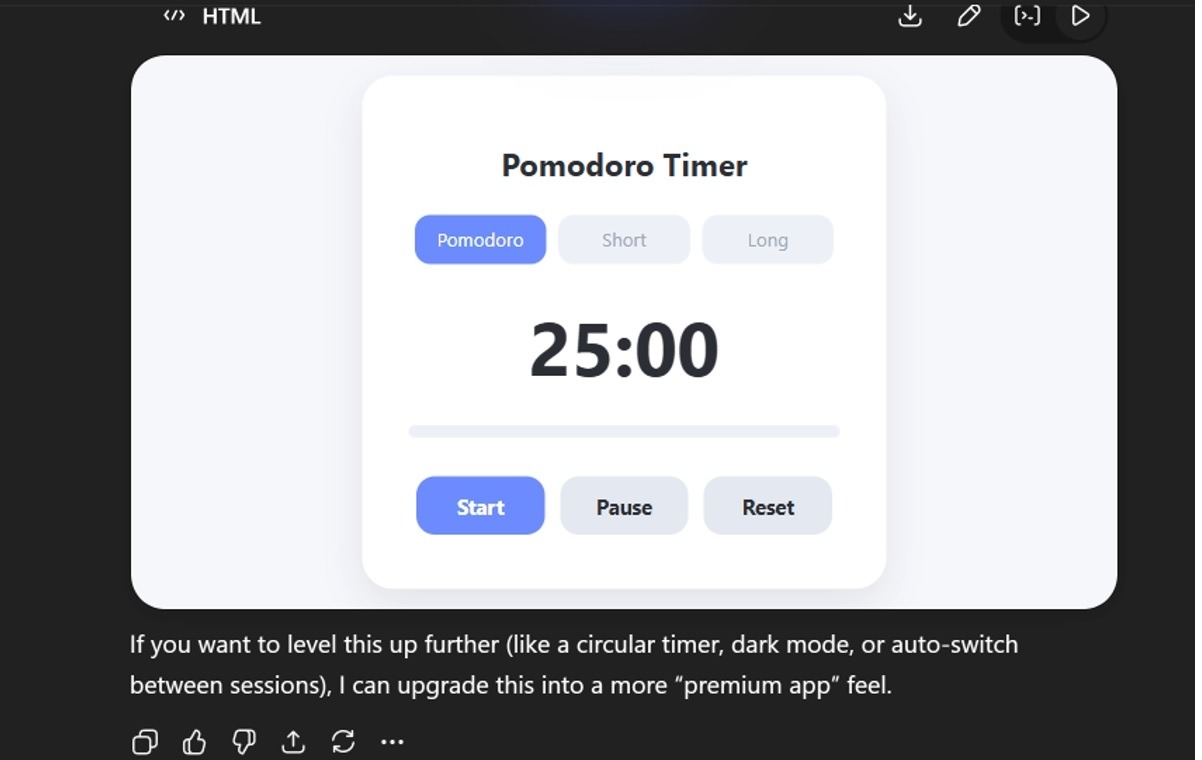
Here’s my personal prompt to make Pomodoro Timer:
Create a modern and clean Pomodoro Timer using HTML, CSS, and JavaScript in a single file (one code block). The design should have good UI/UX, not just basic functionality.
Requirements:
- Timer modes: Pomodoro (25 min), Short Break (5 min), Long Break (15 min)
- Start, Pause, and Reset buttons
- Display countdown in mm:ss format
- Highlight active mode (Pomodoro / Break)
- Smooth transitions or subtle animations
- Play a simple alert sound when time is up
UI/UX:
- Clean, minimal, and modern design
- Centered layout with good spacing
- Rounded buttons and soft shadows
- Responsive (works on mobile and desktop)
- Use a pleasant color palette (not too bright)
- Show visual feedback when buttons are clicked
- Optional: progress bar or circular timer animation
Technical:
- Use only vanilla HTML, CSS, and JavaScript (no frameworks)
- Write everything in a single file
- Code should be clean and easy to understand for beginners
- Add comments to explain important parts
Make sure the final result looks like a real product, not just a basic demo.
Here’s the result:
FAQ: How to Use ChatGPT for Coding Beginners
Can ChatGPT write code for me automatically?
Yes — ChatGPT generates working code based on your description. Give it the language, what the code should do, and any specific requirements, and it will produce a usable starting point. The quality improves significantly when your prompt includes specific details rather than vague instructions.
Is ChatGPT free for coding practice?
Yes — The free version of ChatGPT gives you access to GPT-4o, which handles most coding tasks well for beginners. You can explain concepts, debug errors, generate code, and get project ideas without paying anything.
Can a complete beginner learn to code using only ChatGPT?
Yes, but with a caveat — ChatGPT covers concept explanations, code generation, debugging, quizzes, and project ideas effectively for beginners. However, it works best alongside some hands-on practice in a real code editor. Using it without ever running your own code limits how much you actually learn.
Does ChatGPT make coding mistakes?
Yes — ChatGPT sometimes produces code with errors, especially in complex or context-heavy situations. It does not run the code before giving it to you, so bugs slip through. Always test everything in your own editor. When something breaks, that’s a good opportunity to practice debugging.
Is vibe coding a good approach for beginners?
Yes, with boundaries — Vibe coding helps beginners build real things faster by describing what they want in plain English and letting ChatGPT generate the code. It builds momentum and confidence early on. The risk is skipping foundational understanding entirely, so always take time to read and understand the code before moving on.
Should I use ChatGPT Plus for coding as a beginner?
It depends — The free plan is sufficient for most beginner coding tasks. ChatGPT Plus becomes more useful when you’re working on longer, more complex projects that need larger context windows and faster response times. If you’re just starting out, the free plan is a practical first step.
Can I use ChatGPT to learn multiple programming languages at once?
Technically yes, but it’s not recommended — ChatGPT supports Python, JavaScript, Java, C++, Ruby, Go, SQL, HTML, CSS, and many others. For beginners, starting with one language — typically Python or JavaScript — and going deep builds a stronger foundation than spreading attention across several at once.
Conclusion
Using ChatGPT for coding gives beginners a real advantage — faster explanations, instant debugging help, personalized learning roadmaps, and a low-barrier path into building real projects. The key is using it the right way. Give it specific prompts, read the code it gives you, test everything yourself, and treat it as a study partner rather than a replacement for actual learning.
Whether you’re asking it to explain a for loop, debug a TypeError, walk you through building your first app, or help you explore vibe coding by building something through natural language instructions, ChatGPT meets you where you are. That’s what makes it genuinely useful for beginners.
Start with one concept today. Open a new chat, paste in your starter prompt with your language and skill level, and ask your first question. The learning happens one prompt at a time.
If you’re just getting started with the platform itself, check out how to use ChatGPT for beginners to understand the basics before diving into coding-specific use cases.
You May Also Like
 AI Tool Reviews
How to Use ChatGPT for Beginners: The Complete Step-by-Step Guide (2026)
 ChatGPT
How to Use ChatGPT at Work: Productivity Tips That Actually Save You Hours
 ChatGPT
How to Use ChatGPT Best Prompts
 AI for Coding
The Best AI Models for Developers in 2026: An Honest, Hands-On Look at What Actually Works
 AI Models
GPT-5.5 vs Claude Opus 4.7 vs Gemini 3.1 Pro: Real Benchmark Results Compared
 ChatGPT