
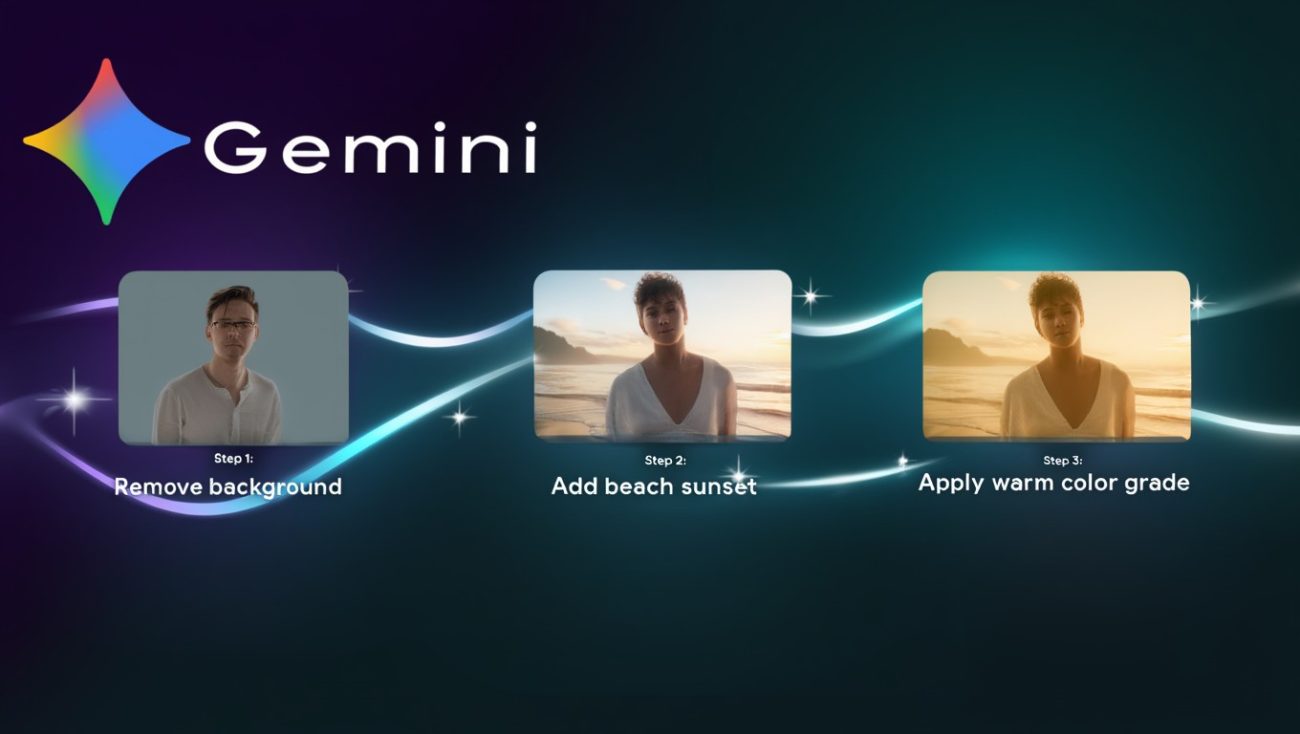
The Gemini AI 3D figure trend has exploded across TikTok, Instagram, and X (formerly Twitter) since early 2025 until now, 2026. This viral phenomenon involves using Google’s Gemini AI—specifically the Nano Banana image generation model—to transform ordinary photos into stunning 3D collectible figurines. Users upload selfies, pet photos, or character images and apply specialized prompts that convert these flat images into realistic toy-style figures complete with packaging, display bases, and studio lighting.
The trend gained momentum when Google officially promoted the capability through social media demonstrations. Unlike previous AI toy trends that required complex software or multiple tools, Gemini’s approach works through simple text prompts and image uploads. The results look remarkably professional—figures appear to sit on acrylic stands inside clear plastic packaging, mimicking the style of Funko Pops, action figures, and designer collectibles.
What makes this trend particularly engaging is its accessibility. You don’t need 3D modeling skills, expensive software, or hours of manual work. With the right Gemini AI 3D model prompt, you can generate a polished figurine image in under 30 seconds. The outputs work perfectly for social media sharing, profile pictures, digital art portfolios, and even as references for actual 3D printing projects.
Why Are Creators Obsessed with Gemini 3D Figurine Generation?
Creators have embraced the Gemini 3D figurine trend for several compelling reasons that go beyond simple entertainment value. The primary attraction lies in the combination of high-quality output, extreme ease of use, and the emotional appeal of seeing yourself or loved ones transformed into collectible art.
First, the visual quality stands out. Nano Banana Pro (Gemini 3 Pro Image) renders text with 75-80% accuracy, maintains consistent character features across multiple images, and handles complex lighting scenarios that make figures look genuinely three-dimensional. The model understands physical properties like shadows, reflections, and material textures—creating glossy vinyl surfaces, matte plastic finishes, or metallic armor details depending on your prompt specifications.
Second, the workflow requires zero technical expertise. Traditional 3D modeling demands knowledge of software like Blender, Maya, or ZBrush—programs with steep learning curves that take months to master. Gemini eliminates this barrier entirely. You simply upload a photo, type a descriptive prompt, and receive a finished image. This democratization of 3D-style art creation has opened the door for millions of casual users who previously couldn’t participate in digital figure design.
Third, the social sharing aspect drives engagement. Figurine images perform exceptionally well on visual platforms because they tap into nostalgia (reminiscent of childhood toys) while showcasing cutting-edge AI technology. Posts tagged with #3DFigurine, #AICollectible, or #NanoBanana regularly achieve viral status, with some creators building entire content strategies around generating and sharing these AI figures.
Finally, the trend connects to practical applications. Many users export their Gemini-generated figurine images as references for actual 3D printing projects, custom merchandise design, or character development for games and animations. The AI serves as a rapid prototyping tool that bridges imagination and physical creation.
How Does Gemini AI Actually Generate 3D-Style Figures?
Understanding the technical process behind Gemini’s 3D figure generation helps you craft better prompts and achieve more consistent results. Gemini AI doesn’t actually create true 3D models with geometry, vertices, and meshes that you could rotate or print directly. Instead, it generates highly convincing 2D images that simulate the appearance of 3D objects through advanced photorealistic rendering techniques.
The magic happens through Gemini 3 Pro Image (also called Nano Banana Pro), which builds upon Google’s Gemini 3 multimodal architecture. This system uses a two-stage generation process: first, it creates intermediate “thought images” that refine composition and logical consistency, then it produces the final polished output. This iterative approach allows the model to correct errors, adjust spatial relationships, and ensure all visual elements work together harmoniously before you see the result.
When you upload a reference photo and request a 3D figurine style, Gemini analyzes the facial features, proportions, and distinctive characteristics of your subject. It then applies the visual language of collectible toys—exaggerated heads, stylized bodies, specific material properties, and packaging elements—while maintaining recognizability. The model draws upon its training data, which includes millions of product photography images, toy catalog photos, and 3D renderings, to understand what makes something look like a “figurine” versus a regular photograph.
The system excels at several specific technical tasks:
- Material simulation: It accurately renders plastic gloss, vinyl shine, fabric textures, and metallic surfaces
- Lighting control: It places studio lighting, creates soft shadows, and generates reflections that suggest three-dimensional form
- Packaging design: It generates realistic blister packs, cardboard backing, and display bases that complete the collectible aesthetic
- Character consistency: It maintains facial features and identifying characteristics across different poses and styles
Importantly, Gemini 3 Pro Image can process up to 14 reference images simultaneously (depending on the platform), allowing you to blend multiple source materials into a single cohesive figurine design. This multimodal capability means you could combine a photo of your face, an image of your favorite outfit, and a reference of a specific toy style to create something truly unique.
What Are the Best Gemini AI 3D Model Prompts for Creating Figurines?
Crafting effective Gemini AI 3D model prompts requires understanding the specific elements that trigger the model’s figurine-generation capabilities. The most successful prompts include five core components: subject definition, style specification, material description, lighting direction, and packaging context. Missing any of these elements often results in generic images that lack the distinctive collectible aesthetic.
Here are the most effective prompt formulas that creators are using successfully in 2026, organized by figurine style:
1. Classic Collectible Figurine Prompt
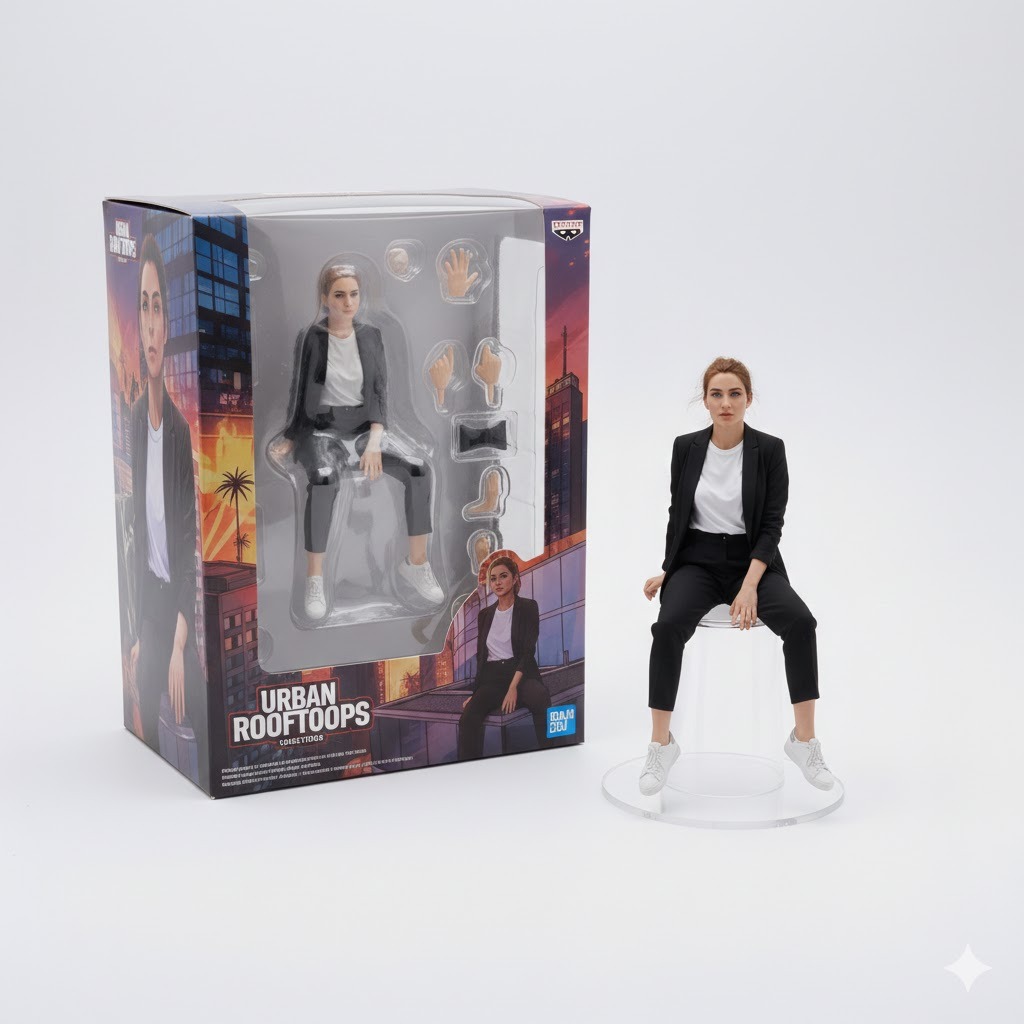
“Turn this photo into a highly detailed 3D collectible figurine, standing on a round clear acrylic base, with professional studio lighting and sharp focus. Add realistic toy packaging with a clear plastic blister pack window and colorful cardboard backing. Product photography style, 8K resolution, photorealistic plastic texture, studio white background.”
This prompt works because it specifies the complete visual context of a real collectible toy. The mention of “acrylic base,” “blister pack,” and “cardboard backing” triggers Gemini’s understanding of commercial toy photography conventions.
2. Funko Pop Style Prompt
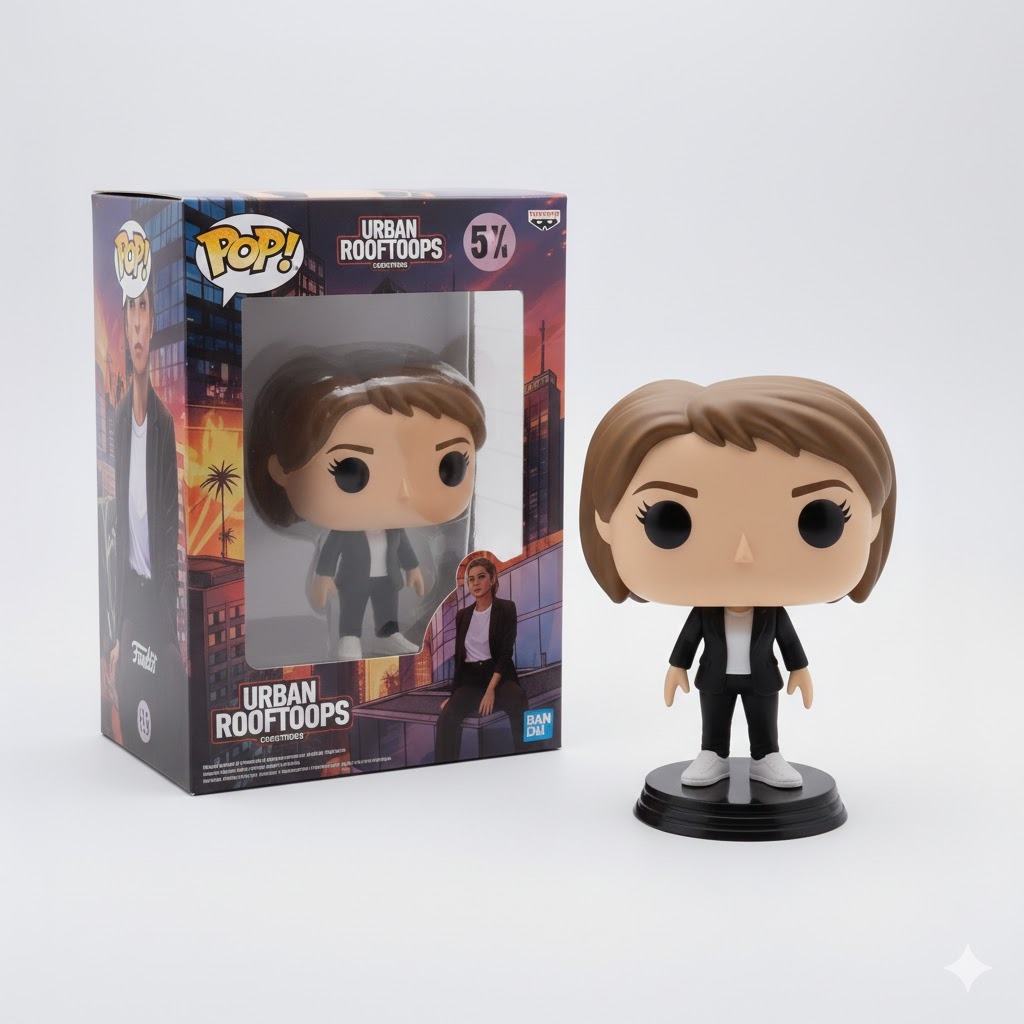
“Create a Funko Pop vinyl figurine of this person, oversized head with large expressive eyes, small body, glossy vinyl finish, standing on a black circular display base. Include the classic Funko box packaging with the clear window showing the figure. Cute, stylized, collectible toy aesthetic, product shot lighting.”
Funko Pops have a very specific visual language—exaggerated head-to-body ratios, simplified facial features, and distinctive packaging. This prompt leverages those recognizable elements to guide the generation toward the desired aesthetic.
3. Superhero Action Figure Prompt
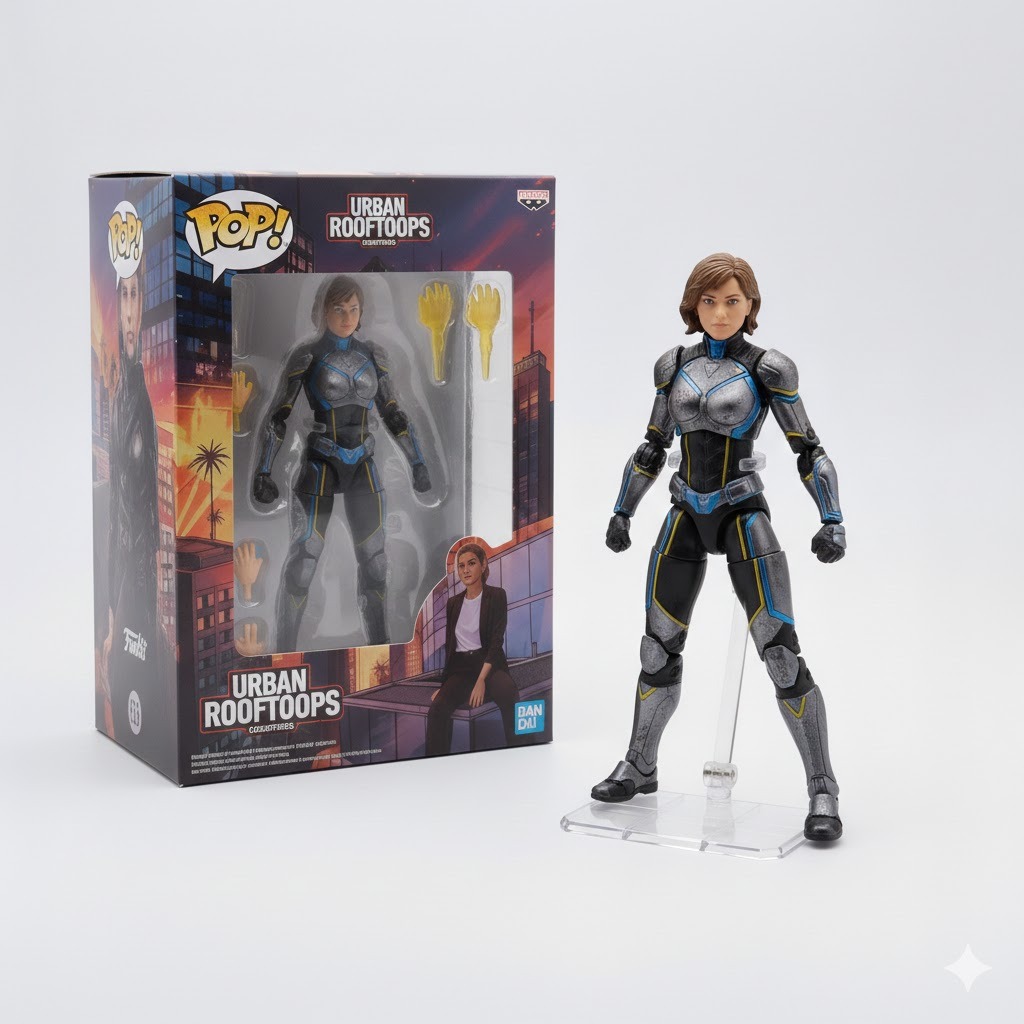
“Transform this photo into a Marvel Legends style superhero action figure, dynamic heroic pose, detailed metallic armor and fabric costume textures, multiple points of articulation visible, packaged in collector-friendly window box with comic book style graphics. Dramatic lighting, toy photography, highly detailed, 8K quality.”
Action figure prompts benefit from referencing established toy lines (Marvel Legends, NECA, McFarlane) because Gemini’s training data includes extensive product photography from these brands. The model understands the specific visual conventions of each line.
4. Anime Figurine Prompt
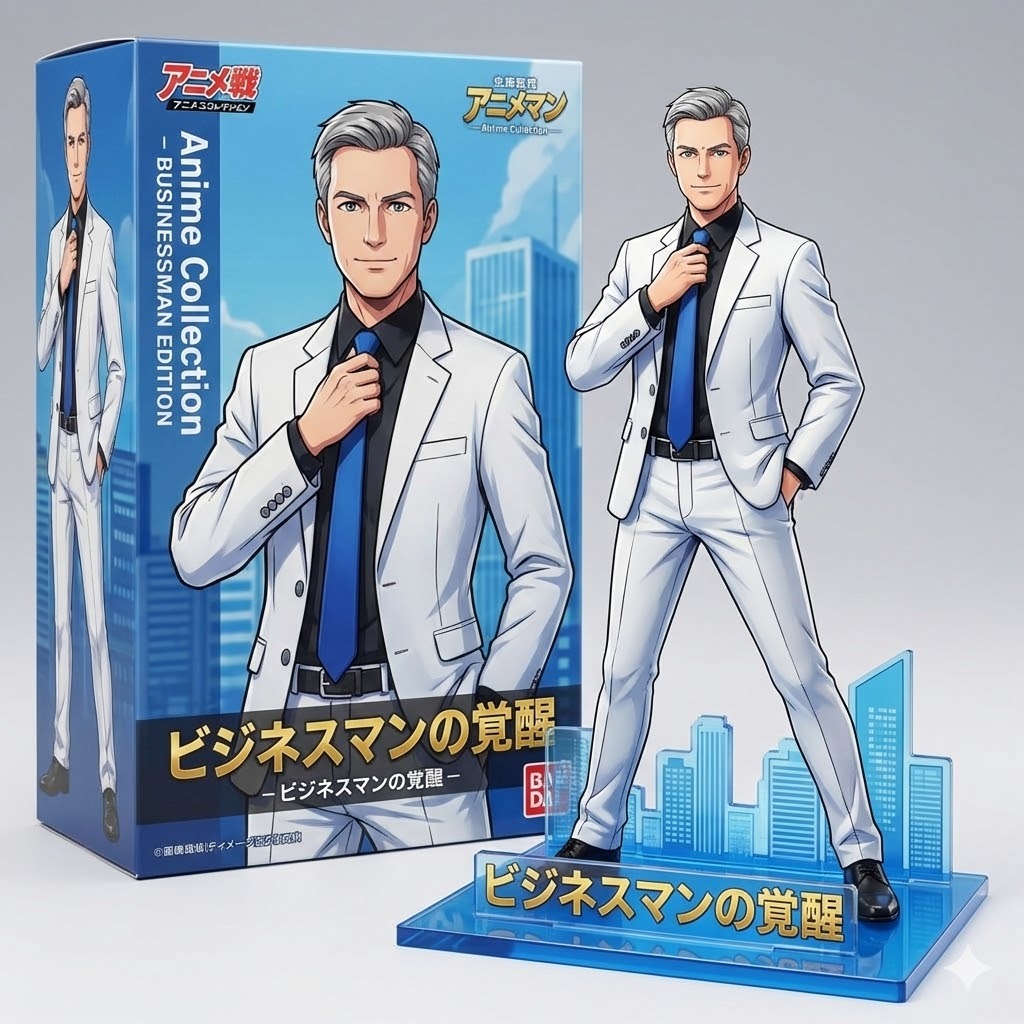
“Make a detailed anime figurine based on this photo, cel-shaded coloring style, glossy PVC plastic texture, dynamic pose on a themed acrylic stand with Japanese text, professional figure photography lighting, includes the original box art packaging with Japanese branding. Vibrant colors, clean shadows, otaku collectible aesthetic.”
Anime figures have distinct characteristics—cel-shading, specific color palettes, and Japanese packaging elements. This prompt incorporates those cultural and stylistic markers for authentic results.
5. Pet Collectible Prompt
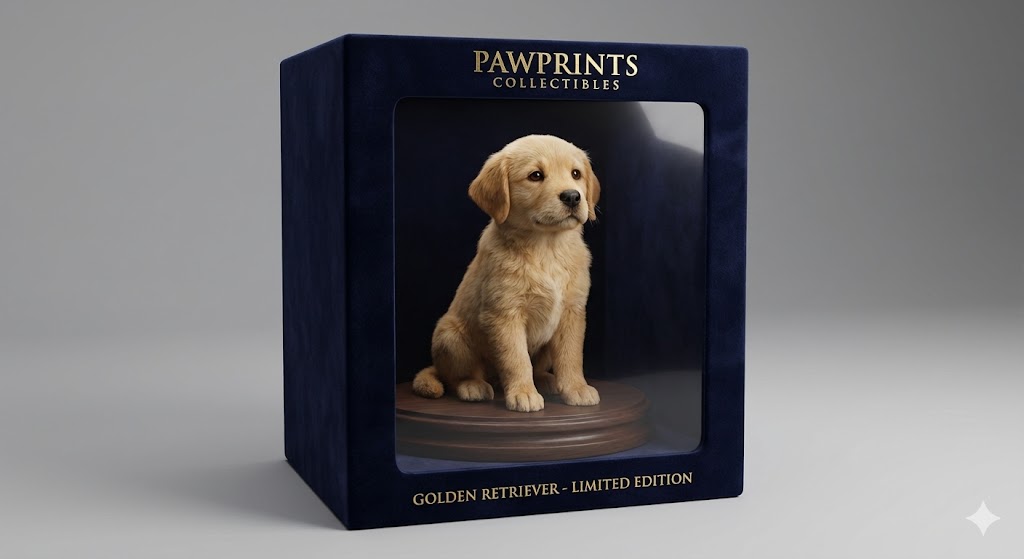
“Turn this pet into a realistic 3D figurine, sitting on a round display stand, with accurate fur texture simulation, cute expressive eyes, packaged in premium pet collectible box with clear viewing window. Soft studio lighting, product photography, toy packaging mockup, high detail, photorealistic materials.”
Pet figurines require special attention to texture (fur, scales, feathers) and expression. This prompt emphasizes those elements while maintaining the collectible context.
6. Blender Workstation Showcase
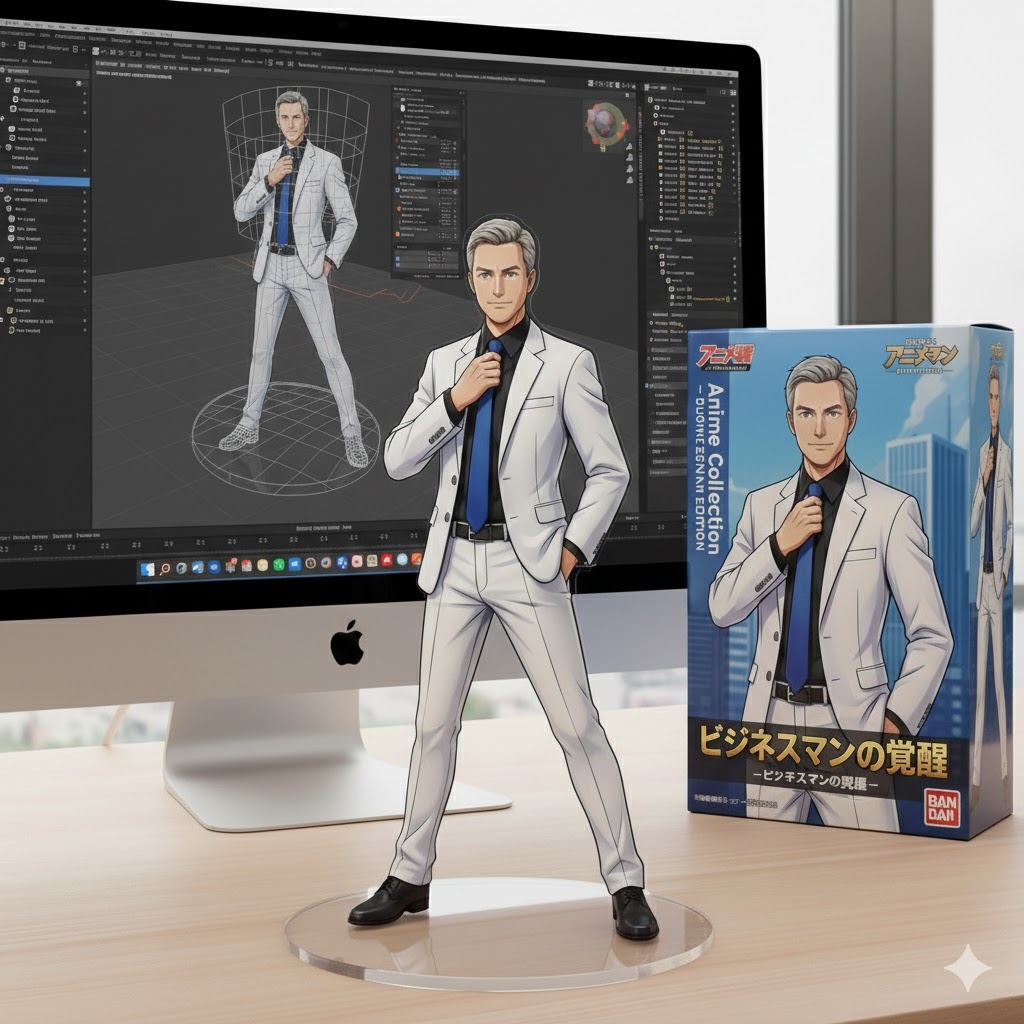
”Using the nano-banana model, design a hyper-realistic 1/7 scale commercialized figure of the illustrated character. Position the figure on a modern walnut computer desk, mounted on a clear hexagonal acrylic base without text. On the iMac screen, display the Blender modeling process with visible wireframes and shader nodes. Beside the monitor, place a TAKARA-TOMY-inspired toy packaging box featuring original artwork.”
7. Artisan Studio Workbench
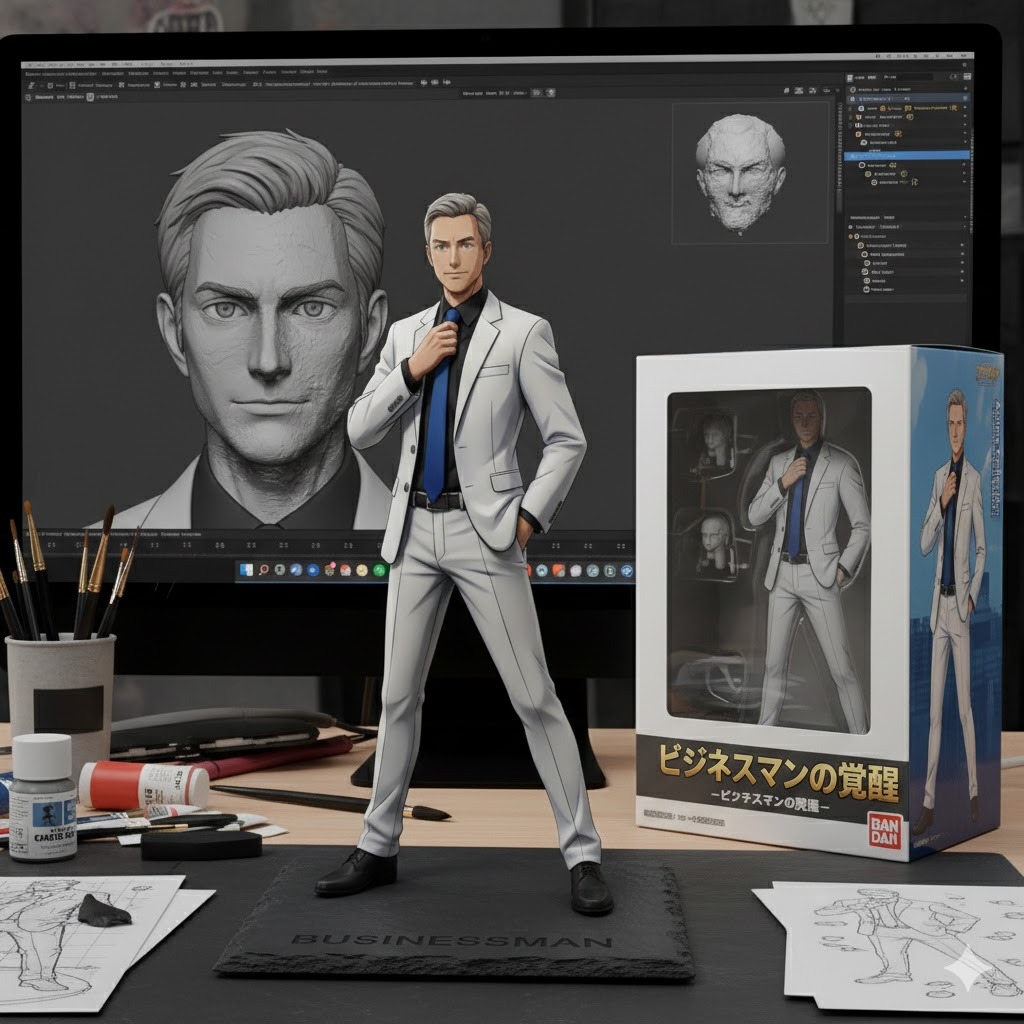
”Create a 1/6 scale commercialized figurine of the characters in a photorealistic style within a cluttered artist’s studio. The figurine stands on a rectangular slate base engraved with the character’s name. Behind it, a Wacom Cintiq screen shows the ZBrush sculpting process with dynamic brush strokes visible. On the workbench, place an opened BANDAI-style box with the figure’s prototype visible inside the packaging.”
8. Convention Booth Presentation

”Design a 1/7 scale commercialized figure for a trade show environment. Place the figure on a branded podium with a rotating motorized base. Behind it, a large curved monitor displays the Maya modeling timeline from blockout to final render. Flanking the figure are stacked retail boxes in TAKARA-TOMY style, creating a commercial product launch atmosphere.”
9. Photography Studio Setup
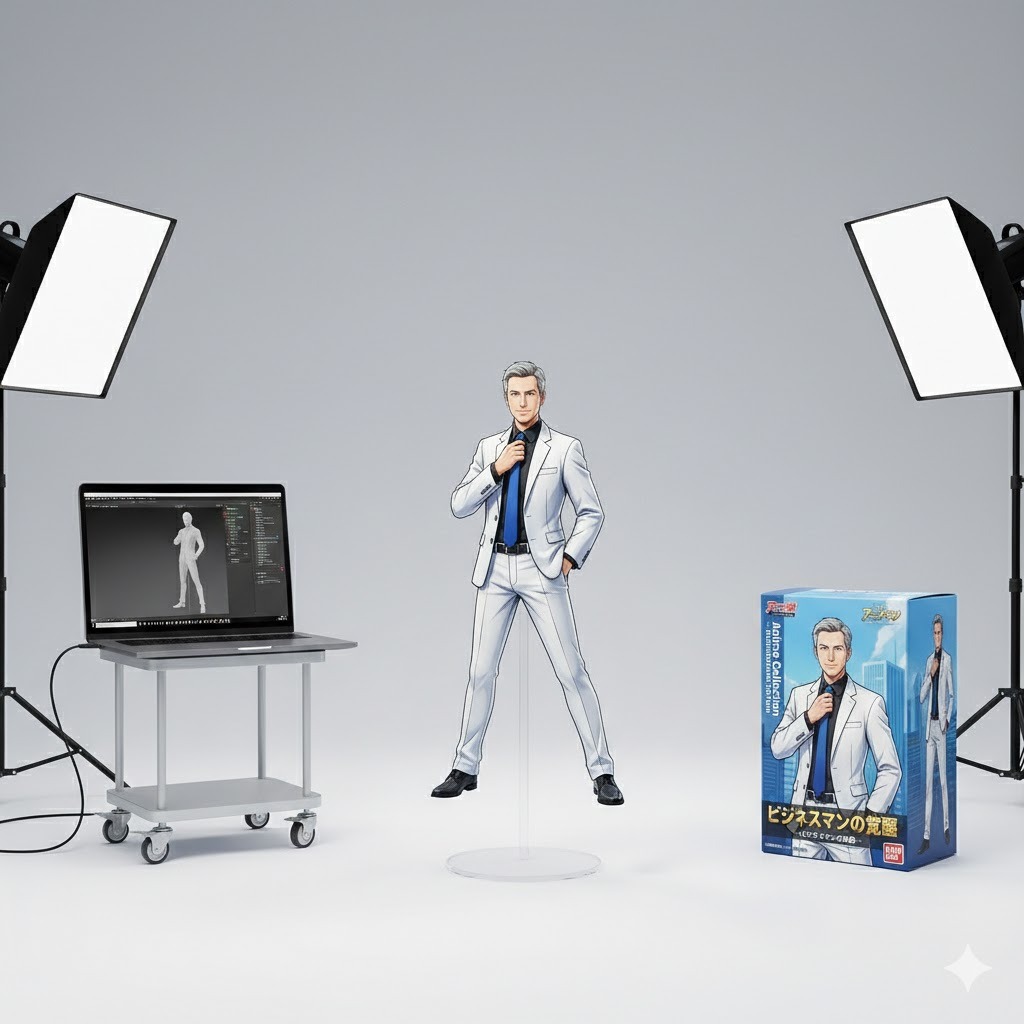
”Create a 1/5 scale commercialized figure in a professional photo studio. The figure poses on an invisible clear support against a seamless white cyclorama. A tethered laptop screen shows the Cinema 4D texturing process with UV maps visible. Nearby, a pristine unopened collector’s box with embossed artwork awaits its reveal shot.”
10. Museum Diorama Exhibit
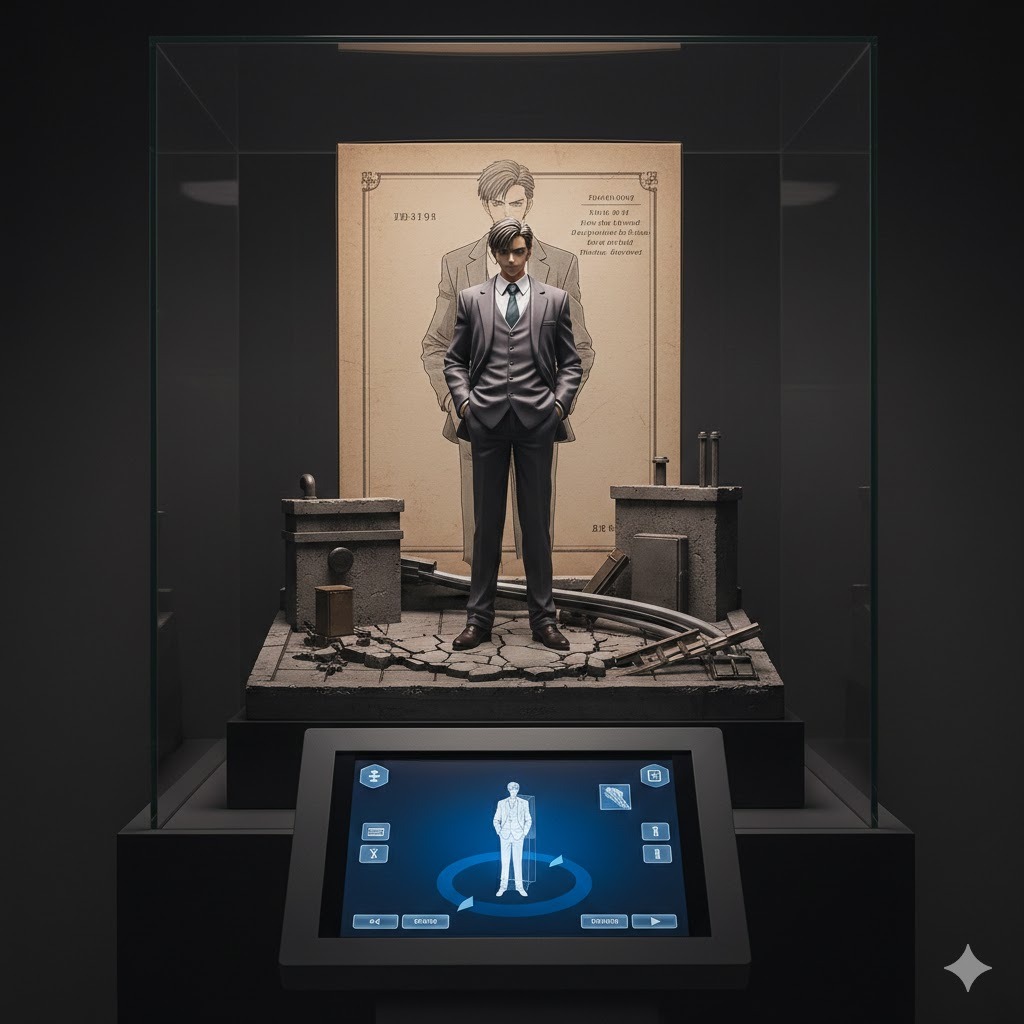
”Develop a 1/4 scale commercialized figure in a public exhibition space. The figure dominates a themed diorama base depicting the character’s environment (no acrylic stand). An interactive touchscreen pedestal allows visitors to rotate the digital 3D model shown on screen. Behind glass, archival packaging with historical annotations preserves the original release artwork.”
How Can You Optimize Your Gemini 3D Prompts for Better Results?
Getting consistent, high-quality 3D figurine outputs from Gemini requires moving beyond basic prompts and applying advanced prompt engineering techniques. The difference between amateur and professional-looking results often comes down to specificity, reference quality, and understanding the model’s reasoning process.
Here are the optimization strategies that produce the best outcomes:
Use Precise Technical Photography Terms
Gemini 3 Pro Image responds strongly to professional photography vocabulary. Instead of saying “good lighting,” specify “three-point studio lighting with soft key light and fill light.” Rather than “high quality,” use “8K resolution, sharp focus, f/8 aperture depth of field.” These technical terms activate the model’s training on professional product photography and yield more polished results.
Control the Composition with Camera Angles
Specify exactly how you want the figurine framed:
- “Eye-level straight-on shot” for standard product views
- “Low angle heroic shot” for dynamic superhero poses
- “45-degree three-quarter view” for showing depth and dimension
- “Top-down flat lay” for packaging-focused images
Camera angle specifications help Gemini understand the spatial presentation of your 3D figure.
Define Material Properties Explicitly
Different collectible types use distinct materials, and Gemini can render these accurately when prompted correctly:
- Vinyl figures: “glossy vinyl texture, slight surface reflections, smooth injection-molded plastic appearance”
- Resin statues: “matte resin finish, subtle surface texture, premium feel”
- Metallic figures: “chrome-plated metal finish, high reflectivity, polished surface”
- Fabric elements: “realistic cloth texture, fabric folds, soft material appearance”
Include Negative Space and Background Context
Figurines exist in context—usually against clean backgrounds that emphasize the product. Specify “pure white seamless background,” “gradient gray studio backdrop,” or “soft shadow on white surface” to create professional product photography aesthetics. Avoid vague terms like “nice background” that leave too much to the model’s interpretation.
Leverage Multi-Image Input for Complex Requests
When available (Gemini 3 Pro supports up to 14 images), upload multiple references:
- Primary subject photo (the person or pet being transformed)
- Style reference (an image of the specific toy line you want to emulate)
- Pose reference (showing the desired body positioning)
- Packaging reference (demonstrating the box style you prefer)
Clearly label each image’s purpose in your prompt: “Use Image 1 for the character likeness, Image 2 for the Funko Pop style reference, Image 3 for the pose, and Image 4 for the packaging design.”
Apply the “Chain of Refinement” Technique
Rather than expecting perfect results from a single prompt, use an iterative approach:
- First generation: Create the basic figurine with core prompt
- Second generation: Upload the first result and request specific modifications (“Make the lighting more dramatic, add metallic armor details, change the base to hexagonal shape”)
- Third generation: Final polish with packaging elements and text additions
This chain-of-reasoning approach allows you to build complexity gradually rather than overwhelming the model with too many requirements at once.
What Is the Difference Between Gemini Fast and Pro for 3D Figure Generation?
Choosing the right Gemini model significantly impacts your 3D figurine results, workflow speed, and costs. Gemini 3 Fast and Gemini 3 Pro serve different purposes in the 3D figure creation pipeline, with Fast prioritizing speed and cost-efficiency while Pro delivers maximum reasoning depth and multimodal control.
Understanding these differences helps you select the appropriate tool for your specific figurine project:
Performance Comparison for 3D Figure Tasks
| Feature | Gemini 3 Fast | Gemini 3 Pro |
|---|---|---|
| Generation Speed | 3x faster than previous Pro models | Baseline speed (slower) |
| Image Quality | 90-95% of Pro quality | Maximum quality and detail |
| Text Rendering Accuracy | ~75% accuracy on packaging text | ~80% accuracy on complex text |
| Multi-Image Input | Limited (typically 6 images) | Up to 14 images |
| Reasoning Depth | 4 adjustable thinking levels | 2 thinking levels (low/high) |
| Cost per 1M Tokens | $0.50 input / $3.00 output | $2.00 input / $12.00 output |
| Best Use Case | Rapid prototyping, batch generation | Final production, complex multi-image blends |
When to Choose Gemini 3 Fast for 3D Figures
Fast good in scenarios where you need to generate multiple variations quickly or when you’re experimenting with different figurine styles. For social media content creators who need to produce several figurine options before selecting the best one, Fast’s 3x speed advantage and 75% lower cost make it the practical choice.
Specific Fast advantages include:
- Rapid iteration: Test 10 different prompt variations in the time Pro would take for 3
- Batch processing: Generate figurines for entire groups (family photos, team pictures) affordably
- Real-time creativity: The faster response keeps creative momentum flowing during brainstorming sessions
- Coding integration: If you’re building automated figurine generation tools, Fast’s speed and SWE-bench Verified performance (78% vs Pro’s 76%) make it technically superior for development workflows
When to Choose Gemini 3 Pro for 3D Figures
Pro becomes essential when quality cannot be compromised or when projects require advanced multimodal capabilities. For professional designers creating portfolio pieces, merchandise developers needing print-ready assets, or artists blending multiple complex references, Pro’s additional reasoning depth justifies the higher cost.
Pro-specific advantages include:
- Maximum image input: Process up to 14 reference images simultaneously for complex character creation
- Superior text rendering: Critical for packaging designs with readable logos and product names
- Advanced reasoning: Better handling of complex spatial relationships in multi-object scenes
- Consistency across generations: More reliable character likeness maintenance across multiple outputs
Hybrid Workflow Strategy
The most effective approach for serious 3D figure creators combines both models strategically:
- Exploration phase: Use Fast with low/medium thinking levels to generate 20-30 quick variations and identify promising directions
- Refinement phase: Select the best 3-5 concepts and regenerate with Pro using high thinking level for maximum quality
- Production phase: For final assets, use Pro with full image input capacity to blend all reference materials
- Scaling phase: If producing multiple similar figures (like a series), return to Fast for cost-effective batch generation using the refined prompt template
This hybrid strategy can reduce costs by 50-70% compared to using Pro exclusively while maintaining premium quality for final deliverables.
How Can You Turn Gemini 2D Images into Actual 3D Models?
While Gemini excels at creating convincing 2D images of 3D figurines, many creators want to take the next step: converting these flat images into actual 3D models with geometry that can be rotated, animated, or 3D printed. This workflow requires combining Gemini’s image generation capabilities with specialized 2D-to-3D conversion tools, creating a pipeline from concept to physical object.
Here’s the complete workflow for transforming Gemini figurine images into real 3D assets:
Step 1: Generate Optimal 2D Source Images with Gemini
The quality of your final 3D model depends entirely on the 2D images you start with. When generating source images for 3D conversion, modify your prompts to emphasize:
- Single viewpoint clarity: “Clean side view, no obstructions, plain background, sharp silhouette”
- Multiple angles: Generate separate images showing front, side, and three-quarter views
- Consistent lighting: Avoid dramatic shadows that obscure form; use “even studio lighting, minimal shadows”
- High resolution: Specify “4K resolution, crisp edges, clear details” for better conversion accuracy
Generate at least 3-4 complementary views of the same figurine concept to provide comprehensive visual information for the 3D reconstruction process.
Step 2: Choose Your 2D-to-3D Conversion Tool
Several AI-powered platforms specialize in converting 2D images to 3D models. The best options in 2026 include:
| Tool | Best For | Price Range | Output Quality |
|---|---|---|---|
| Meshy AI | Quick conversions, hobbyist projects | Free tier available, $15-50/month | Good for simple objects |
| Tripo3D | Character figures, detailed sculpting | $20-80/month | High detail, good topology |
| Sloyd | Game-ready assets, optimization | $10-40/month | Optimized polygon counts |
| NVIDIA GET3D | Professional workflows, textures | Enterprise pricing | Industry-leading quality |
| CSM (Common Sense Machines) | Real-time generation, API access | Usage-based | Fast, moderate quality |
Step 3: Upload and Process Through 2D-to-3D Pipeline
Using Meshy AI as an example (the most accessible option for beginners):
- Upload your Gemini-generated images: Start with the clearest side view or front view
- Select generation mode: Choose “Image to 3D” for single-image conversion or “Multi-View to 3D” if you have multiple angles
- Configure settings: Specify desired polygon count (start with 50K-100K for detailed figurines), texture resolution (2K-4K recommended), and output format (OBJ for compatibility, GLB for web, STL for 3D printing)
- Generate and review: The AI will create a 3D mesh based on the visual information. Review for accuracy, particularly around complex areas like faces, hands, and intricate costume details
- Refine if needed: Most platforms allow iterative refinement or manual editing to correct errors
Step 4: Post-Process in Traditional 3D Software
AI-generated 3D models typically require cleanup before they’re production-ready. Import your model into Blender (free), ZBrush (for sculpting refinements), or Maya (for professional animation pipelines) to:
- Retopology: Simplify messy geometry into clean, animation-friendly topology
- UV mapping: Ensure texture coordinates are properly laid out for painting or material application
- Detail enhancement: Add fine details that AI might have missed, such as surface imperfections or fabric textures
- Scale and proportion: Verify the model matches real-world collectible figure dimensions (typically 1:12 or 1:6 scale for action figures)
Step 5: Output for Your Intended Use
Different end uses require different export settings:
- 3D printing: Export as STL or OBJ with manifold (watertight) geometry, appropriate wall thickness (2-3mm minimum), and support structures for overhangs
- Game engines: Use FBX or GLB format with optimized polygon counts (5K-20K polygons for real-time rendering)
- Animation: Ensure rig-friendly topology with proper edge flow at joints, export with bone weights if applicable
- Virtual reality: Use GLB/GLTF format with baked textures and optimized file sizes under 50MB
Important Limitations to Understand
The 2D-to-3D conversion process has inherent constraints:
- Occlusion problems: Areas hidden in the 2D image (back of head, underside of body) must be inferred by the AI and may be inaccurate
- Texture projection: Colors and patterns from the 2D image get projected onto 3D surfaces, sometimes causing stretching or misalignment
- Geometric complexity: Highly intricate details (fine hair strands, thin accessories) may not convert accurately and require manual reconstruction
- Scale ambiguity: The AI doesn’t know if your figurine should be 4 inches or 12 inches tall—you must specify scale manually
Despite these limitations, the Gemini-to-3D-pipeline workflow has enabled thousands of creators to move from imagination to physical collectible faster than ever before, democratizing a process that previously required years of 3D modeling expertise.
What Are the Most Common Mistakes When Creating Gemini 3D Figurines?
Even with powerful AI tools, creators frequently encounter pitfalls that degrade their 3D figurine results. Understanding these common errors—and how to avoid them—saves time, reduces frustration, and produces consistently better outputs.
Here are the mistakes we see most often and the solutions that fix them:
Vague or Ambiguous Prompting
The mistake: Using generic prompts like “make me into a 3D figure” or “create a toy version of this photo.”
Why it fails: Gemini has no context about what kind of toy, what style, what materials, or what presentation format you want. The model defaults to generic outputs that lack the distinctive collectible aesthetic.
The solution: Apply the “5-Element Prompt Structure” every time:
- Subject: Exactly who/what is being transformed
- Style: Specific toy line or aesthetic (Funko, anime, superhero, etc.)
- Materials: Surface properties (vinyl, resin, metal, fabric)
- Presentation: Packaging, base, background context
- Technical specs: Lighting, camera angle, resolution
Example improved prompt: “Transform this person into a detailed resin statue figurine, anime-style, matte surface texture, standing on a circular marble-pattern base, inside premium collector’s box with foam padding, soft studio lighting from 45-degree angle, 4K product photography.”
Overloading a Single Prompt
The mistake: Trying to specify every detail in one massive prompt: “Make me a superhero figure with red cape, blue suit, gold belt, holding a sword, standing on a rock, with lightning effects, in a dynamic pose, with battle damage, metallic paint, in a box with comic art, with my logo on the chest, and make it look like a Marvel Legends figure, and add a diorama base, and include a accessories tray, and make the eyes glow…”
Why it fails: Gemini has limited context windows and reasoning capacity. Overloaded prompts confuse the model, causing it to ignore some elements or merge them incoherently.
The solution: Use the “Chain of Refinement” technique. Start with a core concept, generate it, then iteratively add complexity:
- Generation 1: “Create a superhero action figure of this person, Marvel Legends style, dynamic pose”
- Generation 2: (Upload result 1) “Add battle damage details, metallic armor sections, and glowing eyes”
- Generation 3: (Upload result 2) “Place this figure in premium packaging with clear window and comic book graphics”
Ignoring Negative Prompting
The mistake: Only describing what you want, not what you want to avoid.
Why it fails: Without boundaries, Gemini may include unwanted elements—strange artifacts, incorrect proportions, or inappropriate backgrounds—that ruin the collectible aesthetic.
The solution: Explicitly exclude problematic elements: “Professional product photography, NO blurry areas, NO distorted hands, NO text errors, NO cluttered background, NO cartoon shading, photorealistic only.”
Using Low-Quality Source Images
The mistake: Uploading blurry, poorly lit, or heavily filtered photos as reference material.
Why it fails: Gemini can only work with the visual information provided. Low-quality inputs produce low-quality figurine likenesses. The model struggles to interpret facial features from pixelated images or compensate for extreme filters that alter natural appearance.
The solution: Use source photos with these characteristics:
- Resolution: Minimum 1024×1024 pixels (higher is better)
- Lighting: Even, natural lighting without harsh shadows
- Angle: Front-facing or three-quarter view works best
- Clarity: Sharp focus, no motion blur
- Authenticity: Minimal filters or facial-altering effects
- Background: Simple, uncluttered backgrounds help the model isolate the subject
Neglecting Aspect Ratio and Composition
The mistake: Accepting default square outputs when figurine packaging requires vertical formats, or not specifying how the figure should be framed.
Why it fails: Collectible photography has established conventions—action figures typically use vertical 9:16 or 2:3 formats to show the full figure and packaging. Square images often crop critical elements.
The solution: Always specify composition parameters:
- For full figure + packaging: “Vertical 9:16 aspect ratio, full body visible, packaging included”
- For portrait-style busts: “4:5 portrait orientation, head and shoulders focus”
- For wide diorama scenes: “16:9 cinematic ratio, environmental context visible”
Forgetting Physical Plausibility
The mistake: Requesting physically impossible configurations that confuse the model: “Figure floating in space with no stand, casting a shadow on the ground below.”
Why it fails: Gemini’s training includes physical world understanding. Impossible scenarios trigger the model’s safety and coherence filters, often resulting in “safe” generic outputs or refusals.
The solution: Maintain physical consistency:
- Gravity: Figures should stand on bases or have support structures
- Lighting: Light sources should be consistent (don’t ask for “sunlight from left and studio light from right” unless you want specific artistic effects)
- Materials: Don’t combine incompatible materials (“transparent metal” or “soft stone”) unless going for fantasy aesthetics
Over-Reliance on Single Generation Attempts
The mistake: Giving up after one or two attempts that don’t meet expectations.
Why it fails: AI generation involves randomness. Even perfect prompts don’t guarantee perfect results on the first try. Professional AI artists generate dozens of variations to find exceptional outputs.
The solution: Adopt an “iterative batch” mindset:
- Generate 5-10 variations of each concept using the same prompt
- Select the 2-3 best results for refinement
- Use those as references for the next generation cycle
- Expect to spend 15-30 minutes refining complex concepts, not 30 seconds
By avoiding these common mistakes and applying the solutions consistently, you’ll achieve professional-quality 3D figurine results that rival manual digital sculpting—at a fraction of the time and cost.
How Is the Gemini 3D Figurine Trend Evolving in 2026?
The Gemini 3D figurine phenomenon represents more than a temporary viral moment—it signals fundamental shifts in how we create, consume, and value digital and physical collectibles. Understanding these emerging trends helps creators stay ahead of the curve and capitalize on new opportunities as the technology matures.
Here are the key evolution patterns we’re tracking:
From Static Images to Interactive 3D Experiences
Google’s development of XR Blocks and Gemini’s integration with WebXR (Web-based Extended Reality) is transforming figurines from static images into interactive 3D environments. Using Samsung Galaxy XR headsets and the Gemini Canvas interface, creators can now place AI-generated figures into spatial environments where they respond to voice commands, gestures, and physical interactions.
This means the figurine trend is expanding beyond social media images into:
- AR collectibles: View your AI-generated figure standing on your actual desk through phone AR
- VR displays: Create virtual trophy cases and museums showcasing your figurine collection
- Interactive characters: Give your figurine simple animations and responses using Gemini’s multimodal capabilities
The workflow is already accessible: upload your figurine image to Gemini, switch to Canvas mode on an XR-enabled device, and prompt “Place this figure on my desk and make it wave when I say hello.”
Integration with 3D Printing Marketplaces
The bridge between AI-generated figurine images and physical production is shortening. Services like Shapeways, Sculpteo, and Craftcloud now offer direct API integrations that accept Gemini-generated images, automatically convert them to 3D printable files, and produce physical collectibles within 48 hours.
This integration enables:
- On-demand manufacturing: Create one custom figurine without minimum order quantities
- Artist marketplaces: Designers sell “digital blueprints” that buyers print locally or through services
- Limited editions: AI-assisted creation of numbered collectible series with verified authenticity
Dynamic and Personalized Collectibles
The next generation of AI figurines won’t be static representations—they’ll be dynamic characters that evolve. Using Gemini’s agentic capabilities, creators are developing:
- Seasonal variants: Figurines that automatically generate holiday-themed versions (Halloween costumes, Christmas sweaters) based on calendar dates
- Mood-responsive figures: Characters that change expression or pose based on user input or biometric data
- Story-driven collections: Series of figurines that “unlock” based on narrative progression, creating gamified collecting experiences
Professional Adoption and Commercial Applications
What started as a consumer social media trend is rapidly professionalizing:
- Marketing agencies use Gemini figurines to create branded mascot collectibles for product launches
- Entertainment studios generate character merchandise concepts for focus testing before physical production
- Educational institutions create historical figure collectibles for engaging history lessons
- Corporate HR designs employee recognition figurines for achievement awards
The cost efficiency (under $0.50 per figurine image using Gemini Fast) makes experimental merchandising viable for projects that previously couldn’t afford custom collectible design.
Hybrid Human-AI Sculpting Workflows
Professional 3D artists are incorporating Gemini into their pipelines not as a replacement, but as an acceleration tool:
- Concept phase: Generate 20 figurine variations in Gemini to explore directions
- Selection phase: Client chooses 3 concepts for traditional sculpting
- Reference phase: Use Gemini outputs as detailed reference images for manual modeling
- Refinement phase: Generate texture maps and material references using AI
- Production phase: Traditional 3D printing and manufacturing
This hybrid approach cuts concept-to-production time from weeks to days while maintaining the artistic quality of human craftsmanship.
Ethical and Copyright Considerations
As the trend matures, important questions are emerging:
- Likeness rights: Creating figurines of real people (celebrities, politicians, private individuals) raises consent and commercial use questions
- Style mimicry: When Gemini generates figures “in the style of” specific toy lines (Funko, Hot Toys), trademark considerations arise
- Data provenance: Understanding what training data influenced specific aesthetic outputs
Creators should stay informed about platform terms of service, emerging AI regulations, and best practices for ethical AI art creation.
FAQ: Common Questions About Gemini AI 3D Model Prompts
Can Gemini AI create actual 3D models I can rotate and print?
No, Gemini AI generates 2D images that simulate 3D appearance. The model creates photorealistic pictures of figurines with shadows, reflections, and depth cues that make them look three-dimensional, but these are flat images without actual geometry. To create rotatable or printable 3D models, you must use a secondary 2D-to-3D conversion tool like Meshy AI, Tripo3D, or Sloyd that interprets Gemini’s images and reconstructs 3D geometry from them.
Is the Gemini 3D figurine trend free to try?
Yes, basic access is available through free tiers. Google offers free access to Gemini 3 Fast through the Gemini app and website with reasonable usage limits. For heavy usage or access to Gemini 3 Pro Image with advanced features (higher resolution, more image inputs, better text rendering), subscription plans or API credits are required. The free tier is sufficient for casual experimentation and social media content creation.
Do I need artistic skills to create good Gemini figurines?
No, prompt engineering replaces traditional artistic skills. You don’t need drawing, sculpting, or 3D modeling abilities to create impressive figurines with Gemini. Success depends on writing clear, specific prompts that describe what you want in detail. However, understanding basic art concepts (lighting, composition, color theory) helps you write better prompts and evaluate results more critically.
Can I sell merchandise featuring my Gemini-generated figurines?
It depends on the platform terms and your specific usage. Google’s terms of service generally allow commercial use of AI-generated content, but you should verify current policies as they evolve. Additionally, if your figurine resembles existing copyrighted characters (Marvel heroes, Disney princesses) or uses trademarked toy line styles (Funko Pop), separate intellectual property considerations apply. For original characters based on your own photos, commercial use is typically permissible.
Why do my figurine faces look distorted or unlike the source photo?
This happens due to insufficient source image quality or overly complex prompt requests. Ensure your uploaded photos are high-resolution (1024×1024 minimum), well-lit, front-facing, and free from heavy filters. If distortion persists, simplify your prompt to focus on the core figurine concept first, then iteratively add complexity. Using Gemini 3 Pro instead of Fast often improves facial consistency due to deeper reasoning capabilities.
How long does it take to generate a 3D figurine with Gemini?
Most figurine images generate in 5-15 seconds using Gemini Fast, or 15-30 seconds using Gemini 3 Pro. The “Reasoning Pause” (where the model processes your request before generating) accounts for 3-5 seconds of this time. Complex multi-image inputs or high-resolution requests may extend generation time to 45-60 seconds. Batch processing multiple variations adds linear time—generating 10 options takes roughly 10x the single-generation time.
Can Gemini generate animated 3D figures or just static images?
Currently, Gemini generates static images only. For animation, you need to convert Gemini’s static figurine images into actual 3D models using tools like Meshy AI, then import those models into animation software (Blender, Maya, Unreal Engine) or game engines. However, Google is developing video generation capabilities, and future updates may enable direct animation generation from figurine images.
What’s the difference between Nano Banana and Gemini 3 Pro Image?
They are the same technology with different branding. “Nano Banana” was the original codename for Google’s advanced image generation model integrated into Gemini 3 Fast. “Gemini 3 Pro Image” (also called Nano Banana Pro) is the upgraded version built on Gemini 3 architecture, offering improved text rendering, better reasoning, and enhanced multimodal capabilities. When you see “Nano Banana” referenced in tutorials or social media, it typically means the image generation feature within Gemini.
Do Gemini figurine prompts work the same way in all languages?
Yes, but with some variations in text rendering quality. Gemini supports multilingual prompting, and you can describe figurines in Spanish, Japanese, German, or other languages with similar visual results. However, text elements within the generated images (packaging labels, logos, character names) render most accurately in English. For packaging with non-English text, specify the language explicitly in your prompt and verify text accuracy, as Gemini 3 Pro Image achieves approximately 75-80% text accuracy across languages.
Can I create figurines of my pets, cars, or objects—not just people?
Yes, Gemini works with any subject that has visual reference material. The viral trend focuses on human selfies because they’re readily available and emotionally engaging, but the same prompting techniques work for pets, vehicles, buildings, plants, or abstract concepts. Pet figurines are particularly popular—simply upload clear photos of your dog or cat and use prompts like “Transform this pet into a detailed vinyl collectible figurine, sitting pose, realistic fur texture, on display stand with premium packaging.”
Conclusion: Your Next Steps in the Gemini 3D Figure Revolution
The Gemini AI 3D figure trend represents a democratization of collectible design that was unimaginable just two years ago. What previously required expensive software, years of training, and professional studios now happens in seconds with well-crafted prompts and Google’s powerful multimodal AI.
You’ve learned the complete workflow: from understanding why this trend exploded across social media, to mastering the five-element prompt structure that produces professional results, to bridging the gap between 2D images and actual 3D printable models. You know when to use Gemini Fast for speed and cost efficiency versus Gemini Pro for maximum quality, and you understand the common pitfalls that separate amateur outputs from gallery-worthy collectibles.
The technology continues evolving rapidly. Google’s integration with WebXR means your figurines will soon step off the screen and into your physical space through augmented reality. The connection between AI generation and on-demand manufacturing is collapsing the distance between digital concept and physical product. Professional artists are embracing hybrid workflows that combine AI acceleration with human craftsmanship.
Your immediate action steps:
- Start experimenting today using the free tier of Gemini 3 Fast. Upload a clear photo and try the “Classic Collectible” prompt formula from this guide.
- Build your prompt library by saving successful prompts and noting which elements produced the best results for different figurine styles.
- Explore the 2D-to-3D pipeline by taking your best Gemini-generated image and testing Meshy AI or Tripo3D to create your first actual 3D model.
- Share your creations on social media using trending hashtags like #GeminiFigurine, #NanoBanana, and #AICollectible to connect with the growing community of AI figure creators.
- Stay updated on Gemini 3 Pro Image developments and new XR capabilities by following Google’s AI blog and developer announcements.
The barrier between imagination and creation has never been lower. Whether you’re a casual creator looking for fun social media content, an artist exploring new tools, or an entrepreneur testing merchandise concepts, Gemini’s 3D figurine capabilities provide an accessible entry point into the world of collectible design.
Ready to transform yourself into a collectible? Head to gemini.google.com, upload your photo, and start prompting. Your custom figurine awaits.
You May Also Like
 AI Models
GPT-5.5 vs Claude Opus 4.7 vs Gemini 3.1 Pro: Real Benchmark Results Compared
 AI Prompts
20 Funny Things to Ask ChatGPT When You Need a Study Break
 AI Tutorials
How to Use AI in 2026: My Honest Guide After Testing Every Major Tool
 AI Models
The Best AI Models: Types and Examples You Should Know
 AI Tool Reviews
DeepSeek vs. Claude, Grok, Qwen, and Gemini: Which AI Model Actually Fits Your Needs in 2026
 AI Tool Reviews