
It’s 2 a.m. You’ve got a paper due at 9, your brain’s running on cold brew and pure anxiety, and some random on TikTok just swore Grok is “miles better than ChatGPT.” Now you’re sitting there wondering the same thing every broke college kid wonders: is this thing actually free, or is it another one of those “free” tools that asks for your credit card three clicks in?
Fair question. And honestly, the answer isn’t as clean as most blogs make it sound.
I’ve been messing around with Grok since back when it was locked behind X Premium — you basically had to pay Elon eight bucks just to say hi to his chatbot. Then it went free for everyone. Then parts of it got quietly pulled behind a paywall again. It’s been a whole journey. So instead of giving you the surface-level “yes it’s free, go to grok.com, the end” answer, let me walk you through what’s actually true right now, what you get for free, what you don’t, and a few things I’ve picked up along the way that’ll stretch your free usage way further than most people realize.
Grab your coffee. Let’s get into it.
So What Even Is Grok?
Quick refresher in case you’ve been living under a textbook. Grok is the AI chatbot made by xAI, Elon Musk’s AI company. You can think of it as ChatGPT’s slightly chaotic cousin — the one who shows up to Thanksgiving with opinions and a leather jacket.
What makes it different? A few things. It’s less filtered than most big-name chatbots, so it’ll actually take a stance instead of giving you three paragraphs of “on one hand, on the other hand.” It has real-time access to what’s happening on X, which is genuinely useful when you’re researching something current. And it has a personality — it’ll joke with you, push back a little, and occasionally roast your questions in a way that’s more fun than annoying.
For students, the pitch kind of writes itself. Real-time web info for research papers. Solid reasoning for math and coding assignments. A tone that doesn’t feel like you’re talking to a librarian from 1952. And now, you don’t even need an X account to use it, which used to be a huge dealbreaker for people who’d rather not create yet another social login.
Is Grok Free?
Here’s where things get a little muddy. “Free” is doing some heavy lifting in the Grok conversation.
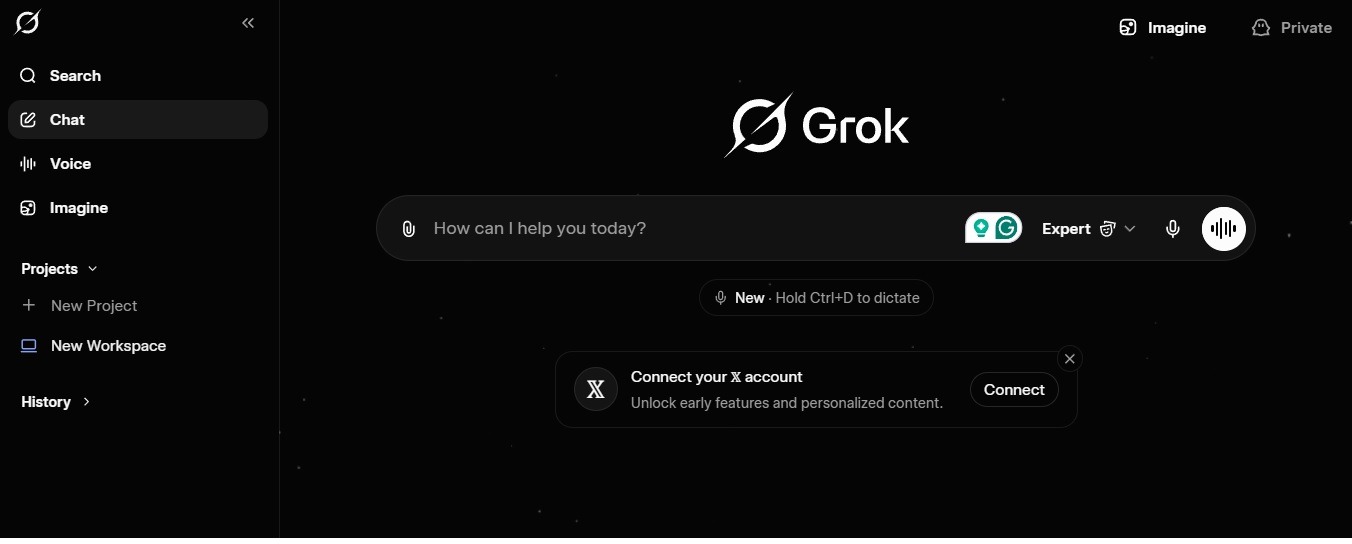
Is Grok free to use? Yes, you can use Grok for free. You head to grok.com, log in with Google or an email, and you’re chatting within about thirty seconds. No credit card prompt, no sneaky trial timer, no “oops, we’ll start charging you next month” surprise. It’s legitimately free in the sense that you pay zero dollars.
But free doesn’t mean unlimited. xAI caps how many messages you can send in a day, limits how many “reasoning” (the slower, smarter thinking) responses you get per hour, and has been slowly pulling premium features behind the SuperGrok paywall. I’ll get into the Imagine situation in a minute because that one deserves its own conversation.
So the realistic way to think about it: Grok’s core chatbot is free forever, but the shiny stuff comes and goes depending on what xAI is pushing that month. Plan around the core, treat the extras as bonuses.
What You Actually Get on the Free Plan
Let me break down what you can realistically expect without paying. Not the marketing version — the real version.
You get access to the main Grok model, which is plenty capable for 90% of student tasks. Writing help, brainstorming, summarizing readings, coding assistance, explaining concepts, and study guides — all of that works great on the free tier. You also get a limited number of “thinking” responses, which are the deeper reasoning answers. These are fantastic for tough problems, but they get used up quickly if you’re firing off questions nonstop.
Real-time web search is included too, which is arguably the best part — you can ask Grok what happened yesterday and actually get a useful answer instead of “my knowledge cuts off in 2023.” There’s also basic image generation, though as we’ll see in a second, the good stuff is no longer in the free box.
What you don’t get: unlimited queries, priority speeds during peak hours, the fanciest models like Grok 4 Heavy, Grok 4.3, and most of the video generation features. If you’re a casual user, you probably won’t hit the wall. If you’re using it like a second brain during finals week, you will.
About That Free Image Generator… Grok Imagine Isn’t Free Anymore
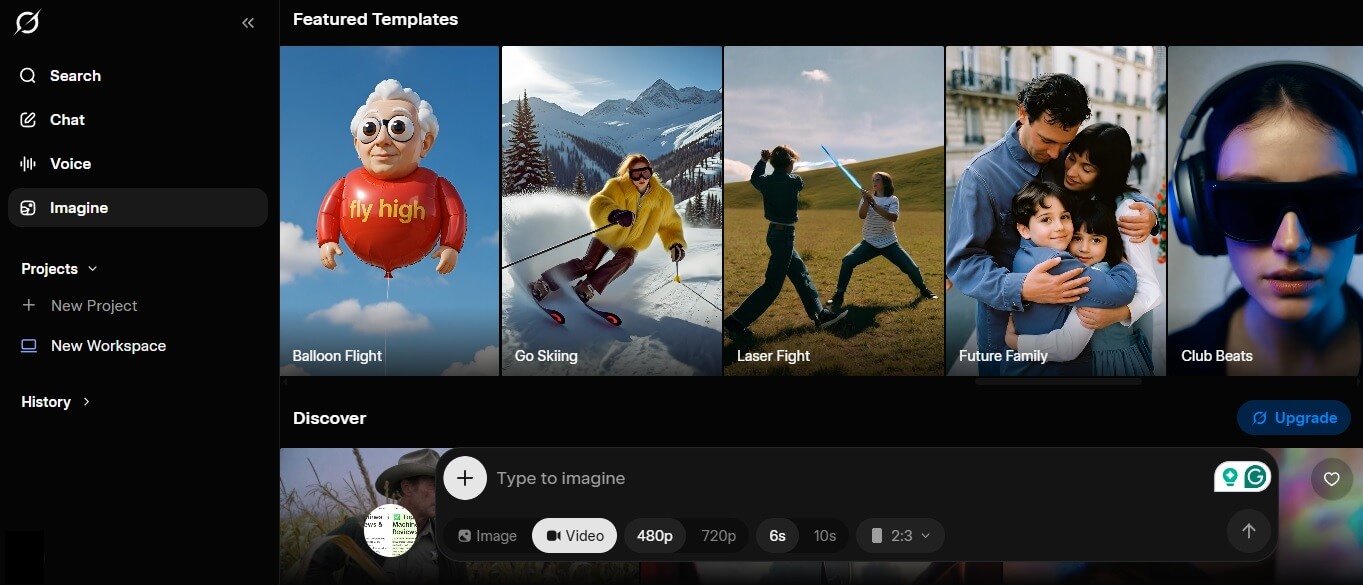
Okay, we need to pause here because I know a bunch of you came looking for this specifically. Grok Imagine — the image and video generator everyone was making viral clips with last year — is no longer free. If you showed up to grok.com expecting to pump out AI videos without paying, I’m sorry to be the one breaking the news.
As of March 19, 2026, xAI quietly pulled the plug on the free tier. No big announcement, no farewell email, no “thanks for being with us” post. People just woke up one morning, tried to generate something, and ran face-first into a paywall. Scroll through the Grok subreddit and you can feel the collective frustration — thread after thread of users asking “why is Imagine not working anymore?” and the answer keeps being the same: you need a paid plan now.
What It Costs You Now
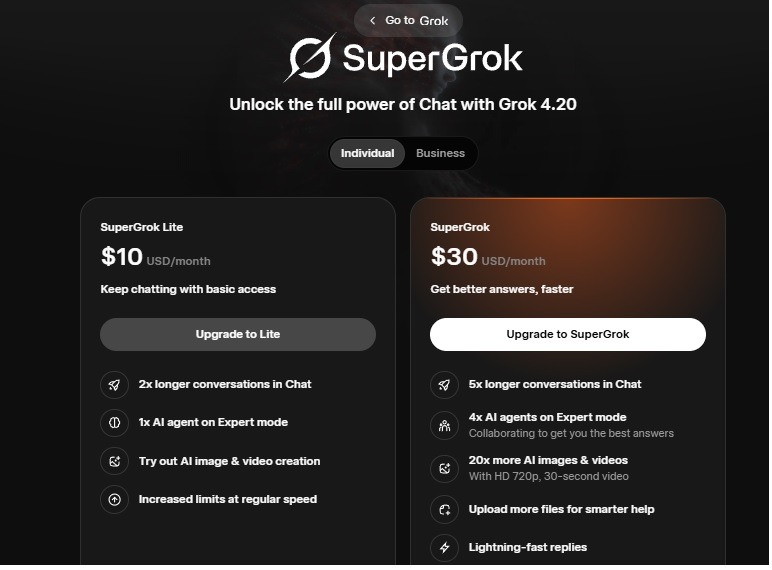
If you want to use Grok Imagine today, you’re looking at the SuperGrok plan, which runs about thirty bucks a month. There’s a cheaper SuperGrok Lite at around ten bucks a month, but the full Imagine experience — solid video generation, higher resolutions, fewer headaches — lives inside the pricier tier.
Inside the paid plans, Imagine runs on a credit system. Text-to-image costs around 8 credits, videos run anywhere from 10 to 40 credits depending on length and resolution. If you’re generating a lot, those credits vanish fast. Even paying users have been grumbling that the limits feel tight for what they’re shelling out. Some third-party platforms are offering pay-per-video access starting around five dollars a pop if you just want to try it once without committing, but those aren’t official xAI products — just go in with your eyes open.
Why Did This Happen?
Nobody at xAI has offered a clean, official reason, which is honestly part of why people are annoyed. But if you piece the context together, the picture gets pretty clear pretty fast.
The first factor is money, plain and simple. Running an AI video generator is absurdly expensive — we’re talking serious GPU costs every time someone hits “generate.” Free users don’t pay the bills, and xAI was essentially setting cash on fire to let millions of people make memes and trend clips for free. That was never going to be sustainable. One industry observer put it bluntly: the free tier was a growth strategy, not a business model. Once the user base was big enough, cashing in was always the plan.
The second factor is the one xAI really doesn’t want to say out loud, but it’s sitting right there in the room. Grok Imagine got caught in a wave of bad press in late 2025 and early 2026 over people using it to generate sexualized and non-consensual imagery. There was real, global backlash — news outlets picking it up, regulators paying attention, the whole ugly mess. Locking Imagine behind a paid account creates a paper trail, a billing identity, and an obvious barrier that makes misuse harder to pull off and easier to trace. A paywall isn’t the same thing as a content filter, but it is a speed bump, and xAI clearly decided it was a speed bump worth adding.
Put those two reasons together — spiraling infrastructure costs plus a serious PR and safety problem — and the decision basically writes itself.
The User Reaction (Spoiler: People Are Furious)
Yeah, it’s been messy. The Grok subreddit turned into a bit of a support group for a while. Some of the complaints are the usual “bring back the free version” stuff, but a lot of them hit on something real — the change happened overnight, with zero communication, and broke workflows people had built their creative hobbies and even small businesses around.
You had creators who’d been using Imagine to draft content for TikTok and YouTube, and suddenly their tool was gone. You had students using it for class projects who couldn’t generate a single image without ponying up. And you had paying users who expected the paywall to bring them better service, only to find out xAI also tightened limits on the paid tier at roughly the same time. Double dip.
The sentiment on social media was blunt. One viral post put it like this: “Thousands of people opened Grok Imagine and hit a wall. No warning. No grace period. Just a paywall.” People feel bait-and-switched, and honestly, it’s hard to argue with them. You don’t build a user base on free access and then yank it without so much as an email, not if you want goodwill.
Is There a Free Workaround? (Kind Of, But Manage Your Expectations)
I know what you’re thinking — “okay cool, so is there a free way around this?” Short answer: not really, not for the real Grok Imagine experience.
What you can still do for free is use the basic image generation inside the main Grok chatbot, which is different from the dedicated Imagine tool. It’s more limited, the output isn’t as polished, and video generation is mostly off the table. But if you just need a quick image to go with a project, it works in a pinch.
A few third-party platforms are routing through xAI’s API and offering small free credit buckets to new users — stuff like a handful of free generations just to test the vibe. Fine for a one-time experiment. Not something you can actually rely on. And please, please don’t download random “Grok Imagine Free” apps from sketchy corners of the app store. Most of them are scams that’ll spam you with ads, ask for permissions they don’t need, or worse.
Honest take: if Imagine is what you want and you actually care about the output, either wait for xAI to run a promo, use the student deal I’m about to tell you about, or just accept that you need to pay for it.
The Student Secret: Two Months of SuperGrok Free
Okay, here’s the part nobody tells you loud enough. If you have a .edu email address, you can get SuperGrok — the paid tier — completely free for two months.
This is a legit program xAI ran for students, confirmed by Elon himself and a bunch of xAI engineers. You just sign up at grok.com using your school email, and you get upgraded access. That means higher message limits, faster responses, access to better reasoning models, and — this is the big one given what we just talked about — Grok Imagine access included.
Two months isn’t forever, but let’s be honest, that’s basically your entire finals season covered. Use it strategically. I’d recommend activating it right before a heavy academic stretch (midterms, finals, thesis crunch) rather than a random Tuesday in September when you’re just vibing through intro lectures.
One heads up: the program availability has shifted over time, so check if it’s still active when you sign up. And don’t be that person who tries to fake a .edu email — xAI verifies, and getting flagged is not the move.
How to Actually Start Using Grok for Free (Step-by-Step)
This is genuinely the easy part, but I’ll walk through it anyway because I’ve seen people overcomplicate it.
Go to grok.com. That’s it, that’s the site. Don’t download sketchy apps claiming to be “Grok AI Free” from the App Store — most of them are reskinned junk that’ll spam you with ads. The real Grok lives on the web (and the official iOS/Android apps under xAI).
Sign in with Google, Apple, or an email. If you have a .edu address, use it — you’ll want it for the student perk. If you already have an X account, you can link it, but you don’t have to.
Start typing. Seriously, no onboarding tour, no credit card wall. Just ask your first question and you’re in.
From there, poke around the interface. There’s usually a toggle for different models (standard vs. thinking), an option to attach images or files, and a voice mode if you want to actually talk to it. I’d spend five minutes just playing with the settings before diving into real work — it makes a big difference in how useful it feels.
What Most Students Get Wrong About Grok
This is the part I wish someone had told me earlier. Most people use Grok (and AI chatbots in general) like a glorified search engine, which is exactly why they end up frustrated.
Grok isn’t Google. You’re not typing two-word queries and expecting the perfect answer on the first try. Where Grok actually shines is when you treat it like a really smart friend who’s a little sleep-deprived — you give it context, you ask follow-ups, you push back when its answer is off. The quality of what you get out is directly tied to how much you put in.
Another big one: people don’t realize Grok will literally tell you when it’s unsure. Unlike some other chatbots that confidently hallucinate, Grok is more willing to say “I’m not sure, here’s what I found on X” or “this might be outdated.” That’s a feature, not a bug. Pay attention when it hedges.
And the last thing — students keep using Grok to write their whole essay, submit it, and act surprised when it sounds like AI slop. That’s not Grok’s fault, that’s user error. Use it for brainstorming, outlining, explaining concepts, and punching up sections where you’re stuck. Don’t outsource your brain.
Common Mistakes That’ll Eat Your Free Quota
A few traps I see over and over, and how to avoid them.
- Burning reasoning responses on stuff that doesn’t need them. The “thinking” mode is limited per hour on free accounts. Don’t use it to ask Grok what the capital of France is. Save it for actual hard problems — debugging code, working through proofs, analyzing complex arguments. Use regular mode for everything else.
- Starting a new chat for every question. Grok works better when you build context in a single conversation. If you’re working on a paper, keep that thread going. Jumping into fresh chats constantly means re-explaining yourself every time, which wastes messages.
- Ignoring the web search toggle. If your question involves anything current — recent research, news, trending topics — make sure web search is on. Otherwise you might get answers based on older training data, and you’ll waste a message getting something outdated.
- Not saving your good prompts. If you find a prompt that works great for, say, summarizing PDFs into study notes, save it somewhere. A simple Notes app doc is fine. You’ll thank yourself three weeks later when you’re scrambling and can’t remember the exact phrasing that worked.
- Treating the free limit as a challenge. Look, if you’re hitting your cap every single day, either upgrade (the student deal exists for a reason) or change how you use it. Batch your questions. Think before you type. Don’t send five one-liners when one well-thought-out message gets you the same result.
What Actually Works: Practical Tips From Real Use
These are the things that made Grok genuinely useful for me instead of just “kind of cool.”
Ask for the reasoning, not just the answer. When you ask Grok to solve a problem, add “and explain your thinking step by step.” You learn more, and you can catch when it’s wrong. This is especially clutch for STEM classes where understanding the logic matters more than the final number.
Use it as a rubber duck for writing. Paste a paragraph and ask “what’s the weakest part of this argument?” or “where does this lose the reader?” It’s shockingly good at giving honest feedback. Way better than asking your roommate who just says “yeah looks fine.”
Feed it your actual assignment prompt. Don’t just ask Grok “how do I write a lit review?” — copy the exact instructions from your syllabus and say “help me understand what this assignment is actually asking for.” Most confusion about assignments isn’t about the topic, it’s about decoding professor-speak.
Combine real-time search with specific questions. Instead of “tell me about AI regulation,” try “what happened this week with AI regulation in the EU, and which sources are covering it?” You get current info with cited context, which is way more useful for papers.
And finally — use voice mode when you’re walking to class or the gym. Asking Grok to quiz you on flashcard content while you’re on a treadmill is genuinely one of the best study hacks I’ve stumbled into. Feels less like studying, works better than flashcards.
Is It Worth Paying For Eventually?
Honest take? For most students, no. The free tier plus the two-month student deal covers you for basically the entire school year if you’re smart about it.
Where it starts making sense to pay: if you’re in grad school, doing heavy research, building something with the API, using Imagine for creative work, or using it for a job on the side. At that point, thirty bucks a month is nothing compared to the time it saves. But if you’re an undergrad using it for essays, study help, and occasional coding homework? The free version is more than enough, and anyone telling you otherwise is usually trying to sell you something.
The SuperGrok Lite plan at around ten bucks is a much easier swallow if you hit the wall but can’t justify the full subscription. Worth keeping in your back pocket — especially if you just want a taste of the premium features without committing to thirty a month.
The Real Takeaway
Grok is free. Really free — not “free with an asterisk that means we’ll charge you later” free. You get a solid AI chatbot with real-time web access, decent reasoning, basic image generation, and no credit card required. For students, especially, the value is absurd.
Is it the same Grok from a year ago when Imagine was free and everything felt unlimited? No. xAI clearly decided the free-for-all era was over, and the paywall around Imagine is probably just the first of several. If that bums you out, I get it. But the core product — the chatbot itself — is still one of the best free AI tools out there, and the student deal on top of it is genuinely one of the better promos in the AI space right now.
The people who get the most out of Grok aren’t the ones who ask the most questions. They’re the ones who ask better questions, use the right mode for the right task, and don’t try to outsource their entire thinking to the bot. Grok is a tool. Like any tool, it’s as good as the person using it.
Grab your .edu email while the student program is still live. Play around with it this weekend. Find a few prompts that work for how your brain operates. And the next time you’re staring down a deadline at 2 a.m., you’ll have one more thing in your corner — without having spent a single dollar.
Good luck out there. Go pass those finals.
You May Also Like
 Grok AI
How to Use Grok AI: A Practical Guide for Real People Who Actually Want to Get Things Done
 AI Tool Reviews
How to Use ChatGPT for Beginners: The Complete Step-by-Step Guide (2026)
 Grok AI
Does Grok Only Respond to Verified Accounts?
 Grok AI
Why Does Grok Know My Location IP Address? What’s Really Going On
 AI Tool Reviews
GPTZero vs ZeroGPT: Which AI Detector Actually Holds Up in the Real World?
 AI Tool Reviews