

Does ChatGPT Use My Personal Data for Training? Yes, ChatGPT trains on your data by default, but only if you use a personal account on the Free, Go, Plus, or Pro plan. OpenAI collects your chat conversations and uses them to improve future versions of its models, including GPT-5.1, GPT-5.2, GPT-5.3, and the latest GPT-5.4, which was released on March 5, 2026. This is confirmed in OpenAI’s official US Privacy Policy, which states that your prompts and responses may be used for model training.
The good news is that you can turn this off. OpenAI gives every user the option to stop data training with a single setting toggle. Many users have never seen this option. This guide explains what OpenAI collects, how it uses that data, and the exact 3 steps to stop your conversations from being used for training — across all plan types, including Free, Plus, Pro, Enterprise, and API.
If you have ever typed something personal into ChatGPT — a business idea, a health question, or a private message — this guide covers everything you need to know to stay in control of your data.
What Data Does ChatGPT Collect From You?
ChatGPT collects 7 types of personal data every time you use the service. These data types include information that is directly tied to your identity, your device, and the content you type.
Here are the 7 types of data ChatGPT collects:
- User Content — the full text of your prompts and ChatGPT’s responses
- Account Information — your name, email address, date of birth, payment details, and login credentials
- Log Data — your IP address, browser type, and the exact date and time of each activity
- Usage Data — which features you used, what content you viewed, and any feedback you submitted, such as thumbs up or thumbs down ratings
- Device Information — your device name, operating system, and unique hardware identifiers
- Location Information — your general location based on your IP address, or your precise GPS location if you grant that permission
- Cookies and Tracking Data — stored data used to maintain your session history and account preferences
Among these 7 types, User Content carries the highest privacy risk because it contains the actual words you type into ChatGPT. This is the data that OpenAI may use to train its models.
Even if you use ChatGPT without login, OpenAI still collects Log Data, Usage Data, and Device Information from your session. Not logging in does not stop data collection entirely — it only limits the amount of account-level data that gets stored.

Why Does OpenAI Collect This Data?
OpenAI collects user data for 4 main purposes. Each purpose reflects a different operational or safety need.
- Model improvement: OpenAI uses real conversations to train future GPT versions, making responses more accurate and natural over time
- Safety and abuse monitoring: OpenAI scans conversations to detect prohibited content, such as violent threats, malware instructions, or illegal material
- Service operations: Data supports bug fixing, support requests, and system performance tracking
- Vendor and partner sharing: OpenAI shares data with third-party service providers, including cloud hosting platforms like Microsoft Azure
The most impactful use for most users is model improvement, because it means your private words could shape the next version of ChatGPT.
Does ChatGPT Share Your Data With Third Parties?
OpenAI does not sell your personal data to advertisers or share your individual conversations with third parties. However, the company does share certain data in specific circumstances:
What OpenAI Shares With Advertisers
The February 2026 privacy policy update explicitly acknowledges that OpenAI may receive information from advertisers and data partners about purchases you make from those advertisers—essentially conversion tracking data. This means if you click on an ad in ChatGPT and later buy that product, the advertiser may send that purchase information back to OpenAI to measure ad effectiveness.
However, advertisers only receive aggregated, anonymized performance metrics (total views and clicks), not individual user identities, conversation content, chat history, personal details, or memories.
OpenAI shares data with:
- Advertisers and data partners: Only aggregated, anonymized performance metrics (total ad views and clicks). Advertisers may share conversion data back with OpenAI if you purchase something after clicking an ad, but this does not include your personal identity or conversation content.
- Service providers and vendors: Companies that help operate ChatGPT—including cloud hosting services (Microsoft Azure), analytics firms, payment processors, and cybersecurity vendors—receive data under strict confidentiality agreements. These partners help keep the service running but cannot use your data for their own purposes.
- Legal authorities and government agencies: When required by law, subpoena, or to prevent imminent harm, OpenAI discloses user information. This includes compliance with US laws like the Patriot Act and FISA, which has raised concerns given the lack of zero-access encryption.
- Employers and workspace administrators: If you use a Business, Enterprise, or Team account, your organization’s administrators can access your chat history, usage statistics, and account activity. They control whether your data trains OpenAI’s models, but they also control visibility into your conversations.
- Affiliated companies within the OpenAI corporate structure: Data may be shared between OpenAI entities and subsidiaries for operational purposes, though this remains within the same corporate family.
- AI training systems (for Free/Plus users): Unless you explicitly opt out in your privacy settings, your conversations may be used to train future versions of GPT models. Business and Enterprise users are excluded from this by default.
ChatGPT is not a completely private confessional. While your individual chats do not get sold to marketing lists or posted publicly, OpenAI retains access for safety monitoring, shares aggregated statistics with advertisers, and must comply with legal demands. For true confidentiality, use Business/Enterprise accounts (keeping in mind that your employer can see everything) or avoid sharing truly sensitive information entirely.
Does OpenAI Use ChatGPT Conversations For Training Purposes?
Yes, ChatGPT uses your conversations for model training by default if you are on a personal plan, such as Free, Go, Plus, or Pro. OpenAI uses a process called Reinforcement Learning from Human Feedback (RLHF) to improve its models. This process involves reviewing real conversation data to make the model’s responses better.
However, this does not apply to everyone. Enterprise and Team account users are excluded from model training by default. OpenAI’s Data Processing Addendum (DPA) for business customers explicitly prohibits the use of their data for training purposes without consent.
What Counts as Training Data in ChatGPT?
Training data includes your prompts, the AI’s responses, and any feedback signals you submit. Specifically, 3 types of inputs contribute to model training:
- The text of your messages and any files, images, or audio you upload
- ChatGPT’s generated responses that you engage with or react to
- Feedback signals, including thumbs up or thumbs down reactions, that you click on responses
Metadata, such as response timing or model selection, may also be logged but is primarily used for operational monitoring, not direct model training.

How the GPT-5 Series Uses Your Data
The GPT-5 model series, from GPT-5.0 through GPT-5.4, all follow the same core data policy. OpenAI may use non-opted-out consumer conversations to refine post-training updates across each version. This means that when OpenAI improved GPT-5.0 into GPT-5.1, then GPT-5.2, and so on, conversations from users who had not opted out could have contributed to those improvements.
Understanding how to use ChatGPT effectively also means knowing where your data goes. Every prompt you send has value — both as a response to you in the moment, and potentially as a data point for OpenAI’s future training cycles.
Which ChatGPT Plans Train on Your Data?
Training status depends on the plan you use. The table below shows 5 ChatGPT plan types and whether each uses your conversations for model training by default.
| ChatGPT Plan | Trains on Your Data by Default? | Can You Opt Out? |
|---|---|---|
| Free | Yes | Yes, via Settings |
| Go | Yes | Yes, via Settings |
| Plus | Yes | Yes, via Settings |
| Pro | Yes | Yes, via Settings |
| Team | No | N/A — excluded by default |
| Enterprise | No | N/A — excluded by default |
| API | No | N/A — excluded by default |
If you are on a personal plan and want to understand how each plan compares in terms of features and access, the detailed breakdown of ChatGPT Go, Plus, and Pro plans covers everything you need to choose the right option.
The key takeaway from this table is that paying for a personal plan, such as Plus or Pro, does not automatically protect your data. Training is still enabled by default on paid personal plans unless you manually disable it.
How to Stop ChatGPT From Training on Your Data
ChatGPT offers 3 methods to stop your conversations from being used for model training. Each method serves a different situation, from daily use to historical data management.
Method 1: Toggle Off the Training Setting in Your Account
This is the fastest and most direct method. It takes less than 60 seconds and applies to all future conversations.
Follow these 4 steps:
- Log into your ChatGPT account at chat.openai.com
- Click your profile icon in the bottom-left corner of the screen
- Go to Settings, then select Data Controls
- Toggle “Improve the model for everyone” to the OFF position
Once this toggle is off, your future conversations will not be used to train OpenAI’s models. This applies immediately and does not affect the speed or quality of your ChatGPT responses.
Method 2: Use Temporary Chat Mode for Sensitive Sessions
Temporary Chat mode prevents conversations from being saved to your history and blocks them from model training. This mode is useful when you want to ask something personal or confidential without leaving any stored record.

To activate Temporary Chat:
- Open a new chat in ChatGPT
- Click the drop-down arrow next to your model name at the top of the screen
- Select “Temporary Chat” from the menu
Note: Temporary Chat conversations are still stored for up to 30 days by OpenAI for safety monitoring and abuse detection. They are not visible in your chat history, but they are not fully deleted the moment you close the window.
Method 3: Submit an Opt-Out Request via the Privacy Portal
This method handles historical data — conversations you sent before turning off the toggle. It sends a formal request to OpenAI to stop using your past content for training.
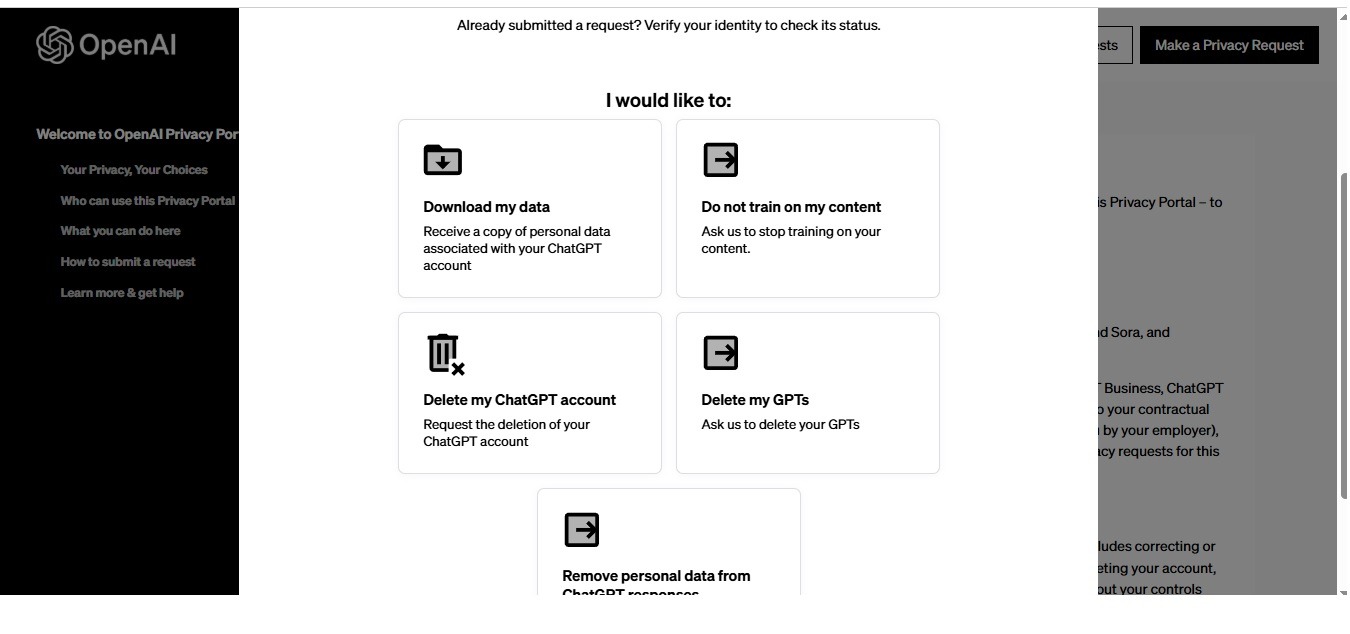
Follow these 5 steps:
- Visit privacy.openai.com
- Make a privacy request (Above button)
- I have a consumer ChatGPT account (Choose this)
- Select the option “Do not train on my content.”
- Complete the email verification and submit your request
This request covers all content associated with your account from the time it was created. OpenAI processes these requests in accordance with applicable data protection regulations, including GDPR for users in the European Union.
Does Opting Out Delete Your Data From OpenAI’s Servers?
No, opting out of training does not delete your data from OpenAI’s servers. Opting out only stops OpenAI from using your data to improve future models. Your conversations are still retained for other purposes.
Specifically, OpenAI keeps conversation data for:
- Up to 30 days for safety monitoring and abuse detection, even after opt-out
- Longer periods for account-level data such as your name, email, payment history, and login records
- Indefinitely for any data required for legal compliance or fraud prevention
To request actual deletion of your stored data, you must submit a separate deletion request at privacy.openai.com or by emailing dsar@openai.com. Opting out of training and requesting data deletion are 2 different actions.
What Happens to Your Data After You Opt Out?
After you opt out, your data enters a limited retention period instead of the training pipeline. OpenAI separates your data into 2 categories after opt-out:
- Safety data: Retained for 30 days to scan for prohibited content, such as violent threats, malware instructions, or child exploitation material
- Operational data: Retained for system performance monitoring, bug reporting, and customer support purposes
Enterprise customers who require zero data retention (ZDR) can configure this at the API level. Under ZDR, no prompt or response data is stored beyond the active session. This configuration is not available to personal plan users.
Is ChatGPT Safe to Use for Sensitive Personal or Business Information?
ChatGPT is not fully private for personal plan users by default. Before sharing sensitive information, there are 5 types of content you should avoid entering into ChatGPT unless you have disabled the training toggle:
- Financial data, such as bank account numbers, credit card details, or salary information
- Medical information, such as diagnoses, prescriptions, or health history
- Legal documents, such as contracts, case notes, or attorney-client communications
- Business secrets, such as product roadmaps, internal strategies, or client data
- Login credentials, such as passwords, security codes, or API keys
For a broader look at how OpenAI handles user safety, the full guide on is ChatGPT safe covers security risks, privacy gaps, and the exact steps to reduce your exposure across every account type.
Students using ChatGPT for academic work should also consider privacy implications carefully. If you are a student looking to access ChatGPT Plus at no cost, the guide on getting free ChatGPT Plus for college students explains verified methods that also include privacy-aware account setups.
What Are the New GPT Models and How Do They Handle Data?
The GPT-5 family includes 5 major model releases from August 2025 through March 2026. Each version builds on the previous one with better reasoning, accuracy, and new capabilities — but the core data policy remains consistent across all versions for personal accounts.
GPT-5.1 — Released November 13, 2025
GPT-5.1 introduced adaptive reasoning, meaning the model allocates different amounts of computing power based on how complex your question is. Simple questions get answered 2–3 times faster. Complex questions get deeper analysis. This version also used 30% fewer thinking tokens than its Codex variant and adopted a warmer, more natural conversational tone. From a data policy standpoint, GPT-5.1 follows the same opt-in training model as GPT-5.0.
GPT-5.2 — Released December 11, 2025
GPT-5.2 became the first AI model to score above 90% on the ARC-AGI-1 benchmark and achieved a perfect 100% score on the AIME 2025 math benchmark. It introduced a 3-tier architecture:
- GPT-5.2 Instant — optimized for fast, high-volume responses
- GPT-5.2 Thinking — configurable reasoning depth for complex tasks
- GPT-5.2 Pro — maximum compute, supporting up to 30 minutes of sustained processing
OpenAI confirmed that non-opted-out consumer conversations contributed to GPT-5.2’s post-training refinement, consistent with its data policy for personal accounts.
GPT-5.3 — Released March 3, 2026
GPT-5.3 Instant reduced hallucinations by 26.8% compared to GPT-5.2 Instant when used with web search. It was designed as a cost-effective everyday model, significantly cheaper than GPT-5.2 while still delivering high accuracy. GPT-5.3 also addressed tone issues present in earlier models, producing more direct and natural responses without unnecessary hedging or filler phrases.
GPT-5.4 — Released March 5, 2026
GPT-5.4 is OpenAI’s most capable model as of March 2026 and introduced 4 genuinely new features not present in any prior version:
- Native computer use — GPT-5.4 can directly control browsers and desktop applications on your behalf
- 1 million-token context window — available via API, allowing analysis of extremely long documents or datasets
- Upfront thinking plan — for complex tasks, GPT-5.4 shows you its step-by-step plan before executing, so you can redirect it if needed
- Full-resolution vision — supports images up to 10.24 million pixels
GPT-5.4 also delivers 33% fewer factual errors compared to GPT-5.2 and matches or exceeds industry professionals in 83% of benchmark comparisons, up from 70.9% for GPT-5.2.
The data policy for GPT-5.4 remains unchanged for personal account users — training is enabled by default and can be disabled via the Settings toggle.
GPT Model Release Timeline at a Glance
| Model | Release Date | Key Feature |
|---|---|---|
| GPT-5.0 | August 7, 2025 | Foundation model launch |
| GPT-5.1 | November 13, 2025 | Adaptive reasoning, faster responses |
| GPT-5.2 | December 11, 2025 | 100% AIME score, 3-tier architecture |
| GPT-5.3 Instant | March 3, 2026 | 26.8% fewer hallucinations, lower cost |
| GPT-5.4 | March 5, 2026 | Computer use, 1M token context window |
7 Things OpenAI Does With Your Data (Summary)
OpenAI uses your data in 7 documented ways, each serving a different operational, safety, or commercial function:
- Model training — uses your prompts and responses to improve future GPT versions
- Safety monitoring — scans content for prohibited material over a 30-day window
- Bug fixing — reviews session data to identify and correct system errors
- Customer support — authorized staff may access conversations to resolve reported issues
- Service analytics — aggregates usage statistics to improve product features
- Third-party sharing — shares data with vendors and service providers, such as cloud platforms and security partners
- Legal compliance — retains certain data to meet regulatory and law enforcement obligations
Being aware of these 7 uses helps you decide what information is appropriate to share in any ChatGPT session.
Does ChatGPT Memory Make Privacy Harder to Control?
Yes, the ChatGPT Memory feature increases the amount of personal data stored across sessions. Memory allows ChatGPT to remember your preferences, projects, and personal details from one conversation to the next. While this improves the user experience, it also means more personal data is stored under your account.
There are 3 ways the Memory feature affects your privacy:
- Preference data — ChatGPT stores details like your name, job, writing style, and interests
- Cross-session context — stored memories apply to all future conversations, not just the current one
- Training exposure — if training is enabled, memories and the conversations that generate them can become part of training data
To disable Memory, go to Settings > Personalization > Memory and toggle it off. This stops ChatGPT from storing new memories, but does not automatically delete memories that are already saved. To delete existing memories, go to Settings > Personalization > Manage Memory and clear them manually.
FAQ: Does ChatGPT Train on My Data?
Does ChatGPT use my conversations to train its AI?
Yes. OpenAI uses conversations from personal account users — Free, Go, Plus, and Pro — to train and improve its models by default. This is outlined in the US Privacy Policy. The training toggle must be manually disabled to stop this.
Does turning off the training toggle delete my past chats?
No. Turning off the training toggle only stops future conversations from being used for training. Past conversations remain stored on OpenAI’s servers. A separate data deletion request must be submitted to remove them.
Is my data safe on ChatGPT Enterprise?
Yes, for training purposes. ChatGPT Enterprise does not use your business data to train OpenAI’s models by default. This is protected under the Data Processing Addendum. However, data is still processed by OpenAI’s systems during the session and may be stored for safety monitoring.
Can OpenAI employees read my ChatGPT conversations?
Yes, in limited cases. OpenAI states that authorized staff and third-party contractors may review conversations to investigate safety issues, fix bugs, or fine-tune models. This applies to both opted-in and opted-out users when a safety concern is flagged.
Does using ChatGPT in a browser versus the app affect data collection?
No. Data collection policies are the same regardless of whether you use the web browser version, the iOS app, the Android app, or any third-party integration. The account-level settings, including the training toggle, apply across all access points.
Does ChatGPT collect data from users who are not logged in?
Yes, partially. Even without an account, OpenAI collects Log Data, Usage Data, Device Information, and cookie data from anonymous sessions. Account-level data, such as name and payment history, is not collected because there is no account to link it to.
Does opting out of training affect ChatGPT’s response quality?
No. Disabling the training toggle has no effect on ChatGPT’s performance, response speed, or accuracy. The same GPT-5 model powers your session whether training is on or off. The toggle only controls what happens to your data after the conversation ends.
Does GPT-5.4 have a different data policy than older GPT versions?
No. GPT-5.4 follows the same data policy as GPT-5.1, GPT-5.2, and GPT-5.3 for personal accounts. Training is enabled by default and can be disabled through the same Settings toggle. The new features in GPT-5.4 — such as computer use and 1M-token context — do not change the training opt-out process.
Conclusion
ChatGPT trains on your data by default if you use a personal account. This applies to Free, Go, Plus, and Pro plans as of March 2026. OpenAI collects 7 types of personal data — including your prompts, device information, and location — and may use your conversations to improve models like GPT-5.1 through GPT-5.4.
There are 3 clear actions you can take right now to protect your data:
- Disable the training toggle in Settings > Data Controls > Improve the model for everyone
- Use Temporary Chat mode for any session that involves sensitive or personal information
- Submit a data opt-out request at privacy.openai.com to cover your historical conversations
The newer GPT-5 models, including GPT-5.3 and GPT-5.4, bring major improvements in accuracy, reasoning, and new capabilities like native computer use. However, these improvements do not change the core data policy for personal users. The responsibility to opt out remains with you.
Taking 60 seconds to adjust your settings is the fastest way to keep your conversations private. Whether you are a student, a professional, or a casual user, understanding how your data is handled is the first step to using ChatGPT with confidence.
You May Also Like
 AI Tool Reviews
How to Use ChatGPT for Beginners: The Complete Step-by-Step Guide (2026)
 ChatGPT
How to Use ChatGPT at Work: Productivity Tips That Actually Save You Hours
 ChatGPT
How to Use ChatGPT Best Prompts
 AI Models
GPT-5.5 vs Claude Opus 4.7 vs Gemini 3.1 Pro: Real Benchmark Results Compared
 ChatGPT
ChatGPT 5.5 Is Here: Benchmarks, What’s New, What’s Different, and Is It Actually Worth the Hype?
 ChatGPT