
Jenni AI is an AI-powered writing assistant built for students, researchers, and academics who need help writing papers, managing citations, and editing drafts. It works inside your browser. You type. It suggests sentences. It finds sources. It formats your citations. Over 5 million users have tried the platform, and it has helped generate more than 970 million words so far.
But here is the real question. Is Jenni AI actually worth your time and money? We spent weeks testing the tool, reading real user reviews on Trustpilot (where it holds a 4.1 out of 5 rating from 142 reviews), and comparing it with other writing tools. The short answer — Jenni AI does several things well, especially citation management and autocomplete for academic writing. But it also has clear weaknesses you need to know before you pay.
This guide walks you through everything. You will learn what Jenni AI does, how much it costs in 2026, what real users love and hate about it, and which alternatives might work better for your needs. Whether you are a PhD candidate, a college freshman, or a content creator, this review gives you honest, practical details to help you decide.
What Does Jenni AI Actually Do?
Jenni AI is a web-based writing tool that combines AI text generation, citation management, and document editing into one platform. It uses large language models along with an academic database powered by OpenAlex, which contains over 250 million academic works from journals, books, preprints, and conference proceedings.
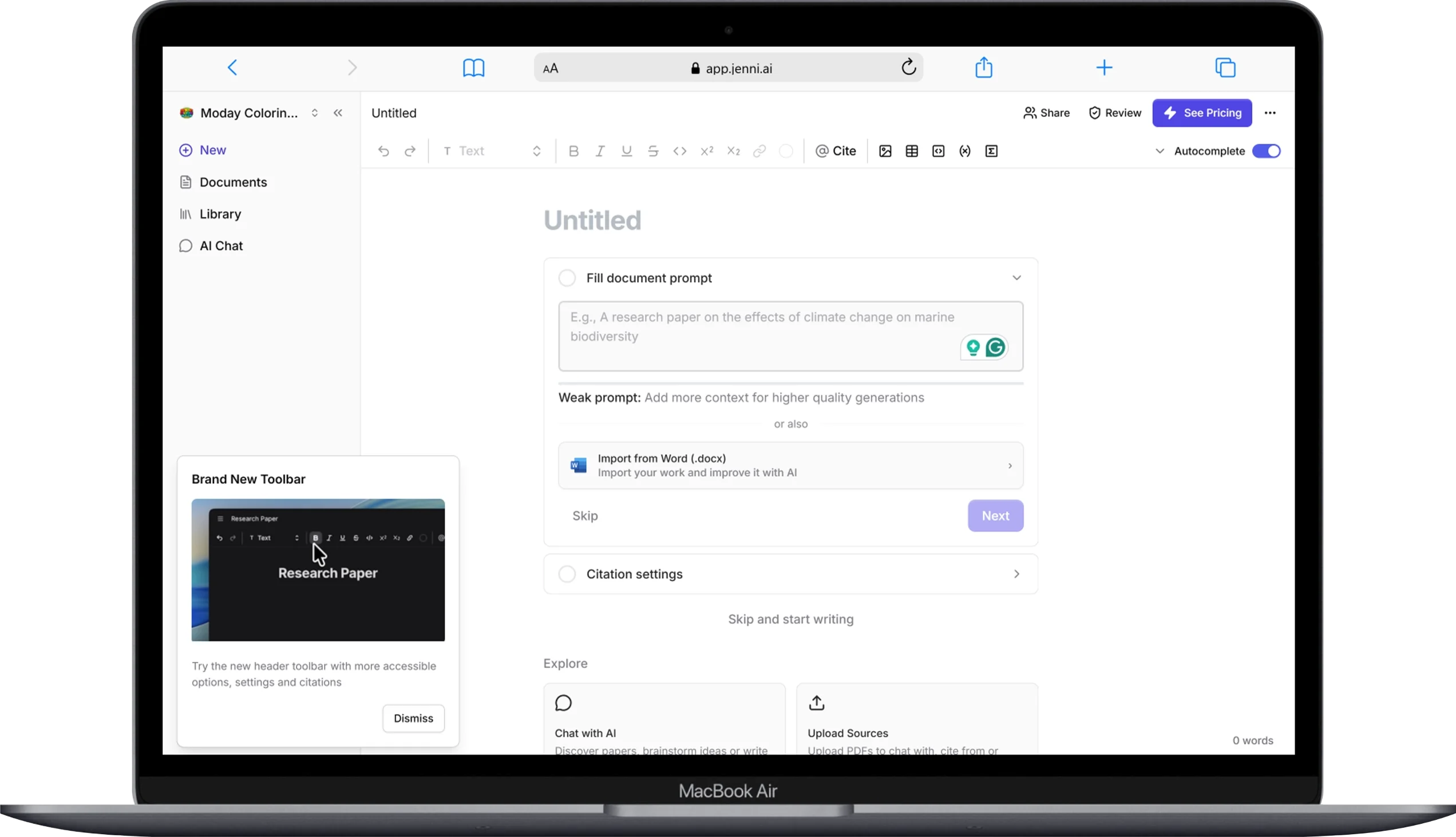
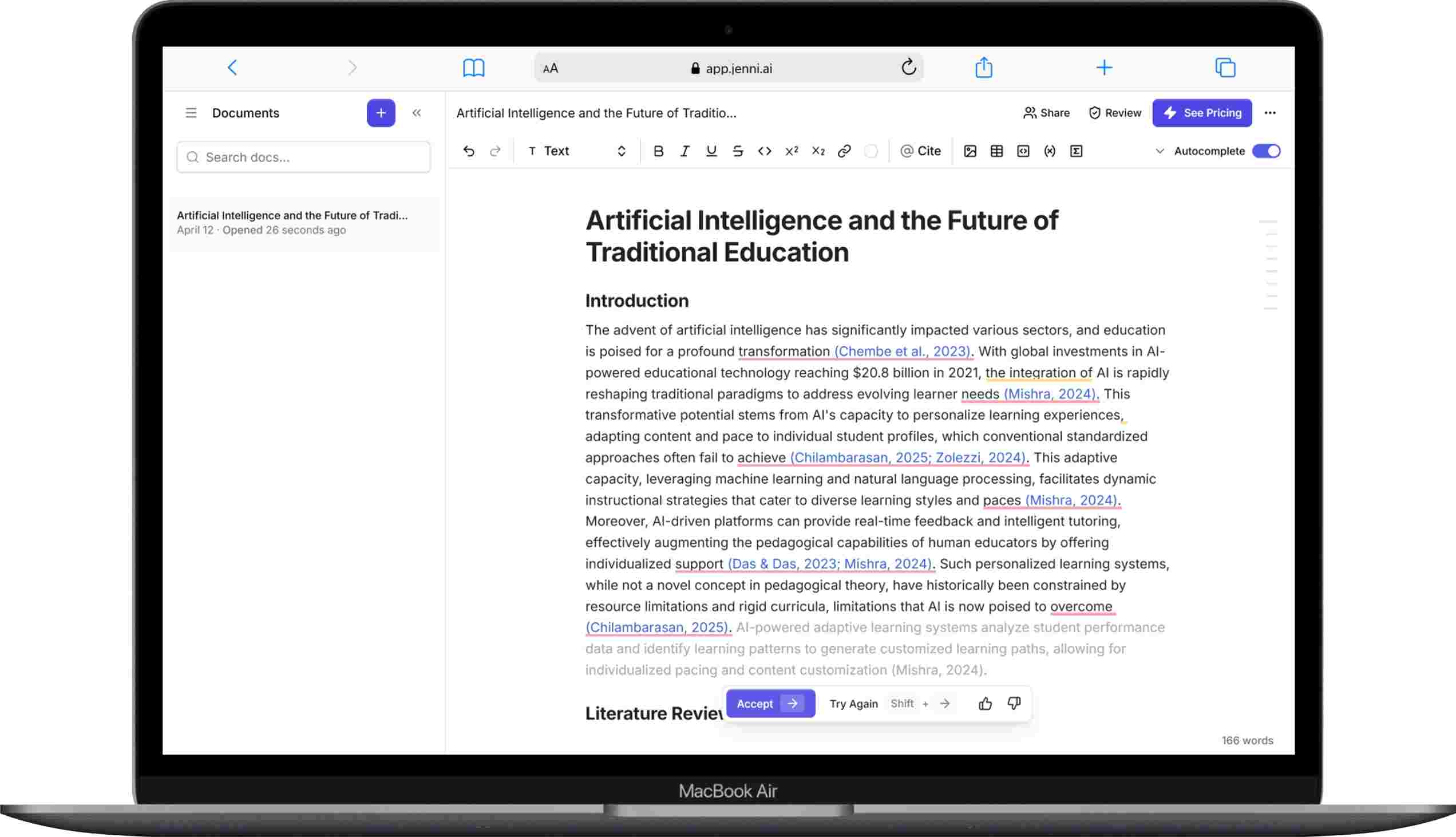
The platform sits somewhere between a word processor and a research assistant. You write inside its editor. The AI watches what you type. Then it offers sentence completions, suggests relevant sources, and formats citations automatically. This makes it different from tools where you copy-paste text back and forth. With Jenni AI, everything happens in one place.
The tool supports 6 major use cases: literature reviews, research papers, essays, industry reports, non-fiction books, and speeches. It also supports over 2,600 citation styles, including APA, MLA, Chicago, and Harvard formats.
How Does Jenni AI Autocomplete Work?
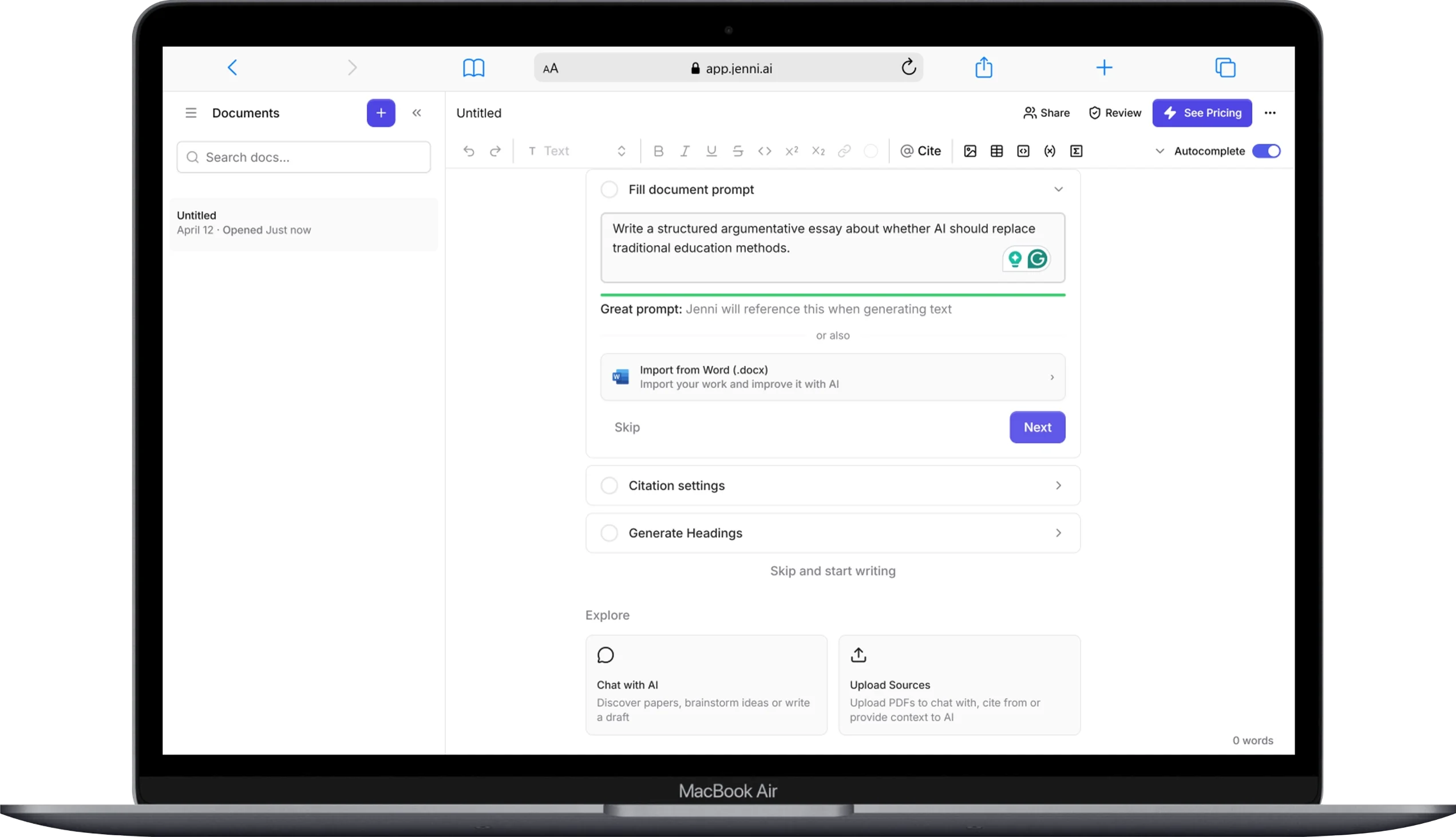
Jenni AI autocomplete generates sentence suggestions in real time as you type. When you pause while writing, the tool recognizes the break and offers a continuation. You can accept, reject, or edit each suggestion.
What makes this feature feel natural is the timing. We noticed the AI does not interrupt when you are typing at a steady pace. It only jumps in when you stop — almost as if you are thinking about what to write next. This small detail makes the experience smooth. You stay in control. The AI acts more as a writing partner than a replacement.
You can also turn autocomplete off completely. This matters for students who worry about AI detection. If you only want citation help and editing features, you can disable autocomplete and still get value from Jenni AI.
One thing worth mentioning — the autocomplete feature is limited to 5,000 suggestions per month on the Plus plan. The Pro plan gives you unlimited autocomplete. On the free plan, you get only 200 AI-generated words per day, which is quite restrictive for any real writing project.
What Makes Jenni AI Citations Different From Other Tools?
Jenni AI uses “Smart Citations” that link directly to the exact page and paragraph in your source PDFs. This is one of the strongest features of the platform and the main reason many researchers choose it over general-purpose AI tools.
Here is how it works. When Jenni AI suggests a citation, it does not just give you a title and author. It opens the source PDF and highlights the specific passage that supports your claim. You can verify the reference in one click. This level of transparency helps you maintain academic integrity while saving hours of manual source verification.
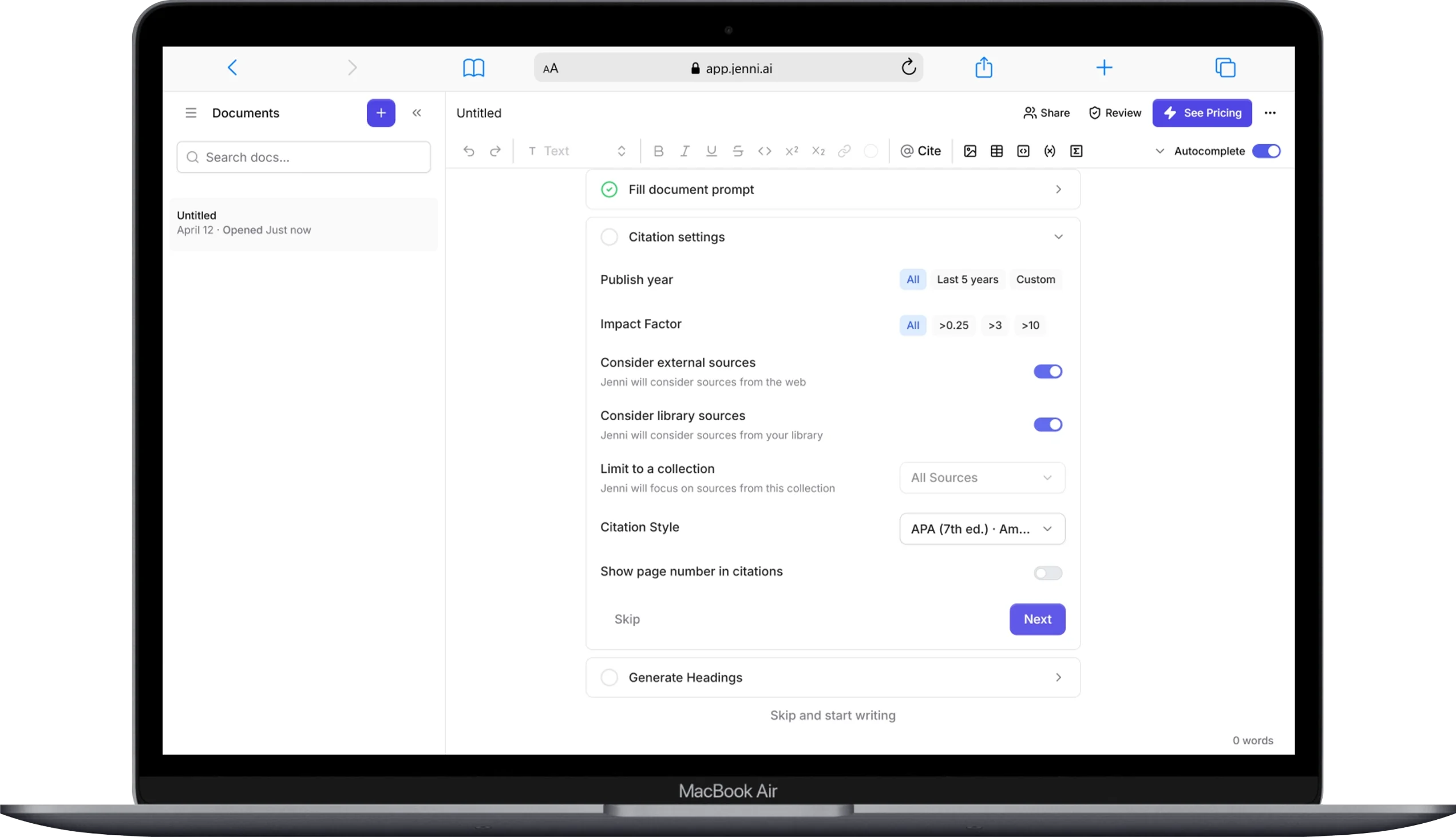
The citation system pulls from 3 sources: Jenni’s own academic database (built on OpenAlex), your uploaded PDFs, and your synced reference managers like Zotero or Mendeley. You can filter citation recommendations by publication date, impact factor, and article type. This gives you control over what kind of sources the AI suggests.
We also tested the “Cite” function on existing text. You highlight a sentence you wrote from memory. Then you click “@ Cite.” Jenni searches for papers that support your statement. This works as a reverse literature review. You write first. The AI finds sources to back it up.
However, real users have reported that citation accuracy is not perfect. Some reviewers on Trustpilot and Reddit have noted that Jenni occasionally fabricates citations or suggests unrelated sources. Always verify your references before submitting any academic work.
What Are Jenni AI’s Editing and Review Features?
Jenni AI offers 4 main editing tools: Claim Confidence, Proofreading, AI Chat, and AI Edit. These features help you improve an existing draft without starting from scratch.
How Does Claim Confidence Work?
Claim Confidence analyzes your manuscript and checks whether your claims have proper citation support. It sorts every claim into 6 categories: misrepresented, contradicted, unsupported, weakly supported, overstated, and unverifiable. For each flagged claim, Jenni suggests a specific source to fill the gap.
This tool works best on early-stage drafts where citations are still incomplete. For polished manuscripts close to submission, you will find fewer useful suggestions.
How Good Is the Proofreading Feature?
The proofreader checks your document for grammar, punctuation, word choice, formality, tone, voice, repetition, and formatting. Each correction comes with a detailed explanation of why the change was suggested. This helps you learn from your mistakes over time.
During testing, we found that Jenni caught errors that even Grammarly missed. The explanations were clear and specific. One small issue — the proofreader also flags formatting elements like figures and citations, which can inflate the total number of suggestions. You can filter by category to focus only on grammar or punctuation.
What Can You Do With AI Edit?
AI Edit lets you select any text in your document and apply specific improvements. You can choose from options including improve fluency, paraphrase, simplify, and strengthen argument. There are dozens of adjustment options available. Each edit comes with an “AI Insight” note explaining what changed and why.
This feature is especially helpful for non-native English speakers. You can ask Jenni to make your writing more academic in tone or switch it to past tense. The tool gives you the rewritten version plus the reasoning behind each change.
How Much Does Jenni AI Cost in 2026?
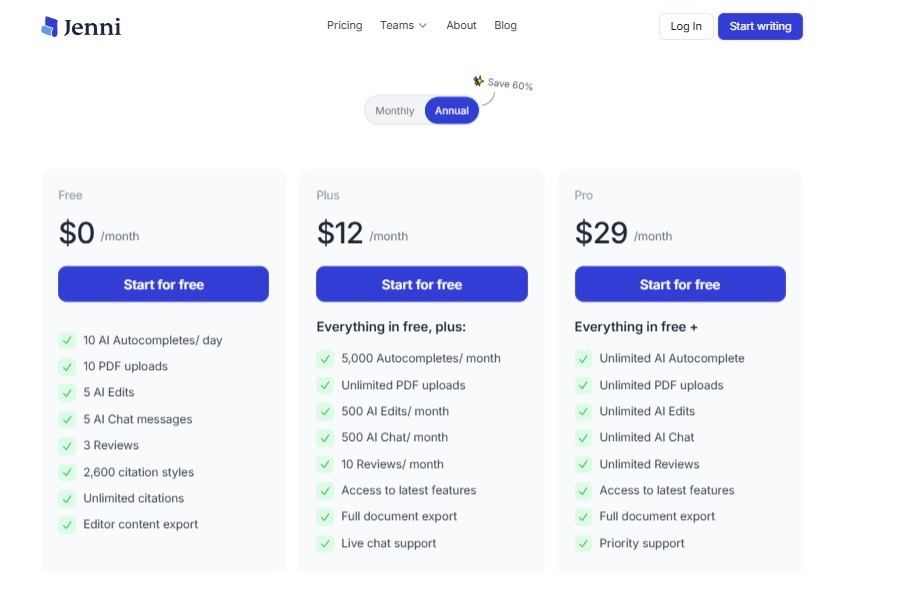
Jenni AI offers 3 pricing tiers: Free, Plus at $12 per month, and Pro at $29 per month. Annual billing reduces costs by approximately 60%.
| Plan | Monthly Price | What You Get |
|---|---|---|
| Free | $0 | 200 AI words per day, limited features |
| Plus | $12/month | 5,000 autocompletes/month, 500 AI edits/month, 500 AI chats/month, 10 reviews/month, unlimited PDF uploads |
| Pro | $29/month | Unlimited autocomplete, unlimited AI edits, unlimited AI chat, unlimited reviews, priority support |
The free plan works for testing the platform. But 200 words per day is not enough for real academic work. If you are writing a research paper or dissertation, you will need the Plus or Pro plan.
Jenni AI also offers “Pay Parity Pricing.” This means users in certain countries receive discounted rates. To check your local pricing, you need to visit the upgrade page inside the app.
One important warning — multiple users have complained about Jenni AI’s auto-renewal and refund policies. On Trustpilot, several reviewers reported unexpected charges and difficulty canceling subscriptions. The company does not send renewal notifications or invoices in some cases. If you subscribe, set your own calendar reminder before the renewal date.
What Do Real Users Say About Jenni AI?
Jenni AI has a 4.1 out of 5 rating on Trustpilot based on 142 reviews, with 68% of users giving it 5 stars and 19% giving it 1 star. This gap tells an interesting story. People either love the tool or have a very negative experience. There is not much middle ground.
What Do Users Like About Jenni AI?
Positive reviews consistently mention 3 things. First, the Smart Citations feature saves significant time. A PhD candidate on Trustpilot wrote that Jenni was “a game-changer” for managing research papers. Second, the interface is clean and simple. Multiple users describe it as lightweight and uncluttered compared to Microsoft Word. Third, customer support (especially from a team member named Kate) responds quickly to issues.
What Do Users Complain About?
Negative reviews focus on 4 main problems. First, billing and auto-renewal issues. Several users reported being charged without clear notification. Second, the AI sometimes makes unauthorized changes to text. One user on Trustpilot described how Jenni “silently” altered and deleted paragraphs from a paper without asking for permission. Third, citation accuracy is inconsistent. Some sources are fabricated or unrelated. Fourth, the learning curve can be steep for basic users. One reviewer noted that getting quality results “requires more time to become familiar with the tool.”
Can Turnitin Detect Content Written With Jenni AI?
Yes, Turnitin can detect AI-generated text from Jenni AI. After Turnitin updated its AI detection capabilities in late 2023, it became effective at flagging most AI-generated content, including text produced by Jenni AI’s autocomplete feature.
This is a serious concern for students. If you rely heavily on Jenni AI’s autocomplete to write your paper, there is a real risk that your work will be flagged as AI-generated. The best approach is to use Jenni AI as a writing aid — not a writing replacement. Use autocomplete for brainstorming or first drafts. Then rewrite in your own voice. You can also run your finished document through an AI detection tool before submitting.
Jenni AI itself has published content arguing that AI detectors are flawed and should not be used to accuse students of misconduct. That position has some merit. But the practical reality is that many universities still use Turnitin. You need to plan accordingly.
Where Does Jenni AI Fall Short?
Jenni AI has 5 notable limitations that affect its usefulness for certain users.
The first limitation is the writing editor itself. It lacks many formatting features available in Microsoft Word, LaTeX (Overleaf), or Google Docs. You cannot easily meet the formatting standards of most academic journals directly inside Jenni AI. This makes the tool better for drafting and early-stage writing than for final manuscript preparation.
The second limitation is handling pre-existing manuscripts. When you import a Word document or paste text into Jenni, your existing citations do not automatically convert to Smart Citations. You have to manually reconnect each citation. For a long paper with dozens of references, this process is time-consuming.
The third limitation is the free plan’s strict word cap. At 200 words per day, the free tier is useful only for a quick test. It does not give you enough room to evaluate the tool properly.
The fourth limitation is inconsistent output quality. Some users on Reddit have described the AI suggestions as “generic” and noted that the rewrite feature “doesn’t adapt to my tone.”
The fifth limitation is no offline access. Jenni AI is entirely web-based. You need a stable internet connection to use it.
How Does Jenni AI Compare to ChatGPT?
Jenni AI is purpose-built for academic writing, while ChatGPT is a general-purpose conversational AI. Both use large language models, but they serve different needs.
Jenni AI gives you an in-browser writing editor with autocomplete, Smart Citations, and manuscript review tools. ChatGPT gives you a chat interface where you can ask questions, generate text, and brainstorm ideas. ChatGPT does not manage citations. It does not integrate with Zotero. It cannot link to specific paragraphs in source PDFs.
If you need to write, cite, and edit an academic paper in one place, Jenni AI is a better fit. If you need a flexible tool for brainstorming, answering questions, summarizing content, and handling non-academic tasks, ChatGPT is more versatile.
One key difference — ChatGPT is still not reliable for generating citations. It often fabricates author names, journal titles, and publication dates. Jenni AI pulls from a verified academic database, which gives it an edge in source accuracy — though it is not perfect either.
What Are the Best Jenni AI Alternatives in 2026?
There are 7 strong Jenni AI alternatives worth considering, each with different strengths for different types of writing and research.
Paperpal
Paperpal is best for researchers who need journal-ready manuscript editing and prefer working inside Microsoft Word. It offers an MS Word plugin, which means you do not have to switch to a new editor. Paperpal focuses on grammar correction, academic tone refinement, and language polishing. It does not offer autocomplete or citation discovery the way Jenni does. But if your main need is editing and proofreading, Paperpal is a strong choice. Monthly pricing starts at $25 per month.
SciSpace
SciSpace combines AI writing with a built-in academic paper reader. You can find research papers, read them with AI-powered explanations, and write your own paper — all in one platform. SciSpace is particularly helpful for literature reviews. It has a large database of academic papers and offers citation management. The tool works well for researchers who want to read and write in the same environment.
Writefull
Writefull specializes in improving academic phrasing and grammar. It is trained specifically on published academic papers. This gives it an edge in suggesting language that sounds natural in a research context. Writefull integrates with Overleaf, Microsoft Word, and web browsers. If you already have a manuscript and need language-level improvements, Writefull is a focused tool that does one thing well.
QuillBot
QuillBot is a paraphrasing tool that also offers grammar checking, summarization, and citation generation. It is more affordable than Jenni AI and works well for students who need quick paraphrasing help. QuillBot does not offer the same depth of academic writing features as Jenni AI, but it is useful for shorter tasks. The free tier is more generous than Jenni AI’s free plan.
Grammarly
Grammarly remains the most widely used writing assistant for grammar, spelling, and clarity. It does not focus on academic citations or AI text generation. But for pure editing and proofreading, Grammarly is hard to beat. It integrates with nearly every writing platform, including Google Docs, Microsoft Word, and email clients. If you already use Grammarly and just need citation help, you could pair Grammarly with a reference manager like Zotero.
Elicit
Elicit is an AI research assistant that helps you find and analyze academic papers. It does not have a writing editor. But it is one of the best tools for literature review and research synthesis. Elicit uses Semantic Scholar’s database and provides structured summaries of research findings. If your main struggle is finding and organizing sources — not writing — Elicit is worth trying.
Yomu AI
Yomu AI is a direct competitor to Jenni AI with similar features including outlining, grammar feedback, and citation discovery. It allows you to filter recommended citations by publication date and article type. Yomu does not have Jenni’s “Smart Citations” with highlighted PDF passages. It also does not offer a free tier, which makes Jenni AI easier to test. But some users prefer Yomu’s interface and find its suggestions more relevant.
Quick Comparison: Jenni AI vs Top Alternatives
| Feature | Jenni AI | Paperpal | SciSpace | Grammarly | QuillBot |
|---|---|---|---|---|---|
| AI Autocomplete | Yes | No | Yes | No | No |
| Smart Citations | Yes | No | Yes | No | Yes (limited) |
| MS Word Plugin | No | Yes | No | Yes | Yes |
| Free Plan | 200 words/day | 5 uses/day | Limited | Limited | Generous |
| Starting Price | $12/month | $25/month | Varies | $12/month | $9.95/month |
| Academic Focus | Strong | Strong | Strong | General | General |
| Plagiarism Check | Yes | Yes | Yes | Yes (Premium) | Yes |
Who Should Use Jenni AI?
Jenni AI works best for 3 specific groups of users. Graduate students writing theses or dissertations benefit from the combined writing-and-citing workflow. Non-native English speakers benefit from the AI editing tools that improve academic tone. Early-career researchers who need to write drafts quickly benefit from autocomplete and Smart Citations.
Jenni AI is not the best choice if you need advanced document formatting, if you prefer working in Microsoft Word, or if you only need basic grammar checking. For those needs, tools like Paperpal, Grammarly, or Writefull are more practical.
How to Get the Most Out of Jenni AI
Follow these 5 steps to maximize your results with Jenni AI.
- Upload your source PDFs first. Smart Citations work best when Jenni has access to your research library. Sync your Zotero or Mendeley account, or drag and drop PDFs directly into Jenni’s library.
- Set your citation style before you start writing. Jenni supports over 2,600 styles. Choosing the right format upfront saves you from reformatting later.
- Use autocomplete as a brainstorming tool, not a final draft generator. Accept suggestions that match your argument. Rewrite everything in your own voice before submitting.
- Run the Claim Confidence tool on early drafts. This helps you spot unsupported claims and fill citation gaps before you invest time in polishing.
- Export to Word or LaTeX for final formatting. Jenni AI supports export in .docx, .tex, and .html formats. Do your final layout work in a more capable editor.
Frequently Asked Questions About Jenni AI
Is Jenni AI Free to Use?
Yes, but with significant limits. The free plan allows only 200 AI-generated words per day. You can explore the interface and test basic features. But for any real writing project, such as an essay, research paper, or thesis chapter, you will need the Plus plan at $12 per month or the Pro plan at $29 per month. The free tier is best used as a trial before committing to a paid subscription.
Is Jenni AI Safe for Academic Use?
Yes, when used responsibly. Jenni AI is a writing assistant. It helps you draft, cite, and edit. It does not write your paper for you — unless you let it. The key is to keep your own thinking and voice at the center of the writing process. Use autocomplete sparingly. Verify every citation. Rewrite AI-generated suggestions in your own words. Jenni AI also states that it does not share your data with third-party AI providers for training purposes.
Does Jenni AI Plagiarize?
No, Jenni AI does not copy text from the internet. It generates original suggestions using large language models. However, AI-generated text can sometimes resemble existing published content. Jenni includes a built-in plagiarism checker that scans your document against online sources. Always run a plagiarism check before submitting academic work.
Is Jenni AI Better Than ChatGPT for Research Papers?
Yes, for academic writing specifically. Jenni AI offers in-text citations, Smart Citations linked to source PDFs, a built-in editor, and manuscript review tools. ChatGPT does not provide verified citations and is known to fabricate references. For writing and citing research papers, Jenni AI is the more practical tool. ChatGPT is better for general brainstorming and non-academic writing tasks.
Can You Cancel Your Jenni AI Subscription Easily?
Yes, but be cautious. Some users on Trustpilot have reported difficulty with the cancellation process and unexpected auto-renewal charges. Jenni AI does not always send renewal reminders or invoices. Set a personal reminder before your billing date. If you need a refund, contact their support team at support@jenni.ai. Multiple users have noted that the support team (especially a representative named Kate) responds quickly to billing issues.
Is Jenni AI Worth the Price?
Yes, for users who write academic papers regularly. The Smart Citations feature alone can save hours of manual source hunting and formatting. The combined writing-and-citing workflow reduces the need to switch between reference managers, writing software, and databases. At $12 to $29 per month, it is competitively priced compared to other academic writing tools. But if you only write occasionally or need basic grammar help, more affordable tools like QuillBot or Grammarly may serve you better.
Wrapping Up: Should You Try Jenni AI?
Jenni AI fills a real gap in the academic writing space. It brings together writing, citing, and editing into one clean interface. The Smart Citations feature — where the AI links directly to highlighted passages in source PDFs — is genuinely useful and hard to find in competing tools. For students and researchers who spend hours bouncing between Word, Zotero, and Google Scholar, Jenni AI simplifies that workflow.
But the tool is not without problems. The free plan is too limited for proper evaluation. Citation accuracy needs improvement. The editor lacks the formatting depth of Word or LaTeX. And the billing complaints on Trustpilot are a legitimate concern you should not ignore.
Our recommendation is straightforward. Start with the free plan to test the interface. If you find the Smart Citations and autocomplete features helpful for your work, upgrade to Plus. If you write frequently and need unlimited features, the Pro plan offers good value. And always — always — verify your citations, rewrite AI suggestions in your own voice, and keep a close eye on your subscription billing.
The best AI writing tool is the one that fits your workflow. For many academic writers, Jenni AI does that well. For others, tools like Paperpal, SciSpace, or Grammarly might be a better match. Now you have the information to choose wisely.
You May Also Like
 AI Tool Reviews
How to Use ChatGPT for Beginners: The Complete Step-by-Step Guide (2026)
 AI Tool Reviews
GPTZero vs ZeroGPT: Which AI Detector Actually Holds Up in the Real World?
 AI Tool Reviews
Kimi vs ChatGPT: Is Kimi AI Actually Better Than ChatGPT?
 AI Models
Kimi K2.6 vs Claude Opus 4.7: Which AI Comes Out on Top?
 ChatGPT
Grok vs ChatGPT: Is Grok Actually Better Than ChatGPT?
 AI Tool Reviews