

Have you ever typed something into ChatGPT and then immediately thought, “I really don’t want that saved”? Maybe it was a question about a health symptom you were embarrassed about. Maybe it was something work-related you weren’t supposed to share. Or maybe you just didn’t want that topic floating around in your chat history forever. That feeling is real — and a lot of people feel it.
A Temporary Chat in ChatGPT is a private session that doesn’t get saved to your chat history, doesn’t save your memory, and isn’t used to train ChatGPT’s model. You ask your questions, get your answers, and when you close the tab, it’s gone. No record. Nothing is stored on your account. Clean slate.
Here’s what most people don’t know, though — this feature is already inside your ChatGPT account right now. It’s not hidden deep in some settings menu. It’s one click away. And once you know how it works, you’ll know exactly when to use it. Let’s break it all down.
What Is a Temporary Chat in ChatGPT?
A Temporary Chat is a one-time session in ChatGPT where nothing is saved, no memory is used, and your conversation doesn’t appear anywhere in your chat history. It works almost like Incognito Mode in your browser — except it’s built directly into ChatGPT.
Every time you start a Temporary Chat, ChatGPT treats you like a stranger. It doesn’t know your name. It doesn’t know what you talked about last week. It doesn’t even know what you said 5 minutes ago in a different chat. Your past conversations have zero influence on what it tells you in this session.
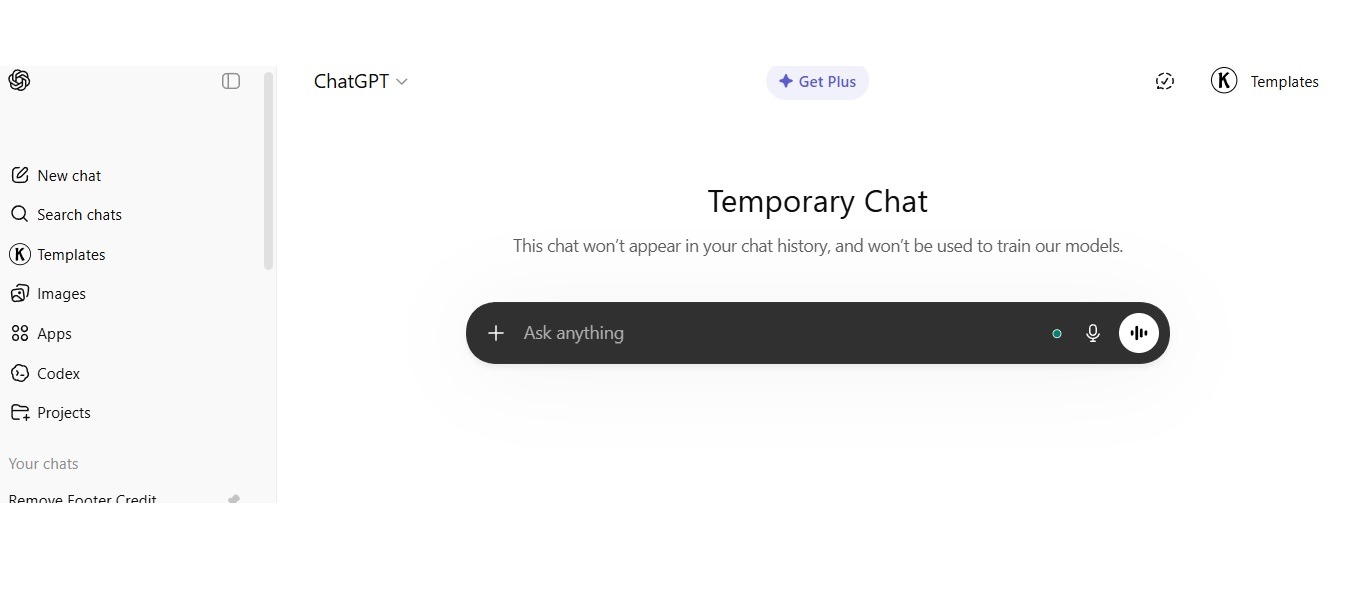
OpenAI confirmed that Temporary Chats won’t show up in your history sidebar and won’t be used to improve their AI models. There’s one small catch though — for safety reasons, OpenAI may still hold a copy of the conversation for up to 30 days before deleting it. This isn’t for personalization. It’s just a standard safety check. After 30 days, it’s deleted.
If you’re just getting started and want to understand how ChatGPT works in general, this guide on How to Use ChatGPT for Beginners is a great place to start before diving into Temporary Chat.
How Does Temporary Chat Actually Work?
Temporary Chat works by turning off 3 things for that session: memory access, history storage, and model training. That’s it. Everything else stays the same.
Here’s what happens the moment you open a Temporary Chat:
- ChatGPT doesn’t pull from your saved memories
- ChatGPT doesn’t look at your past conversations
- Your messages don’t show up in your chat sidebar
- Your session isn’t used to teach ChatGPT anything new
- Your custom instructions may still apply, depending on your settings
When you close the session, the conversation disappears from your account. You can’t go back and find it later. There’s no “undo.” It’s just gone.
What Happens to Your Data in a Temporary Chat?
OpenAI holds your Temporary Chat data for up to 30 days for safety review only, then deletes it. This 30-day window isn’t used to build a profile on you. It exists so OpenAI can review content that might break safety rules if needed.
How Safe is ChatGPT Temporal Chat?
Temporary Chat is safer than a normal ChatGPT conversation, but it is not the same thing as a private vault. OpenAI says those chats do not appear in your history, do not create or use memory, and are not used to train the model. That makes it a better option when you want a clean, disposable session without it lingering in your sidebar or shaping future chats.
Still, “temporary” does not mean “instantly gone.” OpenAI says a copy may be kept for up to 30 days for safety reasons, and those chats may be reviewed to monitor abuse. So if you are dealing with passwords, legal secrets, medical records, financial account details, or anything that would seriously hurt you if exposed, Temporary Chat is not the place to paste it in full. It is private-ish, not bulletproof.
There is one more catch: if you use a custom GPT with actions that send data to another service, that information can fall under the third party’s privacy policy, not just OpenAI’s. So the plain-English version is this: Temporary Chat is a sensible choice for sensitive everyday drafting or brainstorming, but not for high-stakes confidential material.
5 Clear Differences Between Temporary Chat and Regular Chat
Understanding these 2 modes will help you pick the right one every time.
| Feature | Temporary Chat | Regular Chat |
|---|---|---|
| Chat History | Not saved | Saved to sidebar |
| Memory Access | Off | On (if enabled) |
| Model Training | Not used | May be used |
| Session Recovery | Not possible | Retrievable anytime |
| Personalization | None | Based on past sessions |
Regular Chat builds a relationship over time. ChatGPT gets to know your preferences, your tone, your habits. Temporary Chat removes all of that. Each session is completely disconnected from everything else.

How to Start a Temporary Chat in ChatGPT in 4 Steps
Starting a Temporary Chat takes under 30 seconds and needs no changes to your account settings. Here’s exactly what to do:
- Go to chatgpt.com and log into your account
- Click the “+ New Chat” button to open a fresh conversation
- Find the pill-shaped “Temporary” button in the top-right corner of the screen and click it
- Start typing — your session won’t be saved to history
On the ChatGPT mobile app (iOS or Android), the Temporary Chat icon looks like a chat bubble with broken lines around it. Tap it before you type your first message.
Once you activate it, you’ll see a small confirmation message at the top of the screen telling you that memory is off for this chat.
That’s really all there is to it. No complicated setup. No digging through menus.
5 Real Situations Where Temporary Chat Actually Helps You
Temporary Chat helps most in 5 situations: sensitive personal questions, confidential work topics, developer testing, one-time research, and shared device use. Here’s what each one looks like in real life.
1. Asking Personal or Sensitive Questions
You might want to ask about a health symptom, a financial situation, or something personal that you just don’t want tied to your account. Temporary Chat lets you ask freely without that question becoming part of your permanent ChatGPT record.
2. Handling Confidential Work Information
If you work in law, healthcare, finance, or tech, you sometimes need AI help with client data or internal projects. Temporary Chat make it safe, this mean all about your information doesn’t sit in your history where someone could accidentally see it or where it could shape future answers.
3. Testing Prompts as a Developer or Creator
Developers who build AI-powered apps often need to test prompts in a clean space. Since Temporary Chat has no memory or past context, each test runs in total isolation. Your results aren’t skewed by anything ChatGPT “remembers” about you.
4. Quick One-Time Research
Students and researchers doing a fast fact-check on a specific topic don’t always want that search influencing what ChatGPT says in future sessions. Temporary Chat keeps each research task clean and separate.
5. Sharing a Device With Other People
Temporary chat is safe if only you have sharing account or devices to other people. If someone else uses your ChatGPT account — a family member, a colleague, a classmate — Temporary Chat keeps your conversations separate without you needing to log out or create multiple accounts.
What You Can Still Do Inside a Temporary Chat
This is where a lot of people get surprised. You keep full access to GPT-5.3 features in Temporary Chat, including file uploads, image analysis, code help, and smart answers. The only thing that goes away is the memory and history storage.
Here’s what still works perfectly:
- GPT-5.3/ GPT-5.4 — full model, full reasoning, full quality
- File uploads — PDFs, Word docs, spreadsheets
- Image analysis — uploading and describing images
- Code writing and debugging — works exactly the same
- Custom GPTs — you can use them in Temporary Chat too
- Web browsing — available if your plan includes it
The response quality is identical to a regular chat. You’re not getting a “worse” version of ChatGPT. You’re just getting it without the memory.
Speaking of what’s included in your plan — if you’re unsure which ChatGPT plan you’re on and what it gives you, this comparison of ChatGPT Go vs Plus vs Pro explains what each tier actually offers.
Does Temporary Chat Keep Your Conversations Private?
Temporary Chat improves your privacy by removing history and memory, but it doesn’t make your session fully anonymous. Your account is still logged in. OpenAI still processes your messages while the conversation is happening.
Here’s what Temporary Chat does protect you from:
- Your conversation showing up in your chat history
- ChatGPT learning your habits and preferences from the session
- Future responses being shaped by what you said in this session
- Your data being used to train the AI model
Here’s what Temporary Chat doesn’t do:
- It doesn’t hide your IP address or internet activity
- It doesn’t stop OpenAI from keeping a 30-day safety copy
- It doesn’t protect data sent to third-party tools if you use GPTs with external actions
That last point matters. If you use a Custom GPT that connects to outside services — say, a GPT that pulls data from another website or tool — any data sent to that third party follows their own privacy policy, not OpenAI’s 30-day rule. They might store it longer.
If you want a bigger picture of ChatGPT’s safety and privacy practices, this article on Is ChatGPT Safe covers it in detail — including what data OpenAI collects and how to manage it.
Temporary Chat vs Turning Off Memory — What’s the Difference?
A lot of people mix these 2 things up. They’re not the same.
Temporary Chat applies privacy settings to 1 single session only, while turning off memory disables it globally for all future chats.
When you turn off memory from ChatGPT’s settings, ChatGPT stops building memory for every single chat you have going forward. When you use Temporary Chat, you’re only turning off memory for that one specific session. Your memory settings stay the same for all your other regular chats.
Use Temporary Chat when you want a private one-off session but still want memory working in your other conversations. Use disabled memory when you want to stop memory entirely across your whole account.
4 Limitations of Temporary Chat You Should Know Before Using It
Temporary Chat has 4 main limitations: no continuity, no personalization, no recovery, and no memory-based features. Knowing these upfront saves you frustration.
- No continuity — Close the chat and it’s gone. You can’t come back to it.
- No personalization — ChatGPT won’t adapt to your writing style or past preferences in this session.
- No recovery — If you accidentally close a Temporary Chat, there’s no way to get it back.
- No memory-dependent features — Tools that rely on your saved memories or long-term context won’t work the way you’re used to.
These limitations exist because the session is stateless by design. It doesn’t hold onto anything. If you need ChatGPT to remember you or build on past context, regular chat is the right choice.
And if you’re wondering whether you even need a login to use ChatGPT at all, this article on Is ChatGPT Free Without Login breaks down exactly what you can and can’t do without an account — which connects directly to questions about chat history and privacy.
Conclusion
Temporary Chat in ChatGPT is a simple, safe, private, one-session mode that removes history, memory, and training from a single conversation. It’s not an advanced security tool. It’s not a way to become fully anonymous online. But it is a straightforward solution to a real problem — the feeling that you don’t want certain questions tied to your account permanently.
Your Temporary Chat sessions won’t show in your history. ChatGPT won’t learn from them. They won’t shape future answers. And when you close the tab, they’re gone. OpenAI holds a safety copy for up to 30 days, but that’s all.
The 4 things worth remembering: no history saved, no memory used, no model training, and no session recovery after closing. You still get full GPT-5.3 features the whole time.
If you’ve been avoiding certain questions because you didn’t want them saved — you don’t have to anymore. Temporary Chat is already in your account. One click, clean slate, done.
You May Also Like
 AI Tool Reviews
How to Use ChatGPT for Beginners: The Complete Step-by-Step Guide (2026)
 ChatGPT
How to Use ChatGPT at Work: Productivity Tips That Actually Save You Hours
 ChatGPT
How to Use ChatGPT Best Prompts
 AI Models
GPT-5.5 vs Claude Opus 4.7 vs Gemini 3.1 Pro: Real Benchmark Results Compared
 ChatGPT
ChatGPT 5.5 Is Here: Benchmarks, What’s New, What’s Different, and Is It Actually Worth the Hype?
 ChatGPT